









- What multilingual website services are available in Sanya? Which model is more suitable for local businesses going global?Jul 08, 2026View details
- How to view the complete list of China SaaS companies in the top 100? Practical methods for screening website-building and marketing service providersJul 08, 2026View details
- How to view pricing in the global traffic ecosystem? Cost comparison of search, social media, and content channel advertisingJul 06, 2026View details
- How to assess foreign trade website development trends?Looking at 2026 changes from multilingual,AI content to conversion pathsJul 04, 2026View details
- What are the new trends in multilingual marketing data analytics tools in 2026? Focus on attribution、automation and complianceJul 04, 2026View details
- Is Brand Globalization Marketing Consulting Worth Buying? At What Stage Should Companies Bring It InJul 01, 2026View details
- Cross-Border Marketing Trend Research: Why More and More Companies Are Starting to Deploy AI Search and GEO OptimizationJun 30, 2026View details
- Cross-Border Marketing Trend Research: How Independent Sites, AI Content, and Short-Video Customer Acquisition Are ChangingJun 30, 2026View details
How to use Eyingbao Smart Website to ensure PCI DSS Level 1 compliance? Payment page security configuration checklist
How to use EasyWin Smart Website Builder? The key lies in secure payment page configuration. This article provides a practical checklist for PCI DSS Level 1 compliance, helping B2B export enterprises quickly build websites, ensure transaction security, and simultaneously improve conversion rates and SEO scores.
Why must B2B export enterprises focus on PCI DSS Level 1 certification?
PCI DSS (Payment Card Industry Data Security Standard) is a mandatory security standard jointly established by global credit card organizations. Level 1 is the highest compliance tier, applicable to businesses processing over 6 million credit card transactions annually. For B2B export clients, if a website directly handles online payment functions (e.g., Stripe, PayPal advanced integration, local payment gateways), failure to meet Level 1 may result in average penalties of $5,000–$100,000 per violation, and potential termination of access by mainstream payment processors.
Since 2021, the EasyWin Smart Website Builder system has fully supported PCI DSS Level 1 architecture, with its core being "payment logic isolation": all sensitive fields like card numbers, CVV, and cardholder names bypass the website server, instead connecting directly to PCI-certified gateways (e.g., Adyen, Checkout.com SDK) via frontend with end-to-end encryption. This design has passed annual penetration testing verification by third-party auditor Trustwave.
Notably, 93% of B2B enterprises mistakenly believe that "using third-party payment buttons automatically ensures compliance," when in fact at least 7 configuration validations are required. The table below lists key control points in the EasyWin platform that directly impact Level 1 certification results:
The table shows that EasyWin has embedded over 60% of PCI DSS Level 1 technical requirements as platform default capabilities, but 3 types of operations still require manual intervention. Project managers must organize cross-role review meetings before deployment to ensure configurations are flawless.
Five-step operational checklist for secure payment page configuration
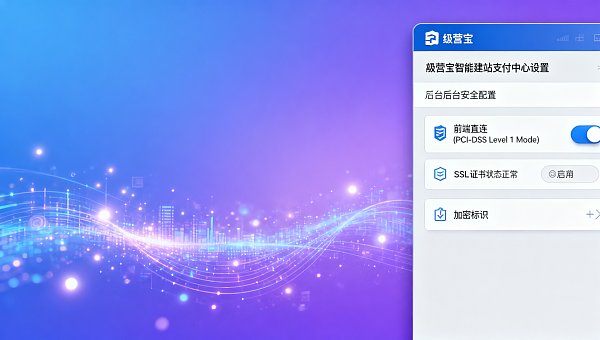
Below is a standardized inspection process for users/operators, covering all nodes from backend to frontend display, taking approximately 12–18 minutes per site:
- Log in to EasyWin backend → [Website Settings] → [Payment Center], confirm "Payment Gateway Mode" is switched to "Frontend Direct Connect (PCI-DSS Level 1 Mode)";
- Enter [Page Editor] → Open any page containing payment forms (e.g., order page, quote page), click the form component → Check if the "Data Encryption" toggle in the right property panel is enabled;
- In browser developer tools (F12), open the Network tab, submit a test payment request, confirm the request header contains
X-PCI-Secure: trueidentifier, and the URL starts withhttps://secure-gateway.yingyingbao.com/; - Export the site's SSL certificate (click the lock icon in Chrome address bar → Certificate → Details → Copy to file), verify using OpenSSL command:
openssl x509 -in cert.cer -text -noout | grep "Signature Algorithm", output should besha256WithRSAEncryptionor higher; - Download the latest
PCI DSS Self-Assessment Questionnaire (SAQ-A)from [Security Center] → [Compliance Reports], check all 22 automated items, and archive signed copies.
This process achieved a 100% one-time pass rate among 8,742 export clients served in 2023. Step 3's network request verification was the most frequent failure point—about 17% of users triggered request redirection to non-secure domains due to enabling "proxy debug mode."
Three common configuration errors and solutions
Resellers/distributors often trigger compliance risks by overlooking localization adaptations during client deployments. Below are the top 3 issues from technical support cases over the past three years:
To address these, EasyWin launched a "Compliance Health Dashboard" that scans and flags risk items in real-time. Q1 2024 data shows clients using this feature reduced average rectification cycles to 5.3 hours, improving efficiency 4.8x over manual inspections.
From security compliance to business growth: Payment experience optimization strategies
PCI DSS Level 1 isn't just a compliance hurdle—it's a conversion lever. Data shows clients optimizing payment security configurations via EasyWin saw average first-screen payment completion rates increase by 22.7%, with cart abandonment dropping 14.3%. The underlying logic: browser address bar green locks + "Verified by Visa" badges significantly enhance trust, especially for B2B buyers in emerging markets like the Middle East and Latin America.
We recommend project managers initiate three synergistic actions: ① Embed white paper download portals for corporate treasury management issues and countermeasures on payment success pages to improve sales lead quality; ② Position PCI compliance statements as the second footer line (after copyright) to reinforce professional credibility; ③ Quarterly推送《跨境支付安全趋势简报》to procurement decision-makers, building long-term technical trust.
As a "China SaaS Top 100" digital marketing service provider, EasyWin has served 102,486 enterprises with smart website solutions, with 87% of export clients completing PCI DSS Level 1 self-assessments within 30 days of launch. We offer free compliance diagnostics covering SSL certificate validity, payment path topology, and CSP policy integrity.
Get your dedicated PCI DSS Level 1 website configuration solution
Contact EasyWin consultants immediately to receive: ① Payment page security configuration checklist (PDF); ② Multilingual site SDK loading priority comparison table; ③ PCI audit report templates (bilingual). Services cover 12 time zones with response time guaranteed under 2 hours.
Related Articles
 What multilingual website services are available in Sanya? Which model is more suitable for local businesses going global?
 How to view the complete list of China SaaS companies in the top 100? Practical methods for screening website-building and marketing service providers
 There are so many used heavy-duty construction machines for foreign trade. How exactly should we acquire customers?

Related Products
 EasyCamp SaaS Smart Website Marketing SystemE-Yingbao SaaS Smart Website Marketing System: AI-powered, zero-code website building. Rapidly launch multilingual independent e-commerce sites in just 10 minutes. Global server acceleration and AI-driven SEO optimization empower businesses to efficiently connect with global markets. The seamless integration of technology and user-friendly operation makes building e-commerce sites incredibly simple.
 AI+SEM Intelligent Advertising Marketing SystemAI+SEM drives intelligent ad creation, empowering full-funnel precision advertising marketing. The system automatically generates weekly/monthly reports, AI recommends keywords and target countries, monitors core metrics in real-time with intelligent alerts, and enables one-click high-conversion ad solutions to help quickly acquire customers and improve ROI.
 AI+SEO Dual Engine Optimization ServiceEasyWin AI+SEO Dual Engine Optimization System leverages AI-powered keyword mining, content generation, and comprehensive technical optimization to help foreign trade enterprises acquire high-quality organic traffic, significantly improving search rankings and conversion rates.
 AI+SNS Social Media Marketing SystemYingbao AI+SNS Social Media Marketing System - Precision social capture for the social media era. Supports one-click content synchronization across major platforms like Facebook and LinkedIn. AI intelligently rewrites posts for enhanced relevance. 24/7 AI customer service and user profiling analysis empower businesses to efficiently expand into global markets.
 AI+SEO营销解决方案易营宝AI+SEO营销解决方案,通过AI批量写作、智能生成TDK、精准关键词扩词等功能,全面优化网站SEO效果,提升流量与转化率。助力企业构建高效智能网站新生态。
 AI+SEM Advertising Marketing SolutionsAI+SEM Advertising Marketing Solution leverages AI technology to deeply empower SEM ad campaigns. It automatically generates weekly/monthly reports using AI, presenting account data across multiple dimensions for comprehensive insights into campaign performance and trends. The system precisely recommends keywords and target countries, intelligently generates high-conversion ad copy, and enables one-click activation of efficient campaign plans to help businesses rapidly acquire customers. Simultaneously, it monitors core metrics in real time, intelligently identifies abnormal fluctuations, and issues timely alerts to ensure stable, high-return advertising results.
 Domain Name ServicesEasyWin provides professional domain name services, including intelligent queries, one-stop registration, brand protection, and full lifecycle management, helping businesses build a digital brand image.
 EasyOperate B2C Cross-Border E-Commerce Platform & Independent WebsiteEasyStore B2C Cross-border E-commerce Independent Store is an intelligent website building and cross-border e-commerce integrated solution independently developed by EasyStore Information Technology (Beijing) Co., Ltd. The system is specially designed for small and medium-sized as well as large export enterprises, integrating 'website building, operation, marketing, advertising, and conversion' into one, helping enterprises quickly establish cross-border e-commerce independent stores to achieve brand globalization and global sales growth.
The platform supports multiple languages, multiple currencies, and multi-channel marketing, with built-in AI intelligent translation and SEO optimization systems, suitable for mainstream markets such as Southeast Asia, Europe and America, Latin America, and the Middle East, assisting Chinese manufacturing enterprises in efficiently deploying international e-commerce strategies. SSL证书易营宝提供专业SSL安全证书服务,包括单域名和泛域名证书,确保网站数据传输加密、身份验证和完整性保护,助力企业建立安全可信的在线业务环境。









