









- AliExpress Announces New Service Rules for Russia, Linked to Wildberries Product IntegrationOct 28, 2026View details
- Black Friday Preparations Enter the Final Sprint Week as Cross-Border E-Commerce Platforms Roll Out Their PlansOct 28, 2026View details
- CBP Finalizes Electronic Rail Export Manifest Rule, Effective October 26, 2026Oct 26, 2026View details
- Amazon’s 2026 peak season surcharge takes effect on October 25Oct 26, 2026View details
- AI Is Eating SaaS: Three Real-World Cases in One AfternoonOct 25, 2026View details
- Exiger CEO: The SaaS Apocalypse Is Real, but It Means Something DifferentOct 25, 2026View details
How can you track website inquiries generated by LinkedIn B2B campaigns?
LinkedIn promotions are generating clicks, and the website is receiving inquiries, but if sales records only “website” as the source, it is impossible to tell which posts, ads, and audiences brought in customers. Continuing to allocate budget based only on click volume can lead you to mistake traffic for lead generation results.
To track website inquiries generated by LinkedIn B2B promotions, connect links with UTM parameters, successful website form submission events, and CRM lead records: links identify the traffic source, events confirm that an inquiry was submitted, and the CRM helps determine whether the lead is qualified. First ensure that the source is captured in the customer record when the form is submitted; this is more important than simply installing tracking code.
First, define what counts as an “inquiry”
A click on a form button is not the same as an inquiry. A user may fail to submit the form, submit it more than once, or simply open the contact page. We recommend defining a website inquiry as a form that has been successfully received in the backend and recorded as a lead. Track clicks on email, phone, and instant messaging buttons separately as contact intent, and do not count them directly as received inquiries.
Sales should then distinguish between spam, qualified inquiries, and sales opportunities. This makes it possible to answer two different questions: how many inquiries LinkedIn generated, and how many are worth following up on. Without this distinction, low-quality submissions may also be mistaken for successful promotion.
Add identifiable tracking tags to every promotional entry point
Ads, posts on the company page, and employee shares should not all use the same link if you need to distinguish between them. Create a UTM naming convention before publishing, and use lowercase English consistently to prevent the same source from being split into multiple entries due to differences in capitalization or spelling.
These values are naming examples, not a format mandated by the platform. The key is for the team to consistently follow the same rules and keep a record linking each campaign ID to its creative. Do not put personal information, such as customer names or email addresses, in URL parameters.
Before publishing, open the landing page using the final link and check that the parameters remain intact after URL shortening, redirects, and language switching. Do not add UTMs to on-site navigation, as this may overwrite the original external source.
Carry source information through to form submission
The presence of UTMs in the address bar does not mean that the inquiry will automatically include its source. The website needs to read the parameters when the user arrives, store them for the configured retention period, and write them to the lead at submission through hidden fields or server-side logic.
We recommend retaining at least the first-touch source, the most recent non-direct source, the landing page, the submission page, the campaign ID, and the submission time. The first-touch source helps identify how customers initially arrived at the website, while the most recent non-direct source helps track touchpoints before submission. Do not let a direct return visit without parameters easily overwrite the existing source.
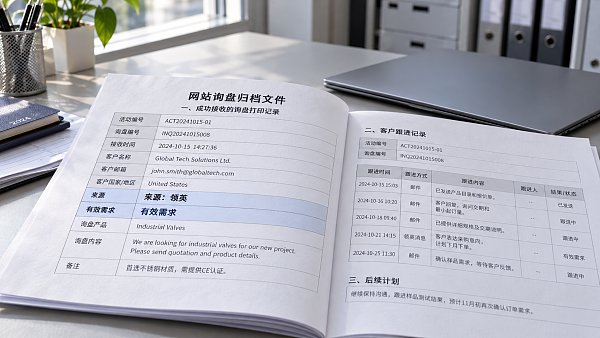
A user may arrive from LinkedIn on a product page, browse other pages, and only then submit a form. This path must be covered. For cross-subdomains, external forms, or booking pages, also confirm that the source can be passed to the final receiving system; the parameters on the initial landing page alone are usually not enough.
Parameter storage and tracking tags should comply with applicable privacy and consent requirements. Browser restrictions, users declining tracking, or switching devices may result in missing data, so it is not possible to guarantee that the source of every inquiry can be fully reconstructed.
Connect successful submission events to analytics and ad platforms
Website analytics tools track the process from visit to submission, while LinkedIn conversion tracking is used to assess ad contributions. The two can be configured in parallel, but they should use consistent business definitions.
- Event triggering: Trigger the event after successful receipt is confirmed in the backend; do not listen only for clicks on the submit button.
- Duplicate control: Generate a unique inquiry ID for each valid submission to prevent refreshes of the thank-you page or repeated callbacks from being counted multiple times.
- Conversion rules: Configure the LinkedIn Insight Tag and corresponding conversion actions, and confirm the applicable pages, ad associations, and attribution window.
If you use both browser-side and server-side event reporting, deduplicate events using the method supported by the platform. Do not send the original form content or sensitive information in events without a valid reason.
Ad platform data and website records do not have to match exactly: a platform may count view-through conversions, while the website may recognize only visits from clicks with parameters. Attribution windows, time zones, and user consent status can also affect results. Confirm the measurement definitions before reconciling the data, rather than immediately assuming that one side is wrong.
Use the CRM to determine which promotions are worth continuing
When a form submission enters the CRM, write the inquiry ID and source fields to the record together to avoid relying on sales staff to select the channel manually. Sales should mainly add information on whether the inquiry matches the business, whether the lead is qualified, and whether it has progressed to a quote. Keep the promotional campaign ID traceable and do not change it when the follow-up status changes.
During reviews, compare visits, successful inquiries, qualified inquiries, and corresponding spend by campaign or creative. For paid promotions, “spend ÷ number of qualified inquiries” can be used to compare acquisition costs, but avoid drawing conclusions too soon if the leads have not yet been screened.
Because B2B sales cycles are longer, track sales progress over time by inquiry creation cohort. Do not divide this month’s new ad spend directly by all sales closed this month, as those sales may have come from earlier promotions.
Before launch, test the entire process with one inquiry
- Visit the website through a link with test campaign parameters, browse other pages, and then submit a form.
- Check whether the record was received in the backend, whether the source fields were retained, and whether the success event fired only once.
- Check that the inquiry ID, campaign name, and submission time in the CRM match, then confirm that the platform received the event.
- Also test a direct return visit, language switching, and mobile form submission to confirm that there are no obvious breaks in the process.
If there are clicks but no visit records, first check redirects and tag loading. If a success event fires but there is no inquiry in the backend, first check the trigger conditions. If the backend has an inquiry but the CRM source is empty, first check the field mapping and storage logic. Fixing each break in the chain helps prevent effective promotions from being wrongly stopped before tracking is fully connected.
Related Articles
 How can you track website inquiries generated by LinkedIn B2B campaigns?
 How can you troubleshoot inaccurate inquiries from EasyYingbao TikTok campaigns targeting overseas customers?
 How Can You Avoid Time Zone Errors When Scheduling Social Media Posts?

Related Products
 Yiyingbao SaaS Intelligent Website Building and Marketing SystemYiyingbao SaaS Intelligent Website Building and Marketing System, AI-powered no-code website building, rapid creation of multilingual B2B international websites in 10 minutes, global server acceleration, AI-powered SEO optimization, helping businesses connect efficiently with global markets. The perfect integration of technology and operation makes building an international trade website remarkably simple
 AI+SEM Intelligent Advertising Marketing SystemAI+SEM drives intelligent ad creation, empowering full-funnel precision advertising marketing. The system automatically generates weekly/monthly reports, AI recommends keywords and target countries, monitors core metrics in real-time with intelligent alerts, and enables one-click high-conversion ad solutions to help quickly acquire customers and improve ROI.
 AI+SEO Dual-Engine System Optimization ServicesYiyingbao’s AI+SEO dual-engine optimization system helps foreign trade enterprises acquire high-quality organic traffic through AI-powered keyword research, content generation, and comprehensive technical optimization, significantly improving search rankings and conversion rates.
 AI+SNS Social Media Marketing SystemYingbao AI+SNS Social Media Marketing System - Precision social capture for the social media era. Supports one-click content synchronization across major platforms like Facebook and LinkedIn. AI intelligently rewrites posts for enhanced relevance. 24/7 AI customer service and user profiling analysis empower businesses to efficiently expand into global markets.
 AI+SEO营销解决方案易营宝AI+SEO营销解决方案,通过AI批量写作、智能生成TDK、精准关键词扩词等功能,全面优化网站SEO效果,提升流量与转化率。助力企业构建高效智能网站新生态。
 AI+SEM Advertising Marketing SolutionsAI+SEM Advertising Marketing Solution leverages AI technology to deeply empower SEM ad campaigns. It automatically generates weekly/monthly reports using AI, presenting account data across multiple dimensions for comprehensive insights into campaign performance and trends. The system precisely recommends keywords and target countries, intelligently generates high-conversion ad copy, and enables one-click activation of efficient campaign plans to help businesses rapidly acquire customers. Simultaneously, it monitors core metrics in real time, intelligently identifies abnormal fluctuations, and issues timely alerts to ensure stable, high-return advertising results.
 Domain Name ServicesEasyWin provides professional domain name services, including intelligent queries, one-stop registration, brand protection, and full lifecycle management, helping businesses build a digital brand image.
 EasyOperate B2C Cross-Border E-Commerce Platform & Independent WebsiteEasyStore B2C Cross-border E-commerce Independent Store is an intelligent website building and cross-border e-commerce integrated solution independently developed by EasyStore Information Technology (Beijing) Co., Ltd. The system is specially designed for small and medium-sized as well as large export enterprises, integrating 'website building, operation, marketing, advertising, and conversion' into one, helping enterprises quickly establish cross-border e-commerce independent stores to achieve brand globalization and global sales growth.
The platform supports multiple languages, multiple currencies, and multi-channel marketing, with built-in AI intelligent translation and SEO optimization systems, suitable for mainstream markets such as Southeast Asia, Europe and America, Latin America, and the Middle East, assisting Chinese manufacturing enterprises in efficiently deploying international e-commerce strategies. SSL证书易营宝提供专业SSL安全证书服务,包括单域名和泛域名证书,确保网站数据传输加密、身份验证和完整性保护,助力企业建立安全可信的在线业务环境。









