









- CBP Finalizes Electronic Rail Export Manifest Rule, Effective October 26, 2026Oct 26, 2026View details
- Amazon’s 2026 peak season surcharge takes effect on October 25Oct 26, 2026View details
- AI Is Eating SaaS: Three Real-World Cases in One AfternoonOct 25, 2026View details
- Exiger CEO: The SaaS Apocalypse Is Real, but It Means Something DifferentOct 25, 2026View details
- Hengqin Cooperation Zone Shares Cross-Border E-Commerce Developments, Focusing on Macao-Hengqin Collaboration and International MarketsOct 24, 2026View details
- A Shenyang study highlights the development of the “cross-border e-commerce + industrial cluster” modelOct 24, 2026View details
How Can You Avoid Time Zone Errors When Scheduling Social Media Posts?
A post was scheduled for 9:00 a.m. New York time, but went live in the early hours of the local morning. The same scheduling setup worked normally last month, but suddenly shifted by an hour this month. When scheduled social media posts do not go live as expected, the cause is often not that someone “got the time wrong,” but that the account, tool, and target market are using different time rules. For overseas marketing teams, avoiding missed moments means linking time zone settings, daylight saving time, and pre-publication checks in a single verification process.
Before rescheduling: determine whether the time zone is wrong or the post is delayed
When you notice an issue, first record three times: the scheduled time, the time shown in the tool, and the actual publication time on the platform, noting the time zone for each. Do not just capture “09:00”; otherwise, you cannot tell whether it means Beijing time or New York time.
- A consistent difference of several hours: First check which time zone the schedule uses and whether it is incorrectly using the browser or workspace default.
- A one-hour difference after the seasonal clock change: Check daylight saving time and whether a fixed UTC offset is being used.
- A delay of only a few minutes, or an individual post that did not go out: Also check permissions, review status, media processing, and task logs; do not immediately assume it is a time zone issue.
- The time in the dashboard changed, but the post went live as expected: The viewer’s display time zone may simply have changed. Confirm this first to avoid publishing the post twice.
When troubleshooting, it is best to compare one published post with one scheduled task. Relying only on the time a phone notification arrived can lead you to mistake a notification delay for a posting delay.
When scheduling social media posts, which time zone should you use?
A single publication may involve the computer’s system settings, the browser, the social media platform, and a third-party scheduling tool. They do not necessarily use the same time zone, and there is no universal order of precedence. Check the settings along the path used to create the task.
Changing the default time zone does not mean existing scheduled posts will be updated automatically. Some systems retain the original absolute publication time, while others may reinterpret the local time. After making a change, review the confirmation page for each important task. If the rules are unclear, verify them with a test task first rather than changing the entire workspace.
Schedule by city time zone; don’t assume the time difference stays the same all year
Beijing uses UTC+8. New York generally uses UTC−5 in winter and UTC−4 in summer. So 9:00 a.m. in New York corresponds to 10:00 p.m. in Beijing in winter and 9:00 p.m. in summer. If you convert times year-round using a “13-hour difference,” the schedule will be off by an hour during daylight saving time.
If the tool supports time zone database identifiers, choose a regional identifier such as America/New_York rather than manually setting a fixed offset such as UTC−5. Regional rules can usually account for daylight saving time based on the date, but you should still confirm that the tool supports this functionality; do not rely only on the city name shown in the dropdown.
Cross-border teams should also keep two details in mind: Europe and the U.S. do not switch to daylight saving time on exactly the same dates, and on the transition day, some early-morning times may not exist or may occur twice. Avoid scheduling important events during the local transition period where possible. If you must schedule them then, confirm the final UTC time.
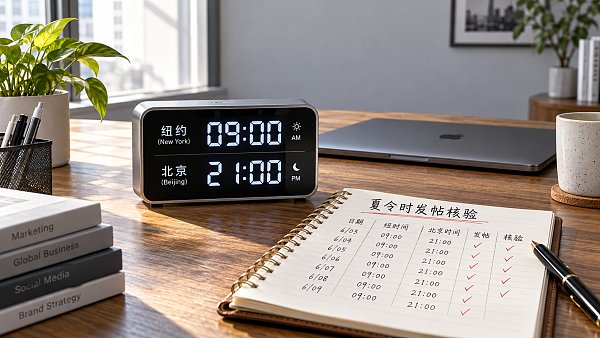
Use “target market date and time → city time zone → Beijing time → tool confirmation” as the verification sequence. For example, when scheduling evening content for a Los Angeles audience, it may already be the next day in Beijing. Checking only the hour and not the date can also cause you to miss key marketing moments.
Use a scheduling record to eliminate ambiguity when coordinating
“Post Friday morning” is not specific enough for a team working across regions. For each important piece of content, record at least the target account, target market, local date and time, city time zone, corresponding Beijing time, content version, and owner. For critical milestones such as a sale going live, you can also record the UTC time as a common reference.
In practice, verify the task after saving it, rather than relying only on what you entered in the form:
- Review after saving. Reopen the task and check the date, day of the week, time zone, and time to make sure the result has not changed due to the input format or a default setting.
- Check tasks near the transition date. If the schedule spans a daylight saving time change, carefully review content scheduled before and after the change, not just tasks scheduled on the day itself.
- Run a low-risk test. Before switching tools, connecting a new account, or importing tasks in bulk, use compliant test content to verify how times are interpreted and how the publishing workflow operates.
- Cross-check critical content. Have another colleague independently convert the time for the target market and check for duplicate scheduling.
If you find an incorrect setting, first pause or cancel the original task, then confirm the new task to avoid duplicate posts after making the correction. Close to publication time, also check whether the task has entered the processing queue; do not assume that clicking “Cancel” means the task has been stopped.
When social media timing is right, make sure the destination page is aligned too
For companies that also operate overseas independent websites, run ads, and manage social media, publishing posts on time is only one part of the process. If a social post says “The promotion has started” but the landing page offer is not yet active, users may still be lost. Check coupon availability, form opening times, ad start and stop times, and customer service shifts against the same schedule.
When coordinating through an integrated service such as 易营宝, which covers website building and overseas marketing, these milestones can be included in a unified delivery checklist, with each system’s time zone and owner clearly specified. Do not assume that all dashboards use the same clock simply because the services are provided in one place.
Reliable scheduled social media posting is not about memorizing the time differences for many countries. It is about making sure every task has a clearly defined regional time zone, a time record that can be checked, and a pre-publication review. Especially when the seasons change, a new account is connected, or responsibilities are handed over, one extra check is usually easier than fixing a problem after publication.
Related Articles
 How can you troubleshoot inaccurate inquiries from EasyYingbao TikTok campaigns targeting overseas customers?
 How Can You Avoid Time Zone Errors When Scheduling Social Media Posts?
 Does social media content for the European market need to be localized by country?


Related Products
 Yiyingbao SaaS Intelligent Website Building and Marketing SystemYiyingbao SaaS Intelligent Website Building and Marketing System, AI-powered no-code website building, rapid creation of multilingual B2B international websites in 10 minutes, global server acceleration, AI-powered SEO optimization, helping businesses connect efficiently with global markets. The perfect integration of technology and operation makes building an international trade website remarkably simple
 AI+SEM Intelligent Advertising Marketing SystemAI+SEM drives intelligent ad creation, empowering full-funnel precision advertising marketing. The system automatically generates weekly/monthly reports, AI recommends keywords and target countries, monitors core metrics in real-time with intelligent alerts, and enables one-click high-conversion ad solutions to help quickly acquire customers and improve ROI.
 AI+SEO Dual-Engine System Optimization ServicesYiyingbao’s AI+SEO dual-engine optimization system helps foreign trade enterprises acquire high-quality organic traffic through AI-powered keyword research, content generation, and comprehensive technical optimization, significantly improving search rankings and conversion rates.
 AI+SNS Social Media Marketing SystemYingbao AI+SNS Social Media Marketing System - Precision social capture for the social media era. Supports one-click content synchronization across major platforms like Facebook and LinkedIn. AI intelligently rewrites posts for enhanced relevance. 24/7 AI customer service and user profiling analysis empower businesses to efficiently expand into global markets.
 AI+SEO营销解决方案易营宝AI+SEO营销解决方案,通过AI批量写作、智能生成TDK、精准关键词扩词等功能,全面优化网站SEO效果,提升流量与转化率。助力企业构建高效智能网站新生态。
 AI+SEM Advertising Marketing SolutionsAI+SEM Advertising Marketing Solution leverages AI technology to deeply empower SEM ad campaigns. It automatically generates weekly/monthly reports using AI, presenting account data across multiple dimensions for comprehensive insights into campaign performance and trends. The system precisely recommends keywords and target countries, intelligently generates high-conversion ad copy, and enables one-click activation of efficient campaign plans to help businesses rapidly acquire customers. Simultaneously, it monitors core metrics in real time, intelligently identifies abnormal fluctuations, and issues timely alerts to ensure stable, high-return advertising results.
 Domain Name ServicesEasyWin provides professional domain name services, including intelligent queries, one-stop registration, brand protection, and full lifecycle management, helping businesses build a digital brand image.
 EasyOperate B2C Cross-Border E-Commerce Platform & Independent WebsiteEasyStore B2C Cross-border E-commerce Independent Store is an intelligent website building and cross-border e-commerce integrated solution independently developed by EasyStore Information Technology (Beijing) Co., Ltd. The system is specially designed for small and medium-sized as well as large export enterprises, integrating 'website building, operation, marketing, advertising, and conversion' into one, helping enterprises quickly establish cross-border e-commerce independent stores to achieve brand globalization and global sales growth.
The platform supports multiple languages, multiple currencies, and multi-channel marketing, with built-in AI intelligent translation and SEO optimization systems, suitable for mainstream markets such as Southeast Asia, Europe and America, Latin America, and the Middle East, assisting Chinese manufacturing enterprises in efficiently deploying international e-commerce strategies. SSL证书易营宝提供专业SSL安全证书服务,包括单域名和泛域名证书,确保网站数据传输加密、身份验证和完整性保护,助力企业建立安全可信的在线业务环境。









