









- Which customer acquisition channels will be affected by cross-border marketing trends in 2026?Sep 06, 2026View details
- Which homogenization risks should be considered in an analysis of the AI-powered website building industry?Aug 30, 2026View details
- How Will AI Marketing Trends 2026 Change Advertising Budget AllocationAug 28, 2026View details
- Is the EV SSL certificate market shrinking or upgrading? How should companies assess certificate procurement?Aug 11, 2026View details
- Why the old AMP SEO 2020 practices no longer work and what has changed in current optimization prioritiesAug 02, 2026View details
- How to Choose Topics for an Industry News Section to Attract More Organic Search TrafficJul 29, 2026View details
Before Trying to Improve Google Search Rankings, Check These 5 Types of Page Issues
If you want to achieve results in increasing Google search rankings, the first reaction for many people is to change the title, add keywords, and publish more articles. However, in actual practice, when rankings fail to improve over the long term, the problem is often not that “not enough content has been published,” but that the page itself has issues. Checking the page fundamentals first is more efficient than optimizing blindly and is more likely to produce genuinely effective growth.
I have seen many websites that appear to be updated every day and even supported by backlinks and advertising traffic, yet their core pages remain unchanged. The reason is simple: Google does not rank a page just because you are “working hard.” It cares more about whether the page can be crawled, understood, considered worthy of ranking, and whether users leave immediately after visiting.
To increase Google search rankings, first check whether the page has been properly indexed
This step seems basic, but it is often overlooked. Many operators assume that once a page is online, Google can see it. In fact, that is not necessarily true. A page being accessible does not mean it has been indexed, and being indexed does not mean it is regarded as a valid page.
If a page has not entered the index at all, subsequent title optimization, content expansion, and internal-link adjustments will generally have little effect. Common issues include:
- The page is blocked by robots rules
- The page has been set to noindex
- The canonical points to another page
- The same content exists under multiple URLs, leaving Google unsure which one to index
- The page hierarchy is too deep, with too few crawl entry points
A straightforward approach is to first use Search Console to check the indexing status of the target URL, then see whether the site has clear entry points. If a page can only be found through the backend, with no links to it from the homepage, category pages, or related articles, it is not surprising that it may be ignored.
Here is a practical rule of thumb: if your website is multilingual, a B2B product site, or an e-commerce site, indexing issues are usually more urgent than whether the copy is well written. Sites that have switched website-building systems, generated pages in bulk through templates, or used parameter URLs are especially prone to technical indexing obstacles.
In short: if you want to improve rankings, first make sure the page “exists in Google’s eyes.”
Content is not about word count; it is about whether the page addresses search intent
Many pages fail to rank not because they contain too little content, but because the content is not relevant. When users search for a term, they want to solve a specific problem. If the page offers a vague introduction, brand promotion, or a long article pieced together from various sources, Google will find it difficult to treat it as a high-quality result.
For a term such as “increase Google search rankings,” the underlying search intent is clear: users want to know why rankings have not improved, what to check first, and how to determine whether the page has problems. If the page starts by discussing the history of SEO, how search engines work, or repeatedly stating that “optimization is important,” it is essentially off topic.
High-quality content usually has several common characteristics:
- It responds directly to the question without going off on tangents
- It provides analysis rather than merely listing concepts
- It distinguishes common situations from special cases
- It provides an actionable troubleshooting sequence
Another common misconception is writing the homepage, product pages, and article pages in the same style. In reality, different pages serve different purposes. Article pages explain topics and attract search traffic, product pages focus more on conversion, and category pages focus more on aggregation and distribution. If every page reads like a brochure, users will not find the answers they need, and rankings will naturally be difficult to maintain.
This issue is even more noticeable on international or multilingual websites. Some pages are translated directly by machine. Although the sentences may appear fluent, the wording may not match local users’ search habits. Google does not necessarily award good rankings simply because you use the target language; it also evaluates whether the content is natural and genuinely helpful.
Slow loading affects more than user experience; it also weakens a page’s competitiveness
This point is frequently discussed, but it is not always handled effectively. What truly affects rankings is not just the score shown by a speed-testing tool, but whether users experience noticeable waiting, whether core content appears quickly, and whether interactions become sluggish.
The common causes of slow pages are quite specific:
- Oversized hero images that have not been compressed
- Too many scripts, especially third-party plugins
- Overly complex templates with too many redundant elements on mobile
- Slow server response and high latency for overseas visitors
If you operate an international trade website, you need to be especially careful here. Fast access in China does not mean that users in the United States, Europe, or Southeast Asia will experience the same speed. You are optimizing for Google rankings, not for the experience on an office local area network. Many websites appear to have “no problems” when viewed locally, but users in target markets have to wait several seconds for them to open. Even if such pages receive traffic, it is difficult for them to perform well.
A common mistake among beginners is focusing all their efforts on making the page “look premium,” adding animations, videos, and complex effects, while pushing genuinely important content further down the page. For SEO pages, enabling users to see the core answer quickly is more important than visual effects.
An unclear structure makes it difficult for Google to identify the page’s focus
Structure here does not refer only to H tags, but to the way information is organized across the entire page. When Google crawls a page, it needs to quickly identify what the page is about, where the key content is, and how the pages relate to one another.
The following situations are generally unfavorable for determining the topic:
- The title and the main focus of the body content do not match
- H1 and H2 headings are used only for layout, without a semantic hierarchy
- A single page targets multiple completely unrelated keywords
- Internal links point in confusing directions, causing related pages to compete with one another
Consider a common scenario: an article attempts to target “SEO basics,” “Google ranking optimization,” “link building,” and “website-building service recommendations” at the same time. A little is written about each topic, but none is explained thoroughly. Such a page may appear information-rich, but its topic is actually scattered, so its ranking often remains stuck in the middle.
The genuinely effective approach is to assign each page a clear primary purpose. An article page should thoroughly address one question, a product page should clearly explain applicable scenarios, capabilities and limitations, and conversion actions, while a landing or topic page can target broader keyword combinations.
If the website is still being built or restructured, choosing a system with a stable structure, multilingual support, and comprehensive basic SEO configuration can save considerable rework later. Platforms such as Yiyingbao, which combine intelligent website building, SEO optimization, and overseas marketing coordination, are suitable for websites with many pages, complex target regions, and a need for unified management. It does not mean that rankings will occur naturally simply because you use it, but it can at least reduce basic technical and structural mistakes.
An unclear conversion path can in turn affect page performance
Many people view rankings and conversions separately, believing that traffic should come first and inquiries and sales can be addressed later. In actual operations, this view is incomplete. Google may consider user behavior signals, and if users cannot find the next step after entering a page, short dwell times, quick exits, and a weakened perception of page value may result.
This does not mean that every page should be filled with forms, pop-ups, and buttons. The key question is whether users can naturally proceed to the next step after reading.
For example, after reading an article about ranking optimization issues, users will typically take one of three actions:
- Continue reading more detailed technical troubleshooting content
- Return to a relevant service page to learn about solutions
- Submit a request directly and seek assistance
If the page has no links to related articles, no clear service links, and no suitable consultation path, it becomes a page that users “read and leave.” The content may appear fine, but its business value and user experience are disconnected.
One point worth emphasizing is that a conversion path is not better simply because it is more aggressive. Users of B2B websites, manufacturing websites, and international brand websites generally have longer decision cycles, so these pages are better suited to gradual guidance. Promotional landing pages and advertising destination pages, on the other hand, require more direct action design. Different page types should not be handled identically.
Do not rush to overhaul the entire site; check it in this order first
If you are currently stuck because rankings are not growing and pages are not gaining traction, it is recommended that you proceed in the following order:
- Confirm whether the target page has been indexed and whether there are crawling or indexing issues
- Check whether the page addresses the correct search intent
- Review mobile loading speed and above-the-fold readability
- Sort out whether the title, hierarchy, internal links, and keyword focus are aligned
- Add an appropriate next step so that the page does not simply “end after reading”
Of these five steps, the first two determine whether you qualify to participate in rankings, while the last three determine whether you can hold your position. Many websites underperform not because they lack tools or articles, but because they have not first organized the quality of their basic pages.
If you are responsible for a corporate website, an international trade independent site, or a multilingual marketing website, you should be especially careful to avoid making only “minor local repairs.” Page issues are often not isolated problems, but the combined result of website structure, content planning, SEO configuration, and marketing paths. This is why some companies later turn to integrated solutions, handling website building, content, indexing, advertising, and data coordination within one unified framework.
Ultimately, increasing Google search rankings is not achieved through one or two tricks. First identify these five categories of page issues, and then decide whether to revise the content, adjust the structure, or rebuild key pages. Only then will each subsequent step deliver greater value.
Frequently Asked Questions
1. The page has already been indexed. Why does it still have no ranking?
Indexing only means that Google knows the page exists; it does not mean Google considers the page worthy of ranking highly. Content relevance, page quality, structural clarity, speed, and user behavior will continue to affect rankings.
2. Does a low number of keyword occurrences mean the page cannot rank?
No. Keywords should appear naturally, but whether the page genuinely solves the problem is more important. Deliberately stuffing keywords can instead make the content awkward and affect readability and evaluation.
3. Is it more effective for a new website to publish many articles first?
Not necessarily. A new website should first establish solid indexing, structure, and basic page quality. If the number of articles increases while the page fundamentals remain poor, common results include unstable crawling, disorganized indexing, and wasted content.
4. Does every page need speed optimization?
Every page needs it, but priorities differ. Start with core traffic pages, product pages, landing pages, and pages that receive the most frequent mobile visits. The results are usually more immediate.
Image Placeholder Checklist
Recommended position: Place it between “Page Indexing Troubleshooting” and “Content Quality Evaluation.”
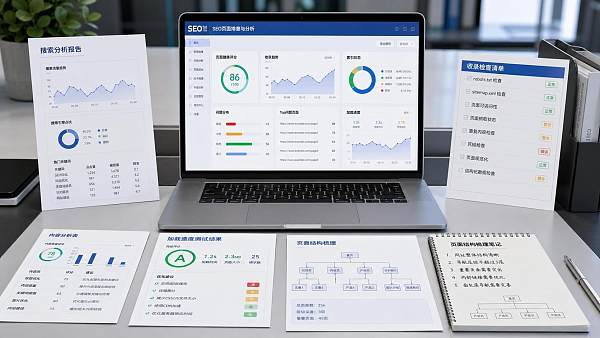
Image content: An illustration of the website page SEO troubleshooting process, including five checkpoints: indexing, content, speed, structure, and conversion.
alt text: Page troubleshooting flowchart before Google ranking optimization
Internal Link Anchor Text Recommendations
- How to troubleshoot Google indexing issues: Link to the technical SEO guide page
- International website loading speed optimization: Link to the website performance optimization topic page
- SEO structure configuration for multilingual websites: Link to the multilingual website-building solution page
- B2B corporate website content layout recommendations: Link to the marketing website development page
- SEO optimization services for overseas independent sites: Link to the service introduction page
Recommended External Authoritative Sources
- Official Google Search Central documentation
- Official Google Search Console Help Center
- Official technical documentation related to web performance and Core Web Vitals
Related Articles


Related Products
 Yiyingbao SaaS Intelligent Website Building and Marketing SystemYiyingbao SaaS Intelligent Website Building and Marketing System, AI-powered no-code website building, rapid creation of multilingual B2B international websites in 10 minutes, global server acceleration, AI-powered SEO optimization, helping businesses connect efficiently with global markets. The perfect integration of technology and operation makes building an international trade website remarkably simple
 AI+SEM Intelligent Advertising Marketing SystemAI+SEM drives intelligent ad creation, empowering full-funnel precision advertising marketing. The system automatically generates weekly/monthly reports, AI recommends keywords and target countries, monitors core metrics in real-time with intelligent alerts, and enables one-click high-conversion ad solutions to help quickly acquire customers and improve ROI.
 AI+SEO Dual-Engine System Optimization ServicesYiyingbao’s AI+SEO dual-engine optimization system helps foreign trade enterprises acquire high-quality organic traffic through AI-powered keyword research, content generation, and comprehensive technical optimization, significantly improving search rankings and conversion rates.
 AI+SNS Social Media Marketing SystemYingbao AI+SNS Social Media Marketing System - Precision social capture for the social media era. Supports one-click content synchronization across major platforms like Facebook and LinkedIn. AI intelligently rewrites posts for enhanced relevance. 24/7 AI customer service and user profiling analysis empower businesses to efficiently expand into global markets.
 AI+SEO营销解决方案易营宝AI+SEO营销解决方案,通过AI批量写作、智能生成TDK、精准关键词扩词等功能,全面优化网站SEO效果,提升流量与转化率。助力企业构建高效智能网站新生态。
 AI+SEM Advertising Marketing SolutionsAI+SEM Advertising Marketing Solution leverages AI technology to deeply empower SEM ad campaigns. It automatically generates weekly/monthly reports using AI, presenting account data across multiple dimensions for comprehensive insights into campaign performance and trends. The system precisely recommends keywords and target countries, intelligently generates high-conversion ad copy, and enables one-click activation of efficient campaign plans to help businesses rapidly acquire customers. Simultaneously, it monitors core metrics in real time, intelligently identifies abnormal fluctuations, and issues timely alerts to ensure stable, high-return advertising results.
 Domain Name ServicesEasyWin provides professional domain name services, including intelligent queries, one-stop registration, brand protection, and full lifecycle management, helping businesses build a digital brand image.
 EasyOperate B2C Cross-Border E-Commerce Platform & Independent WebsiteEasyStore B2C Cross-border E-commerce Independent Store is an intelligent website building and cross-border e-commerce integrated solution independently developed by EasyStore Information Technology (Beijing) Co., Ltd. The system is specially designed for small and medium-sized as well as large export enterprises, integrating 'website building, operation, marketing, advertising, and conversion' into one, helping enterprises quickly establish cross-border e-commerce independent stores to achieve brand globalization and global sales growth.
The platform supports multiple languages, multiple currencies, and multi-channel marketing, with built-in AI intelligent translation and SEO optimization systems, suitable for mainstream markets such as Southeast Asia, Europe and America, Latin America, and the Middle East, assisting Chinese manufacturing enterprises in efficiently deploying international e-commerce strategies. SSL证书易营宝提供专业SSL安全证书服务,包括单域名和泛域名证书,确保网站数据传输加密、身份验证和完整性保护,助力企业建立安全可信的在线业务环境。









