









- Can the average annual growth rate reflect real opportunities in overseas markets?Oct 07, 2026View details
- Which customer acquisition channels will be affected by cross-border marketing trends in 2026?Sep 06, 2026View details
- Which homogenization risks should be considered in an analysis of the AI-powered website building industry?Aug 30, 2026View details
- How Will AI Marketing Trends 2026 Change Advertising Budget AllocationAug 28, 2026View details
- Is the EV SSL certificate market shrinking or upgrading? How should companies assess certificate procurement?Aug 11, 2026View details
- Why the old AMP SEO 2020 practices no longer work and what has changed in current optimization prioritiesAug 02, 2026View details
What should I do if I don't receive the WhatsApp security verification code?
What should you do if you keep not receiving the WhatsApp security verification code? Don't worry. Many people first assume that "the platform is having a problem," but in practice, the issue is more often related to the phone number format, network environment, SMS delivery channel, device permissions, or restrictions triggered by repeated attempts within a short period. For those engaged in foreign trade, cross-border e-commerce, or overseas customer acquisition, this is not a minor issue, because WhatsApp is often directly connected to customer communication, advertising lead follow-up, and team collaboration. Once verification gets stuck, the impact goes beyond simply being unable to log in.
This is especially true after a company connects its website, landing pages, social media advertising, and instant communication tools. When the verification code does not arrive, it can interrupt the entire conversion process. A potential customer may have just entered the inquiry stage through Google Search, a Facebook ad, or an independent website form, only for the sales account to become inaccessible, immediately slowing response times. This is why, in integrated website and marketing service projects, the stability of communication tools may not be highly visible, but it is extremely important.
Before repeatedly tapping “Resend,” first identify which layer is causing the problem
If you are not receiving the WhatsApp security verification code, the right approach is not to repeat the operation blindly. First determine whether the problem lies with the phone number, network, device, carrier, or platform restrictions. Different causes require completely different solutions.
The most common situations include selecting the wrong country code, entering an extra 0 before the mobile number, weak mobile signal, SMS messages being blocked by the system, a dual-SIM phone using the wrong default SIM card for receiving messages, or too many previous attempts causing the system to temporarily stop sending verification codes. Another frequently overlooked situation occurs when users register through an overseas network, public Wi-Fi, or a frequently changing proxy. The platform may consider the environment abnormal and delay verification.
The most practical troubleshooting sequence
If you are currently stuck on the verification page, follow the sequence below. It will generally be more efficient than repeatedly uninstalling and reinstalling the app.
Step 1: Confirm the phone number format. For numbers in mainland China, you generally need to select China's country code and then enter the mobile number itself without adding an extra leading 0. Many people enter the correct number but still fail because of the country code or input format.
Step 2: Check your ability to receive SMS messages. Send a regular text message to your own number and see whether it arrives normally. If even regular SMS messages are delayed, the problem is probably not with WhatsApp, but with the local carrier, signal coverage, or SMS blocking settings.
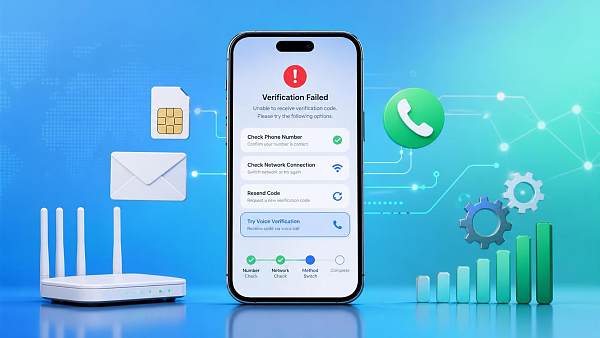
Step 3: Switch the network environment. Turn off unstable public Wi-Fi and switch to 4G or 5G. If the mobile network is unstable, use a more reliable local network. Avoid frequently switching between proxies, accelerators, or unusual network nodes, as these environments can easily trigger risk controls.
Step 4: Check whether the SMS has been blocked. Some Android systems classify verification codes from international platforms as spam messages, blocked messages, or collapsed notifications. On Apple devices, check whether filtering for unknown senders is enabled. If the phone issued by your company has security management software installed, it may also affect SMS display.
Step 5: Do not request verification codes repeatedly. Many platforms have a cooldown period, and repeatedly requesting a code within a short time may actually prolong the problem. If the page tells you to wait for a certain period, wait for the full amount of time before trying again.
Voice verification is often a faster solution than SMS
If the SMS does not arrive after a long wait, you can switch to verification by voice call. This method is particularly effective for certain regions and carriers. The reason is simple: SMS and voice channels are not exactly the same. SMS messages may be delayed, filtered, or congested, while voice calls may still be delivered normally.
However, note that voice verification requires the phone to be able to receive calls normally and that automatic blocking of unwanted calls is disabled. For corporate numbers, virtual numbers, cloud numbers, or numbers that have previously been used with multiple accounts, whether voice verification is available depends on the specific circumstances and cannot be generalized.
Why are business accounts more likely to encounter these problems?
When an individual user does not receive a verification code, it is usually just an inconvenience that prevents login. When a business account encounters the same problem, it often reveals deeper operational issues. For example, if a foreign trade team connects WhatsApp with advertising campaigns, website inquiries, and customer follow-up processes, verification failure after changing devices, handing over responsibilities, migrating a number, or reinstalling the app can affect the entire sales rhythm.
This is why more and more companies are beginning to focus on underlying process management within integrated website and marketing services. A company website is not merely a standalone display page, and social media is not merely a channel for publishing content. Every step from search engines, ad clicks, and multilingual websites to instant chat should ideally be handled reliably. Otherwise, even if front-end customer acquisition is done well, weak communication at the back end will still result in lost conversions.
The reason platforms such as Yiyingbao, which have long provided overseas digital marketing services, place smart website development, SEO optimization, advertising, and social media operations within one system is precisely this: overseas customer acquisition is not about purchasing isolated tools, but about coordinating the entire chain. Yiyingbao Information Technology (Beijing) Co., Ltd. was established in 2013 and is headquartered in Beijing. It has long served foreign trade enterprises, manufacturing factories, cross-border sellers, and brands expanding overseas. In essence, it helps companies connect three capabilities: being found, being contacted, and maintaining continuous conversion. The verification-code issue may appear minor, but it is exactly a critical part of being contactable.
Several common pitfalls
Some practices may seem proactive but actually make the problem more difficult to resolve.
For example, repeatedly uninstalling and reinstalling the app. Unless you are certain that the issue is caused by a cache error, reinstalling the app repeatedly will not improve the delivery rate of verification codes and may also interrupt existing sessions and local data.
Another example is temporarily using an unstable number for receiving verification codes. For businesses, this is a high-risk practice. Unclear number ownership, the inability to retain the number over the long term, and a complicated usage history may all create risks for account security and customer assets.
Another situation occurs when team members in different regions take turns trying to log in to the same number. When the platform detects frequent changes in devices, IP addresses, and regions, it often becomes more cautious. Many people think they are simply "not receiving the verification code," when in fact the platform is reducing the risk of abnormal login activity.
If you must restore access today, make decisions as follows
When time is limited, you do not need to pursue a perfect solution immediately. Prioritizing the restoration of business operations is more practical.
If you are using the account personally, first verify that your phone can receive SMS messages normally and confirm the phone number format. Then try voice verification and wait for the system cooldown period.
If you are part of a business team, in addition to restoring the current account, you should also check three issues: whether the number is a long-term controllable business asset, whether there is clear device and personnel permission management, and whether core customer communication is overly concentrated in a single account. Many teams do not lose because of customer acquisition, but because their basic operations are unstable.
In overseas marketing projects, a truly mature approach is generally not to "fix problems wherever they occur," but to review the website, advertising, forms, customer service entry points, CRM records, and communication-tool permissions together. Over the years, Yiyingbao has provided integrated delivery covering AI-powered website development, multilingual website construction, SEO, advertising, and overseas social media. Its value lies here: not simply building a website, but reducing hidden losses such as traffic arriving without being properly handled, customers making inquiries without receiving replies, and accounts being available but difficult to manage.
In conclusion
Returning to the original question: what should you do if you do not receive the WhatsApp security verification code? In most cases, no complex technical solution is required. First verify the phone number format, check SMS reception, switch to a stable network, avoid repeated attempts, and then try voice verification. These steps often resolve the issue. What really deserves attention is not the verification code itself, but the account management, communication workflow, and overseas operational stability issues it reveals.
If your business already relies on an independent website, SEO, advertising, and WhatsApp to acquire customers collaboratively, it is worth reviewing the entire process: Is the website designed for conversion? Can leads be distributed promptly? Is there a backup mechanism for communication tools? Are suitable localization solutions being used for multilingual markets? These issues may not be noticeable in daily operations, but when a failure occurs, the impact is often not limited to one verification code—it can affect an entire customer journey.
Related Articles


Related Products
 Yiyingbao SaaS Intelligent Website Building and Marketing SystemYiyingbao SaaS Intelligent Website Building and Marketing System, AI-powered no-code website building, rapid creation of multilingual B2B international websites in 10 minutes, global server acceleration, AI-powered SEO optimization, helping businesses connect efficiently with global markets. The perfect integration of technology and operation makes building an international trade website remarkably simple
 AI+SEM Intelligent Advertising Marketing SystemAI+SEM drives intelligent ad creation, empowering full-funnel precision advertising marketing. The system automatically generates weekly/monthly reports, AI recommends keywords and target countries, monitors core metrics in real-time with intelligent alerts, and enables one-click high-conversion ad solutions to help quickly acquire customers and improve ROI.
 AI+SEO Dual-Engine System Optimization ServicesYiyingbao’s AI+SEO dual-engine optimization system helps foreign trade enterprises acquire high-quality organic traffic through AI-powered keyword research, content generation, and comprehensive technical optimization, significantly improving search rankings and conversion rates.
 AI+SNS Social Media Marketing SystemYingbao AI+SNS Social Media Marketing System - Precision social capture for the social media era. Supports one-click content synchronization across major platforms like Facebook and LinkedIn. AI intelligently rewrites posts for enhanced relevance. 24/7 AI customer service and user profiling analysis empower businesses to efficiently expand into global markets.
 AI+SEO营销解决方案易营宝AI+SEO营销解决方案,通过AI批量写作、智能生成TDK、精准关键词扩词等功能,全面优化网站SEO效果,提升流量与转化率。助力企业构建高效智能网站新生态。
 AI+SEM Advertising Marketing SolutionsAI+SEM Advertising Marketing Solution leverages AI technology to deeply empower SEM ad campaigns. It automatically generates weekly/monthly reports using AI, presenting account data across multiple dimensions for comprehensive insights into campaign performance and trends. The system precisely recommends keywords and target countries, intelligently generates high-conversion ad copy, and enables one-click activation of efficient campaign plans to help businesses rapidly acquire customers. Simultaneously, it monitors core metrics in real time, intelligently identifies abnormal fluctuations, and issues timely alerts to ensure stable, high-return advertising results.
 Domain Name ServicesEasyWin provides professional domain name services, including intelligent queries, one-stop registration, brand protection, and full lifecycle management, helping businesses build a digital brand image.
 EasyOperate B2C Cross-Border E-Commerce Platform & Independent WebsiteEasyStore B2C Cross-border E-commerce Independent Store is an intelligent website building and cross-border e-commerce integrated solution independently developed by EasyStore Information Technology (Beijing) Co., Ltd. The system is specially designed for small and medium-sized as well as large export enterprises, integrating 'website building, operation, marketing, advertising, and conversion' into one, helping enterprises quickly establish cross-border e-commerce independent stores to achieve brand globalization and global sales growth.
The platform supports multiple languages, multiple currencies, and multi-channel marketing, with built-in AI intelligent translation and SEO optimization systems, suitable for mainstream markets such as Southeast Asia, Europe and America, Latin America, and the Middle East, assisting Chinese manufacturing enterprises in efficiently deploying international e-commerce strategies. SSL证书易营宝提供专业SSL安全证书服务,包括单域名和泛域名证书,确保网站数据传输加密、身份验证和完整性保护,助力企业建立安全可信的在线业务环境。









