









- CBP Finalizes Electronic Rail Export Manifest Rule, Effective October 26, 2026Oct 26, 2026View details
- Amazon’s 2026 peak season surcharge takes effect on October 25Oct 26, 2026View details
- AI Is Eating SaaS: Three Real-World Cases in One AfternoonOct 25, 2026View details
- Exiger CEO: The SaaS Apocalypse Is Real, but It Means Something DifferentOct 25, 2026View details
- Hengqin Cooperation Zone Shares Cross-Border E-Commerce Developments, Focusing on Macao-Hengqin Collaboration and International MarketsOct 24, 2026View details
- A Shenyang study highlights the development of the “cross-border e-commerce + industrial cluster” modelOct 24, 2026View details
SEO traffic suddenly dropped. How can you identify the affected pages?
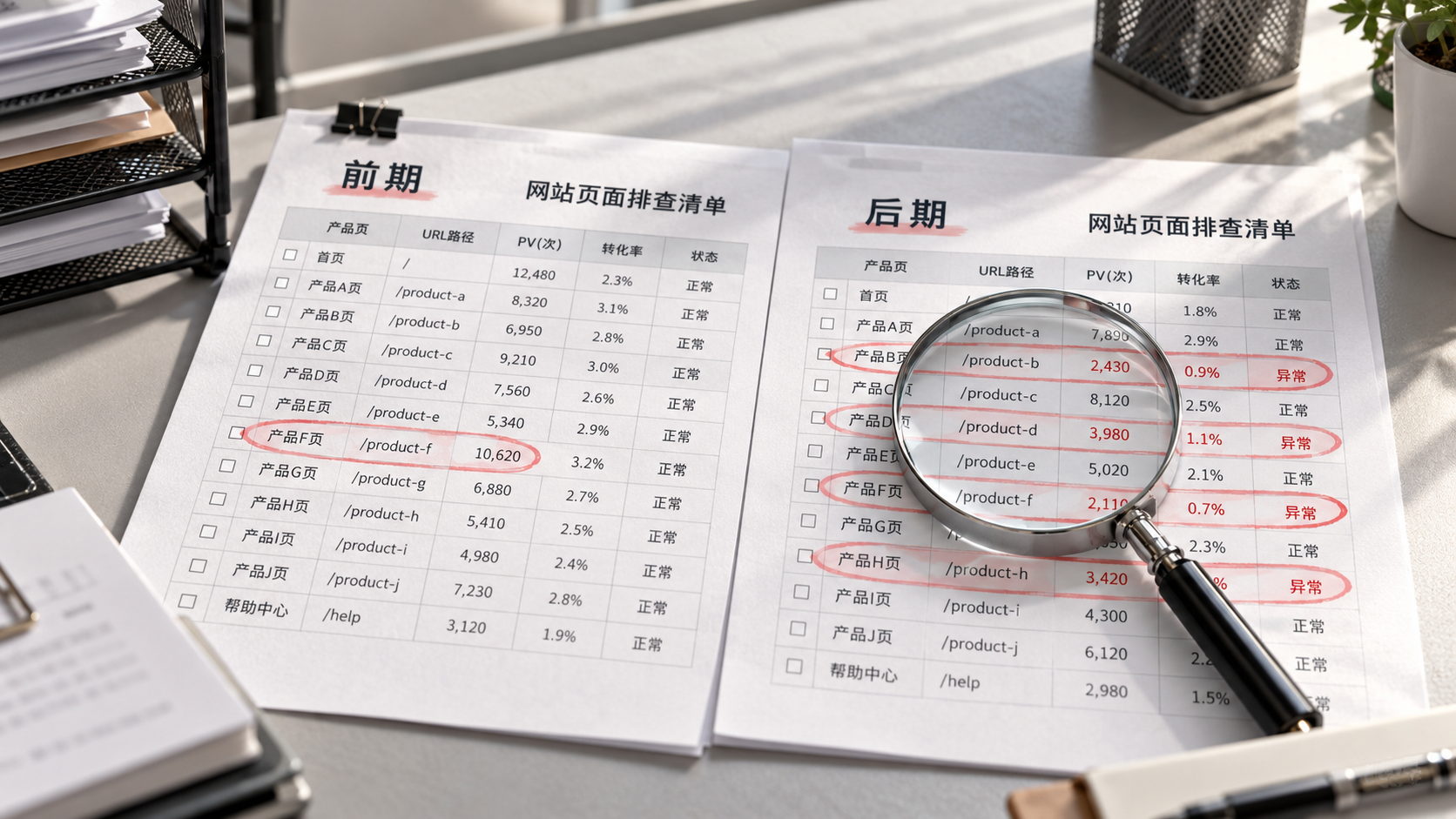
When SEO traffic suddenly drops, first identify “which pages lost how much traffic,” then determine the cause. Directly changing titles, updating content in bulk, or adjusting the site structure can disrupt the current state and make subsequent troubleshooting harder to assess. For this kind of sharp traffic decline (baisse trafic seo), an effective starting point is to create a before-and-after comparison table for pages and determine whether the decline is concentrated on a few pages, a particular page type, or spread across the entire site.
Also confirm which data set shows the decline: a drop in search clicks in Google Search Console and a decrease in organic search sessions recorded in GA4 do not point to exactly the same troubleshooting steps. The former reflects changes in clicks from search results; the latter is also affected by tracking code, user consent settings, and channel attribution.
Keep the comparison criteria consistent to avoid mistaking data fluctuations for a problem
In the “Performance” report in Search Console, first review the daily click trend and identify when the decline began. Then select two periods of the same length with the same distribution of weekdays. You can start by comparing two full weeks; if the site normally receives few clicks per day, extend the periods as appropriate to avoid large percentage changes caused by a handful of clicks lost on an individual inquiry page.
Keep filters such as search type, country, and device consistent, and exclude dates for which data has not yet been fully reported. If the business has pronounced holidays or seasonality, also refer to the same period last year, while accounting for changes this year in newly added pages, promotional plans, and market coverage.
Next, cross-check organic search sessions in GA4. If GA4 shows a marked decline while Search Console clicks remain largely stable, first check the tracking implementation, redirects, and consent management settings. If both decline, move on to locating the affected pages. The two tools use different measurement criteria, so their figures do not need to match exactly; focus on whether the timing and scope of the decline are consistent.
Export page data and sort by “clicks lost”
In Search Console, enable date comparison, switch to the “Pages” dimension, and export data for both periods. For each URL, retain at least clicks, impressions, click-through rate, and average position, and add page type, language, or target market to make subsequent grouping easier.
Consider adding the following fields:
- Clicks lost: Clicks in the earlier period minus clicks in the later period, used to identify the main sources of the traffic decline.
- Percentage decline: Clicks lost divided by clicks in the earlier period, used to assess the impact on an individual page; handle pages with zero clicks in the earlier period separately.
- Business value: Flag product pages, inquiry entry pages, solution pages, and their conversion performance to help determine the order of review.
Sort in descending order by clicks lost first, then review the percentage decline. For example, if one page drops from 500 clicks to 250 and another from 10 to zero, the latter has a larger percentage decline, but the former has a much greater impact on the total. This is only a calculation example; actual priorities should also take inquiry quality into account.
The comparison table should include all URLs that appeared in either period to avoid missing pages that received no clicks in the later period. If there are many pages, also be aware of row limits in the interface and exports. If necessary, split the data by directory or use the API to retrieve more complete data; do not treat the visible list as a complete inventory of the site.
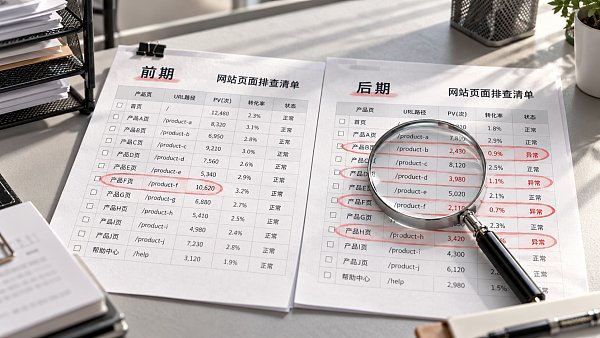
Also check whether other URLs have taken over the lost traffic: clicks to an old product page may decline while a new product page gains clicks, possibly due to a migration or a change in which page appears in search results. Search Console page data is generally attributed to the canonical URL selected by Google. When analyzing the data, consider redirects and canonicalization together to avoid double-counting losses.
Group affected pages to identify common patterns
Once you have a list of declining pages, group them by directory, template, language, country, and device before reviewing them individually. This step is especially important for multilingual international trade websites: a stable English directory alongside a decline in the French directory calls for a different scope of investigation than a simultaneous decline across product detail pages in all languages.
If losses are concentrated in a few high-traffic articles, first check the queries associated with those articles and changes in search results. If pages using the same template are declining in large numbers, review template deployments, internal link changes, indexing directives, and canonical URL settings. If the decline is limited to mobile devices or a particular country, continue the analysis with the relevant filters to avoid sitewide averages masking a localized issue.
For each group, review both total clicks and the number of affected pages. A decline on one high-traffic page may pull down the group’s overall figures; this alone does not mean the entire directory has a problem. Comparing the start of the decline with records of site releases, domain migrations, and URL changes can narrow the scope, but timing overlap is only a clue and must be verified by checking the pages.
Review priority pages and use queries to determine what to investigate next
For pages with substantial click losses and high business value, click the URL to open its report, then switch to the “Queries” dimension. Page-level average position and click-through rate can be affected by changes in the mix of queries, so compare the same set of key queries where possible and keep country and device settings consistent.
- Impressions decline and rankings for key queries also fall: Check whether the page is still indexable, whether its content has changed, whether internal links have decreased, and whether competing pages in search results have changed.
- Impressions decline while rankings for key queries remain relatively stable: Check for changes in query demand and seasonality, and confirm whether a group of queries that previously generated impressions has disappeared.
- Impressions remain similar but click-through rate declines: Review changes to the title, snippet, and search results page presentation to determine whether the information visible to users is affecting clicks.
- Clicks suddenly drop close to zero: First check the HTTP status, noindex, redirects, and the canonical URL selected by Google before considering content optimization.
The Queries report does not show every query, so do not treat the sum of clicks for visible queries as the page’s total. When checking a URL, also consider the index record and live inspection: a page being accessible now does not mean it was free of issues when the decline occurred; likewise, a problem that has been fixed may not yet be reflected in search performance.
The final troubleshooting checklist should answer four questions: Which URL declined? How much traffic was lost? What type of shared issue does it indicate? Who should investigate next? For international B2B websites, losses on a small number of high-intent product pages may affect lead generation more than losses across many informational pages, so prioritize pages based on historical inquiry performance. After implementing fixes, continue monitoring with the same date ranges and filters, and record when the fixes were made so you can determine whether the affected pages have actually recovered.
Related Articles
 How Can an SEO Content Strategy Prevent Keyword Cannibalization?
 Website Rankings Stuck on Page Two? How to Find Opportunities for Improvement
 SEO traffic suddenly dropped. How can you identify the affected pages?


Related Products
 Yiyingbao SaaS Intelligent Website Building and Marketing SystemYiyingbao SaaS Intelligent Website Building and Marketing System, AI-powered no-code website building, rapid creation of multilingual B2B international websites in 10 minutes, global server acceleration, AI-powered SEO optimization, helping businesses connect efficiently with global markets. The perfect integration of technology and operation makes building an international trade website remarkably simple
 AI+SEM Intelligent Advertising Marketing SystemAI+SEM drives intelligent ad creation, empowering full-funnel precision advertising marketing. The system automatically generates weekly/monthly reports, AI recommends keywords and target countries, monitors core metrics in real-time with intelligent alerts, and enables one-click high-conversion ad solutions to help quickly acquire customers and improve ROI.
 AI+SEO Dual-Engine System Optimization ServicesYiyingbao’s AI+SEO dual-engine optimization system helps foreign trade enterprises acquire high-quality organic traffic through AI-powered keyword research, content generation, and comprehensive technical optimization, significantly improving search rankings and conversion rates.
 AI+SNS Social Media Marketing SystemYingbao AI+SNS Social Media Marketing System - Precision social capture for the social media era. Supports one-click content synchronization across major platforms like Facebook and LinkedIn. AI intelligently rewrites posts for enhanced relevance. 24/7 AI customer service and user profiling analysis empower businesses to efficiently expand into global markets.
 AI+SEO营销解决方案易营宝AI+SEO营销解决方案,通过AI批量写作、智能生成TDK、精准关键词扩词等功能,全面优化网站SEO效果,提升流量与转化率。助力企业构建高效智能网站新生态。
 AI+SEM Advertising Marketing SolutionsAI+SEM Advertising Marketing Solution leverages AI technology to deeply empower SEM ad campaigns. It automatically generates weekly/monthly reports using AI, presenting account data across multiple dimensions for comprehensive insights into campaign performance and trends. The system precisely recommends keywords and target countries, intelligently generates high-conversion ad copy, and enables one-click activation of efficient campaign plans to help businesses rapidly acquire customers. Simultaneously, it monitors core metrics in real time, intelligently identifies abnormal fluctuations, and issues timely alerts to ensure stable, high-return advertising results.
 Domain Name ServicesEasyWin provides professional domain name services, including intelligent queries, one-stop registration, brand protection, and full lifecycle management, helping businesses build a digital brand image.
 EasyOperate B2C Cross-Border E-Commerce Platform & Independent WebsiteEasyStore B2C Cross-border E-commerce Independent Store is an intelligent website building and cross-border e-commerce integrated solution independently developed by EasyStore Information Technology (Beijing) Co., Ltd. The system is specially designed for small and medium-sized as well as large export enterprises, integrating 'website building, operation, marketing, advertising, and conversion' into one, helping enterprises quickly establish cross-border e-commerce independent stores to achieve brand globalization and global sales growth.
The platform supports multiple languages, multiple currencies, and multi-channel marketing, with built-in AI intelligent translation and SEO optimization systems, suitable for mainstream markets such as Southeast Asia, Europe and America, Latin America, and the Middle East, assisting Chinese manufacturing enterprises in efficiently deploying international e-commerce strategies. SSL证书易营宝提供专业SSL安全证书服务,包括单域名和泛域名证书,确保网站数据传输加密、身份验证和完整性保护,助力企业建立安全可信的在线业务环境。









