









- Which customer acquisition channels will be affected by cross-border marketing trends in 2026?Sep 06, 2026View details
- Which homogenization risks should be considered in an analysis of the AI-powered website building industry?Aug 30, 2026View details
- How Will AI Marketing Trends 2026 Change Advertising Budget AllocationAug 28, 2026View details
- Is the EV SSL certificate market shrinking or upgrading? How should companies assess certificate procurement?Aug 11, 2026View details
- Why the old AMP SEO 2020 practices no longer work and what has changed in current optimization prioritiesAug 02, 2026View details
- How to Choose Topics for an Industry News Section to Attract More Organic Search TrafficJul 29, 2026View details
What should I do about ERR_SSL_SERVER_CERT_BAD_FORMAT? Troubleshooting steps for certificate format errors
First, what is this error actually telling you?
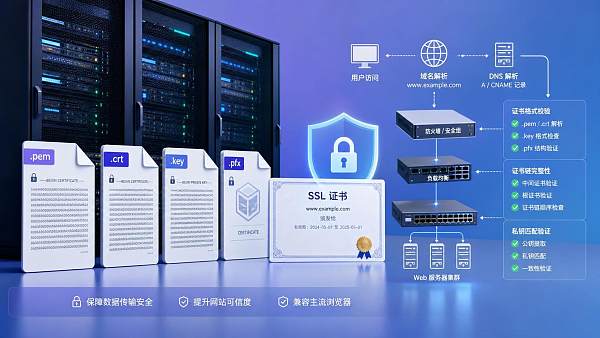
When encountering ERR_SSL_SERVER_CERT_BAD_FORMAT, many maintenance personnel immediately think about applying for a new certificate. In fact, there is no need to rush. More often, this error means that the certificate content provided by the server cannot be parsed in a normal format by the browser or upstream service. The problem is usually not whether a certificate exists, but whether the certificate file is correct, the certificate chain is complete, the private key matches, and the configuration references the correct files.
If you searched for “err_ssl_server_cert_bad_format что делать”, the troubleshooting approach is the same. The key is to first identify which layer contains the format error: the file itself, the service configuration, the certificate chain, or the proxy/CDN origin connection.
Which three things should you check first for maximum efficiency?
In after-sales maintenance scenarios, the most time-saving approach is not to search through the entire server configuration, but to focus first on three common causes:
- The certificate file is incorrectly encoded or damaged, for example, with spaces introduced during copying, abnormal line breaks, a BOM header, or missing header and footer markers.
- The certificate chain is incomplete: only the site certificate was uploaded, without correctly concatenating the intermediate certificate.
- The certificate does not match the private key. Although the configuration file can be saved, the handshake fails immediately.
If you have several types of files, such as .crt, .cer, .pem, .key, .pfx, do not look only at their extensions. An extension indicates convention, not the actual encoding format. During troubleshooting, you must inspect the file content.
How can you determine whether the certificate file itself is problematic?
The most direct method is to open the certificate file and inspect its beginning and end. A common PEM format should have a structure like this:
-----BEGIN CERTIFICATE-----
-----END CERTIFICATE-----
If you see a string of binary garbled characters, it is probably in DER format. If the server configuration requires PEM and you upload a DER file directly, a format error can easily occur. Several other common pitfalls include:
- Omitting the BEGIN/END lines when pasting the certificate content into the configuration.
- Line breaks being folded into a single line after copying from an email or chat tool.
- The Windows editor saving the file with a special encoding, causing abnormal server-side reading.
- Referencing a private key file as the certificate file, or vice versa.
These issues may seem basic, but they are very common during bulk delivery for multiple sites, environment migrations, and urgent certificate replacements.
Can a missing certificate chain also cause this error?
Yes, and it is easily misdiagnosed as a “broken certificate.” Some browsers or diagnostic tools provide relatively general prompts, which ultimately appear as errors such as an invalid format or invalid certificate.
You can think of the files actually required by the server as consisting of two parts: the site certificate and the intermediate certificate chain. Many CAs provide these as separate files. Maintenance personnel may upload only the domain certificate without concatenating the intermediate certificates in the correct order, leaving the client with an incomplete chain.
Sometimes the issue is not a missing chain but an excessive one. In particular, repeatedly importing and exporting certificates between Nginx, Apache, load balancers, and cloud platforms can result in the same certificate segment being concatenated repeatedly, making parsing unstable.
How can you quickly verify that the private key does not match?
This is another common type of failure. When a certificate is renewed, if the certificate comes from a new CSR while the server is still using the old private key, the browser may not display a straightforward “private key mismatch” message. Instead, you may see a handshake failure, certificate format error, or connection refusal.
When checking, do not guess based on file names. The most reliable approach is to separately read the modulus or public-key fingerprint of the certificate and private key and compare them. If they do not correspond, the two files cannot be used together. This step is critical for maintenance personnel because many incidents occur in environments where multiple sets of historical certificates and private keys exist on the same machine.
In addition, if you have a .pfx/.p12 file, confirm that the correct private key was included during export and whether the target service supports directly importing this format. Some platforms require you to split it into a PEM certificate and a KEY private key before configuring them separately.
What is most likely to be misconfigured in Nginx, Apache, and control panel environments?
It is not the complex parameters, but rather the most basic paths and file references. Check them in the following order:
- Confirm that the configuration references the currently active certificate, not a file with the same name in an old directory.
- Confirm whether the site certificate and intermediate certificate need to be merged into a single file.
- Confirm that the private key path is correct and that there are no insufficient-permission issues.
- Run a configuration check before reloading the service to avoid a situation where the syntax passes but the certificate file content is invalid.
- If a CDN, WAF, or reverse proxy is in front, determine whether the error occurs between the client and the edge node or between the edge node and the origin server.
This is particularly important in integrated website and marketing service scenarios. Many independent sites have more than one entry point. The corporate website, campaign landing pages, multilingual sites, and shop subdomains may each use different certificate configurations. Fixing the main site does not mean that the Russian site or advertising landing pages have also recovered.
Why can the actual business impact be greater than the browser error suggests?
Because this is not simply an issue of an unattractive access experience. Once a certificate format error goes live, its impact can spread across the entire customer acquisition chain: abnormal search engine crawling, inaccessible advertising landing pages, interrupted form submissions, failed API callbacks, and even disruptions to third-party payment or login interfaces.
When handling this type of failure, maintenance personnel cannot focus only on whether the browser homepage has recovered. A more practical approach is to expand the troubleshooting scope to several key paths: the primary domain, www, mobile domain, static resource domain, API subdomain, and landing pages currently used for advertising. If your site handles overseas traffic, this step is even more important. Access paths and cache statuses may vary by region.
How can you avoid the same error recurring in multi-environment deployments?
In practice, recurring errors are usually caused not by the certificate itself, but by a lack of standardization in the delivery process. When different people upload files for the test, staging, and production environments, and the file names are similar, the probability of errors naturally increases.
There are three practical measures: first, standardize certificate directories and naming rules; second, record the certificate source, domain, expiration date, and private-key association in the change request; third, perform an external handshake verification immediately after each replacement instead of merely checking whether the control panel displays “Deployment successful.” If your team also handles the operation and maintenance of enterprise digital systems, content such as Optimization Paths for Financial Management Information Systems in State-Owned Enterprises in the Context of Digital Transformation can at least serve as a reminder of one principle: processes are more valuable than one-off firefighting, especially during cross-system and cross-person handovers.
When temporarily restoring business operations, can you directly switch to a self-signed certificate?
It is acceptable for internal testing, but generally unsuitable for public-facing services. A self-signed certificate can indeed allow the service to start listening, but browsers will continue to report that it is untrusted, and advertising platforms, API clients, and crawlers may not accept it either. For a production website, this approach is more like temporary service preservation than a fix.
If you must mitigate the impact for a short period, prioritize enabling an existing valid backup certificate or rolling back to the last confirmed working release. First confirm that the private key matches, the certificate has not expired, and the covered domains are consistent. Compared with temporarily generating a new set of files, restoring a historically usable configuration is usually faster and less likely to introduce new problems.
After troubleshooting, what results should you check to confirm that the issue is truly fixed?
Do not look only at whether “the page can open.” At a minimum, perform the following checks:
- The certificate chain is complete, and the browser can properly expand the certificate details down to the intermediate certificate.
- The primary domain and commonly used subdomains can complete the handshake successfully.
- APIs, callbacks, form submissions, and login redirects do not fail because of HTTPS issues.
- The CDN or proxy-layer cache has been refreshed, and external access receives the new certificate.
- The operations record specifies the replacement files, time, and responsible person.
The most common and effective principle is actually quite simple: verify the file format first, then the chain, then the private key, and finally the node that is actually in service. Following this order, issues such as ERR_SSL_SERVER_CERT_BAD_FORMAT can usually be resolved without too much delay, and it is less likely that one layer will be fixed while another is overlooked.
Related Articles



Related Products
 Yiyingbao SaaS Intelligent Website Building and Marketing SystemYiyingbao SaaS Intelligent Website Building and Marketing System, AI-powered no-code website building, rapid creation of multilingual B2B international websites in 10 minutes, global server acceleration, AI-powered SEO optimization, helping businesses connect efficiently with global markets. The perfect integration of technology and operation makes building an international trade website remarkably simple
 AI+SEM Intelligent Advertising Marketing SystemAI+SEM drives intelligent ad creation, empowering full-funnel precision advertising marketing. The system automatically generates weekly/monthly reports, AI recommends keywords and target countries, monitors core metrics in real-time with intelligent alerts, and enables one-click high-conversion ad solutions to help quickly acquire customers and improve ROI.
 AI+SEO Dual-Engine System Optimization ServicesYiyingbao’s AI+SEO dual-engine optimization system helps foreign trade enterprises acquire high-quality organic traffic through AI-powered keyword research, content generation, and comprehensive technical optimization, significantly improving search rankings and conversion rates.
 AI+SNS Social Media Marketing SystemYingbao AI+SNS Social Media Marketing System - Precision social capture for the social media era. Supports one-click content synchronization across major platforms like Facebook and LinkedIn. AI intelligently rewrites posts for enhanced relevance. 24/7 AI customer service and user profiling analysis empower businesses to efficiently expand into global markets.
 AI+SEO营销解决方案易营宝AI+SEO营销解决方案,通过AI批量写作、智能生成TDK、精准关键词扩词等功能,全面优化网站SEO效果,提升流量与转化率。助力企业构建高效智能网站新生态。
 AI+SEM Advertising Marketing SolutionsAI+SEM Advertising Marketing Solution leverages AI technology to deeply empower SEM ad campaigns. It automatically generates weekly/monthly reports using AI, presenting account data across multiple dimensions for comprehensive insights into campaign performance and trends. The system precisely recommends keywords and target countries, intelligently generates high-conversion ad copy, and enables one-click activation of efficient campaign plans to help businesses rapidly acquire customers. Simultaneously, it monitors core metrics in real time, intelligently identifies abnormal fluctuations, and issues timely alerts to ensure stable, high-return advertising results.
 Domain Name ServicesEasyWin provides professional domain name services, including intelligent queries, one-stop registration, brand protection, and full lifecycle management, helping businesses build a digital brand image.
 EasyOperate B2C Cross-Border E-Commerce Platform & Independent WebsiteEasyStore B2C Cross-border E-commerce Independent Store is an intelligent website building and cross-border e-commerce integrated solution independently developed by EasyStore Information Technology (Beijing) Co., Ltd. The system is specially designed for small and medium-sized as well as large export enterprises, integrating 'website building, operation, marketing, advertising, and conversion' into one, helping enterprises quickly establish cross-border e-commerce independent stores to achieve brand globalization and global sales growth.
The platform supports multiple languages, multiple currencies, and multi-channel marketing, with built-in AI intelligent translation and SEO optimization systems, suitable for mainstream markets such as Southeast Asia, Europe and America, Latin America, and the Middle East, assisting Chinese manufacturing enterprises in efficiently deploying international e-commerce strategies. SSL证书易营宝提供专业SSL安全证书服务,包括单域名和泛域名证书,确保网站数据传输加密、身份验证和完整性保护,助力企业建立安全可信的在线业务环境。









