









- How to assess foreign trade website development trends?Looking at 2026 changes from multilingual,AI content to conversion pathsJul 04, 2026View details
- What are the new trends in multilingual marketing data analytics tools in 2026? Focus on attribution、automation and complianceJul 04, 2026View details
- Is Brand Globalization Marketing Consulting Worth Buying? At What Stage Should Companies Bring It InJul 01, 2026View details
- Cross-Border Marketing Trend Research: Why More and More Companies Are Starting to Deploy AI Search and GEO OptimizationJun 30, 2026View details
- Cross-Border Marketing Trend Research: How Independent Sites, AI Content, and Short-Video Customer Acquisition Are ChangingJun 30, 2026View details
- How Can a Brand Updates Page Be Made More SEO-Friendly? Analysis of Update Frequency, Content Structure, and Internal Linking StrategyJun 28, 2026View details
- What stages does the cross-border services ecosystem include? How do website building, promotion, payment, and compliance work togetherJun 22, 2026View details
- How will email marketing costs change in 2026Jun 22, 2026View details
What should I do if WhatsApp security verification keeps failing?6 common causes and handling steps
When WhatsApp Security Verification Keeps Failing,Do Not Rush to Keep Tapping Retry
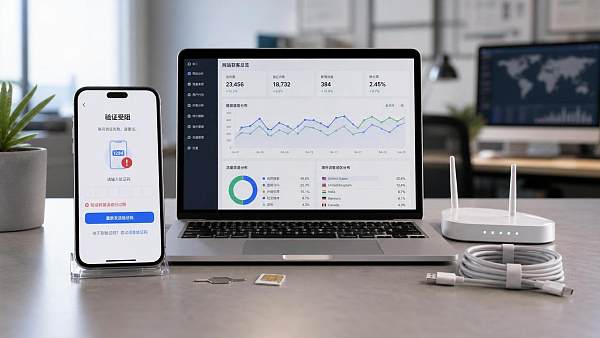
What should you do when WhatsApp security verification keeps failing?This issue may seem to be only about not receiving a verification code,but in practice it often blocks the very front of the business process. For teams that rely on independent websites for customer acquisition,ad conversions,and overseas communication,verification failure affects not only login,but also slows down inquiry replies,ad lead handoff,and customer follow-up rhythms.
In an integrated website and marketing service scenario,WhatsApp is often not an isolated tool,but an important connection point among landing pages,forms,social media traffic generation,and sales communication. Especially before and after multilingual websites,cross-border malls,or overseas advertising campaigns go live,once verification becomes abnormal,front-end traffic may come in,but back-end communication is cut off,and losses usually appear faster than expected.
A more common way to judge the issue is not to stare at a single error message,but to return to the usage environment. Is it the first login on a new device,or migration of an old account?Is the local network unstable,or is the number format itself non-compliant?In different scenarios,the handling sequence is not the same.
Why the Focus of Handling Can Be Completely Different Even When the Same Verification Failure Occurs
Many people keep requesting verification codes as soon as they encounter a failure,and as a result turn an originally recoverable issue into a temporary restriction. When asking what to do if WhatsApp security verification keeps failing,the key is not to “try a few more times”,but to first identify which type of failure it is:network,number,device,frequency,or account environment.
In actual applications,foreign trade website building or overseas marketing projects commonly face two situations. The first is when a new website goes live and WhatsApp is being connected to the website footer,buttons,or ad landing pages;the second is when a team changes mobile phones,SIM cards,or office networks,and a previously usable number suddenly cannot complete verification. The former requires more attention to the number and environment,while the latter requires more attention to the device and restrictions.
Six High-Frequency Causes Often Correspond to Six Different Handling Paths
1. Network Abnormality,So the Verification Code Request Is Not Sent at All
If the page keeps loading,the request is submitted slowly,or neither SMS nor voice verification responds,suspect the network first. This is especially common in public Wi-Fi,cross-border office networks,or environments where proxy nodes are switched frequently.
When handling it,first switch to stable mobile data,then turn off unrelated proxies or network acceleration. Do not keep tapping send repeatedly while changing networks. When the network has just recovered,wait a few minutes before operating,and the success rate is usually higher.
2. Incorrect Number Format,It Looks Fillable but the System Fails to Recognize It
What should you do when WhatsApp security verification keeps failing?The second high-frequency point is the number format. Selecting the wrong country/area code,incorrectly retaining a leading zero,or incompatibility with virtual number ranges can all prevent the verification code from being delivered correctly.
This type of issue is more likely to occur in multi-market operations. When targeting North America,Europe,the Middle East,or Southeast Asia,number rules vary by region. If the same communication number is configured simultaneously on the website,ads,and social media,it is recommended to verify the number availability separately first,and then connect it to the marketing process.
3. Incorrect Device Time,So the System Treats a Normal Request as Abnormal
Many people overlook device time. After the phone time,time zone,or automatic synchronization is turned off,security checks in the verification process may become invalid. It appears to be a verification code issue,but the essence is inconsistency between the device time and the server time.
Before implementation,what needs to be confirmed is to enable automatic date,time,and time zone settings,restart the app,and then request again. For login scenarios after changing phones,this step has a very high priority.
4. Too Many Requests in a Short Time,Triggering Verification Code Restrictions
This is the easiest place to misjudge. Many people think that because they have not received the verification code,they should continuously tap SMS verification,voice verification,and resend,only to trigger a waiting mechanism. Continuing to operate at this time will often only lead to continued failure.
The correct approach is to stop repeated requests and wait according to the page prompt. During the waiting period,do not uninstall and reinstall,and do not repeatedly switch devices. For marketing projects,if the communication number handles ad return traffic or on-site inquiries,it is best to prepare a backup contact path in advance to avoid a single point of interruption.
5. Two-Step Verification or Residual Old Devices Prevent the New Device from Completing Verification
If the verification code has been received but the process gets stuck in subsequent steps,common causes include a two-step verification PIN,unhandled old device sessions,or an incomplete account migration process. This situation is more common during team handovers,device upgrades,and cross-region office switching.
First confirm whether two-step verification is enabled,then check whether the associated email can receive recovery information. If the account was previously linked to a business phone,it is recommended to keep the original device available until the new device has been fully verified successfully before logging out from the old device.
6. Abnormal Account Environment,So the System Temporarily Raises the Review Intensity
If the number itself is correct and the network is normal,but failures still occur repeatedly,the account environment should be considered. For example,if a new device,new IP,and new region change at the same time,or if there were previously abnormal logins,frequent network switching,or traces of batch operations,the system may temporarily raise the verification threshold.
In this type of scenario,you cannot focus only on the verification code itself;you need to stabilize the usage environment even more. Try to operate on commonly used devices and commonly used networks,and avoid continuously changing login conditions. For site operations that rely on overseas customer acquisition,account stability itself is also part of the communication process.
Put the Problem Back into the Business Scenario,and the Diagnosis Will Be Faster
In a website and marketing collaboration scenario,when WhatsApp security verification keeps failing,the issue often cannot be viewed only from the mobile phone side. For example,an independent website has just gone live,and button clicks work normally,but no one receives the inquiries;on the surface,it looks like poor conversion,but in reality the number may have become unavailable after verification failure. Another example is that after advertising starts,inquiries surge,and the team temporarily changes phones to log in,only to trigger restrictions on a normal account.
Digital platforms like 易营宝 that have long served overseas markets place more emphasis on the continuity of communication tools in the coordination of website building,SEO,ad placement,and social media operations. A website being indexed and ads being launched are only the first half;whether instant contact in the second half is stable directly affects inquiry handling efficiency and lead conversion quality.
- New website deployment period:verify number availability first,then add on-site buttons and form redirects.
- Ad launch period:avoid frequent device changes and keep the account environment stable.
- Team handover period:handle two-step verification and old device sessions first.
- Multi-region operation period:prioritize checking country/area codes,networks,and local SMS capability.
These Misjudgments Are the Most Common and Often Waste More Time Than Technical Failures
One common misjudgment is treating all verification failures as platform faults. In fact,most issues arise from local conditions. Looking only at error messages without checking number rules,network quality,and device status usually leads to detours.
Another easily overlooked point is considering only whether login is possible at the moment,without considering the stability of subsequent operations. If verification barely succeeds today,but after ad scaling tomorrow frequent environmental changes trigger abnormalities again,the business will still be affected. For projects that operate overseas independent websites,SEO,and social media traffic generation over the long term,communication accounts need to be included in daily maintenance just like website domains and ad accounts.
The Truly Effective Handling Sequence Is to Troubleshoot First and Then Recover
If you are still asking what to do when WhatsApp security verification keeps failing,you can follow this sequence:first check whether the network is stable,then verify the number format,then confirm the device time,then check whether a waiting restriction has been triggered,and finally investigate two-step verification and the account environment. When the sequence is correct,you can usually avoid many detours.
A more reliable approach is to incorporate communication tools into the overall digital marketing process. Before the website goes live,test the contact process first;before ad placement,check the account status;before changing devices,prepare a recovery path. In this way,when verification failure occurs,it is not only solving a single login issue,but also completing a key link in the overseas customer acquisition process.
The next step can be to first sort out the current usage scenario:is it new registration,device replacement,network replacement,or temporary login during a business peak period;then compare it with the six types of causes above and troubleshoot item by item. Record the scenario,restriction conditions,and recovery steps. Later,whether for website operations,social media handoff,or ad conversion,everything will be more stable.
Related Articles
 How can video news production be made more efficient?Breaking down the standard process from topic selection to editing
 How to assess foreign trade website development trends?Looking at 2026 changes from multilingual,AI content to conversion paths
 What are the new trends in multilingual marketing data analytics tools in 2026? Focus on attribution、automation and compliance



Related Products
 EasyCamp SaaS Smart Website Marketing SystemE-Yingbao SaaS Smart Website Marketing System: AI-powered, zero-code website building. Rapidly launch multilingual independent e-commerce sites in just 10 minutes. Global server acceleration and AI-driven SEO optimization empower businesses to efficiently connect with global markets. The seamless integration of technology and user-friendly operation makes building e-commerce sites incredibly simple.
 AI+SEM Intelligent Advertising Marketing SystemAI+SEM drives intelligent ad creation, empowering full-funnel precision advertising marketing. The system automatically generates weekly/monthly reports, AI recommends keywords and target countries, monitors core metrics in real-time with intelligent alerts, and enables one-click high-conversion ad solutions to help quickly acquire customers and improve ROI.
 AI+SEO Dual Engine Optimization ServiceEasyWin AI+SEO Dual Engine Optimization System leverages AI-powered keyword mining, content generation, and comprehensive technical optimization to help foreign trade enterprises acquire high-quality organic traffic, significantly improving search rankings and conversion rates.
 AI+SNS Social Media Marketing SystemYingbao AI+SNS Social Media Marketing System - Precision social capture for the social media era. Supports one-click content synchronization across major platforms like Facebook and LinkedIn. AI intelligently rewrites posts for enhanced relevance. 24/7 AI customer service and user profiling analysis empower businesses to efficiently expand into global markets.
 AI+SEO营销解决方案易营宝AI+SEO营销解决方案,通过AI批量写作、智能生成TDK、精准关键词扩词等功能,全面优化网站SEO效果,提升流量与转化率。助力企业构建高效智能网站新生态。
 AI+SEM Advertising Marketing SolutionsAI+SEM Advertising Marketing Solution leverages AI technology to deeply empower SEM ad campaigns. It automatically generates weekly/monthly reports using AI, presenting account data across multiple dimensions for comprehensive insights into campaign performance and trends. The system precisely recommends keywords and target countries, intelligently generates high-conversion ad copy, and enables one-click activation of efficient campaign plans to help businesses rapidly acquire customers. Simultaneously, it monitors core metrics in real time, intelligently identifies abnormal fluctuations, and issues timely alerts to ensure stable, high-return advertising results.
 Domain Name ServicesEasyWin provides professional domain name services, including intelligent queries, one-stop registration, brand protection, and full lifecycle management, helping businesses build a digital brand image.
 EasyOperate B2C Cross-Border E-Commerce Platform & Independent WebsiteEasyStore B2C Cross-border E-commerce Independent Store is an intelligent website building and cross-border e-commerce integrated solution independently developed by EasyStore Information Technology (Beijing) Co., Ltd. The system is specially designed for small and medium-sized as well as large export enterprises, integrating 'website building, operation, marketing, advertising, and conversion' into one, helping enterprises quickly establish cross-border e-commerce independent stores to achieve brand globalization and global sales growth.
The platform supports multiple languages, multiple currencies, and multi-channel marketing, with built-in AI intelligent translation and SEO optimization systems, suitable for mainstream markets such as Southeast Asia, Europe and America, Latin America, and the Middle East, assisting Chinese manufacturing enterprises in efficiently deploying international e-commerce strategies. SSL证书易营宝提供专业SSL安全证书服务,包括单域名和泛域名证书,确保网站数据传输加密、身份验证和完整性保护,助力企业建立安全可信的在线业务环境。









