









- Cross-Border Marketing Trend Research: Why More and More Companies Are Starting to Deploy AI Search and GEO OptimizationJun 30, 2026View details
- Cross-Border Marketing Trend Research: How Independent Sites, AI Content, and Short-Video Customer Acquisition Are ChangingJun 30, 2026View details
- How Can a Brand Updates Page Be Made More SEO-Friendly? Analysis of Update Frequency, Content Structure, and Internal Linking StrategyJun 28, 2026View details
- What stages does the cross-border services ecosystem include? How do website building, promotion, payment, and compliance work togetherJun 22, 2026View details
- How will email marketing costs change in 2026Jun 22, 2026View details
- The China-US tariff arrangement has reached a preliminary consensus, and the trade association will be establishedJun 15, 2026View details
- Should overseas brand marketing start with ads or contentJun 21, 2026View details
- What determines B2C cross-border e-commerce website development costs? A breakdown of features, interfaces, and deployment methodsJun 17, 2026View details
Which metrics should be checked for mobile compatibility testing? A complete audit from first-screen speed to interaction experience
Mobile Responsiveness Testing: Don’t Just Focus on “Whether It Opens”
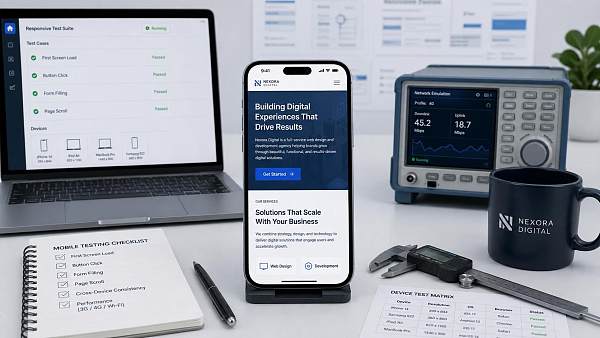
Mobile responsiveness testing may look like a page display issue on the surface, but in practice, it is closer to a full user experience checkup. If a page can open, it only means it has not completely failed. It does not mean users can use it smoothly.
In real business scenarios, traffic declines, higher bounce rates, and fewer inquiries on many websites are all related to insufficient mobile responsiveness testing. More obvious signals include slow above-the-fold loading, buttons that are hard to tap, content that jumps around, and forms that are difficult to complete.
Therefore, when conducting mobile responsiveness testing, you should not only check whether the resolution is compatible. You also need to review speed, stability, interaction, and conversion paths together. With this approach, problems can be identified more accurately, and fixes can be prioritized more effectively.
Step 1: Check Above-the-Fold Speed First, and Don’t Let Users Leave Before They See the Content
In mobile responsiveness testing, above-the-fold speed must be a priority. Mobile networks fluctuate more, and device performance varies more significantly. Once the above-the-fold section loads too slowly, users may not continue reading no matter how good the later content is.
It is recommended to focus on three metrics first: the time when above-the-fold content appears, Largest Contentful Paint, and Total Blocking Time. These three metrics can quickly reflect whether the page is “visible, worth waiting for, and responsive enough.”
- If above-the-fold content appears too late, it is usually related to oversized images, render-blocking scripts, or slow server response.
- If Largest Contentful Paint is too high, it is often because the hero image, banner, or video thumbnail has not been properly compressed.
- If Total Blocking Time is too long, it means script execution is too heavy. The page may look loaded, but in reality, it still cannot be operated smoothly.
For marketing websites or landing pages, above-the-fold speed also directly affects ad quality and conversion costs. When conducting mobile responsiveness testing, it is recommended to test the homepage, product pages, form pages, and campaign pages separately, rather than testing only one entry page.
Step 2: Check Whether the Layout Is Stable and Avoid Content Shifts
When many people conduct mobile responsiveness testing, they first check whether the page scales properly, but overlook layout stability. What users dislike most is not a slight delay, but the page suddenly jumping down just as they are about to tap a button.
This type of issue is usually reflected in Cumulative Layout Shift, commonly known as page jitter. The common causes are not complicated and are mainly concentrated in images without reserved dimensions, delayed pop-up loading, delayed font replacement, and ad placements with unfixed heights.
During mobile responsiveness testing, you can focus on these areas: the hero image section, navigation bar, floating buttons, promotional banners, and form submission area. Once these elements shift, they are most likely to cause accidental taps and directly affect conversions.
- Define dimensions for image and video containers in advance.
- Reserve placeholder space for asynchronously loaded modules.
- Avoid letting pop-ups and announcement bars squeeze the main content.
- Keep the font strategy stable to reduce switching-related jitter.
Step 3: Check Whether Tap Areas Are Accurate, as This Determines Whether Users Can Operate Smoothly
Another frequent issue in mobile responsiveness testing is that the page looks fine, but operations keep going wrong. Buttons that are too small, spacing that is too tight, floating layers that block content, and overlapping fixed navigation can all significantly reduce tap accuracy.
This type of issue is especially easy to miss during after-sales troubleshooting. Just because something can be clicked in the development environment does not mean it is easy to tap on a real device. Finger tapping and mouse clicking follow completely different logic.
When conducting mobile responsiveness testing, it is recommended to focus on button size, button spacing, floating element hierarchy, the bottom safe area, and the state after switching between portrait and landscape modes. If any one of these areas is handled roughly, users will feel that the page is “not responsive to touch.”
- Check whether the main button is large enough and whether nearby links are easy to tap by mistake.
- Check whether the fixed consultation button at the bottom blocks forms or pagination.
- After a drop-down menu expands, check whether it can still be closed or returned from normally.
- After an input field is focused, check whether the pop-up keyboard blocks the submit button.
Step 4: For Interaction Smoothness, Check “Whether Actions Can Be Completed Continuously”
Mobile responsiveness testing is not only a static page inspection. It is even more important to verify dynamic processes. Users browse, scroll, expand, switch, and submit. This is a series of continuous actions, not a single-point test.
If a page drops frames while scrolling, lags during switching, or gives no feedback after form submission, users often click repeatedly, eventually triggering duplicate submissions, page errors, or even data loss. This issue is especially common on campaign pages and inquiry pages.
Therefore, mobile responsiveness testing should cover the complete journey instead of only saving screenshots for records. It is recommended to operate step by step according to the real access flow and observe whether there is lag, a blank screen, no response, abnormal return behavior, or state loss.
A more reliable approach is to break interaction testing into several key scenarios: opening the homepage, entering product details, clicking consultation, filling out a form, returning to the list, and entering the page again. This makes it easier to locate specific failure points.
Step 5: Work Backward from Business Results and Troubleshoot the Metrics That Truly Affect Conversions
Whether mobile responsiveness testing is effective cannot be judged only by the technical pass rate. You also need to see whether business results have improved. Faster pages, more stable layouts, and easier tapping should ultimately translate into session duration, bounce rate, inquiry rate, and form completion rate.
Judging from recent changes, many corporate websites are not lacking traffic. The problem is that mobile traffic enters the site but does not complete conversions. The issue is often not the content itself, but that mobile responsiveness testing does not cover the real conversion path.
If a page is responsible for overseas customer acquisition, ad traffic reception, SEO growth, and similar tasks, then mobile responsiveness testing must be linked to marketing results. This is especially true for multilingual official websites, independent foreign trade websites, cross-border e-commerce stores, and ad landing pages, which are more sensitive to the mobile experience.
A More Practical Mobile Responsiveness Testing Checklist
If you want to improve troubleshooting efficiency, you can turn mobile responsiveness testing into a fixed checklist. This way, after every redesign, campaign addition, ad launch, or plugin update, you can quickly retest and avoid missing key items.
- Test four types of core pages: homepage, detail pages, form pages, and landing pages.
- Test separately under different screen widths, different systems, and different network environments.
- Record above-the-fold speed, layout shift, accidental button taps, and form completion rate.
- Prioritize fixes based on “conversion impact first” instead of spreading effort evenly.
- Retest after fixing to confirm that no new issues have been introduced.
For corporate websites that need continuous customer acquisition, mobile responsiveness testing is not a one-time action, but part of website operations. Every time a page changes, the experience may change as well, so the maintenance rhythm must keep up.
Ultimately, the goal of mobile responsiveness testing is not to create a report, but to help users see content faster, complete actions more reliably, and move into conversion more smoothly. If you focus on above-the-fold speed, layout stability, tap accuracy, and interaction smoothness, the troubleshooting direction will generally stay on track.
Related Articles
 4 Major Reasons Behind WhatsApp Account Bans, A Quick Self-Check for Foreign Trade Professionals
 Cross-Border Marketing Trend Research: Why More and More Companies Are Starting to Deploy AI Search and GEO Optimization
 Cross-Border Marketing Trend Research: How Independent Sites, AI Content, and Short-Video Customer Acquisition Are Changing



Related Products
 EasyCamp SaaS Smart Website Marketing SystemE-Yingbao SaaS Smart Website Marketing System: AI-powered, zero-code website building. Rapidly launch multilingual independent e-commerce sites in just 10 minutes. Global server acceleration and AI-driven SEO optimization empower businesses to efficiently connect with global markets. The seamless integration of technology and user-friendly operation makes building e-commerce sites incredibly simple.
 AI+SEM Intelligent Advertising Marketing SystemAI+SEM drives intelligent ad creation, empowering full-funnel precision advertising marketing. The system automatically generates weekly/monthly reports, AI recommends keywords and target countries, monitors core metrics in real-time with intelligent alerts, and enables one-click high-conversion ad solutions to help quickly acquire customers and improve ROI.
 AI+SEO Dual Engine Optimization ServiceEasyWin AI+SEO Dual Engine Optimization System leverages AI-powered keyword mining, content generation, and comprehensive technical optimization to help foreign trade enterprises acquire high-quality organic traffic, significantly improving search rankings and conversion rates.
 AI+SNS Social Media Marketing SystemYingbao AI+SNS Social Media Marketing System - Precision social capture for the social media era. Supports one-click content synchronization across major platforms like Facebook and LinkedIn. AI intelligently rewrites posts for enhanced relevance. 24/7 AI customer service and user profiling analysis empower businesses to efficiently expand into global markets.
 AI+SEO营销解决方案易营宝AI+SEO营销解决方案,通过AI批量写作、智能生成TDK、精准关键词扩词等功能,全面优化网站SEO效果,提升流量与转化率。助力企业构建高效智能网站新生态。
 AI+SEM Advertising Marketing SolutionsAI+SEM Advertising Marketing Solution leverages AI technology to deeply empower SEM ad campaigns. It automatically generates weekly/monthly reports using AI, presenting account data across multiple dimensions for comprehensive insights into campaign performance and trends. The system precisely recommends keywords and target countries, intelligently generates high-conversion ad copy, and enables one-click activation of efficient campaign plans to help businesses rapidly acquire customers. Simultaneously, it monitors core metrics in real time, intelligently identifies abnormal fluctuations, and issues timely alerts to ensure stable, high-return advertising results.
 Domain Name ServicesEasyWin provides professional domain name services, including intelligent queries, one-stop registration, brand protection, and full lifecycle management, helping businesses build a digital brand image.
 EasyOperate B2C Cross-Border E-Commerce Platform & Independent WebsiteEasyStore B2C Cross-border E-commerce Independent Store is an intelligent website building and cross-border e-commerce integrated solution independently developed by EasyStore Information Technology (Beijing) Co., Ltd. The system is specially designed for small and medium-sized as well as large export enterprises, integrating 'website building, operation, marketing, advertising, and conversion' into one, helping enterprises quickly establish cross-border e-commerce independent stores to achieve brand globalization and global sales growth.
The platform supports multiple languages, multiple currencies, and multi-channel marketing, with built-in AI intelligent translation and SEO optimization systems, suitable for mainstream markets such as Southeast Asia, Europe and America, Latin America, and the Middle East, assisting Chinese manufacturing enterprises in efficiently deploying international e-commerce strategies. SSL证书易营宝提供专业SSL安全证书服务,包括单域名和泛域名证书,确保网站数据传输加密、身份验证和完整性保护,助力企业建立安全可信的在线业务环境。









