





- What should you focus on in the latest enterprise SaaS report? From renewal rates and delivery costs to overseas growth opportunitiesJul 12, 2026View details
- What signals are worth paying attention to in a cross-border marketing trend report? B2B companies should look at these 6 signalsJul 11, 2026View details
- How to Read a Cross-Border Marketing Trends Report? Five Key Dimensions for Evaluating Channel OpportunitiesJul 11, 2026View details
- Which channel has the highest ROI in the global traffic ecosystem? Comparative analysis of search, social media, and advertisingJul 10, 2026View details
- What multilingual website services are available in Sanya? Which model is more suitable for local businesses going global?Jul 08, 2026View details
- How to view the complete list of China SaaS companies in the top 100? Practical methods for screening website-building and marketing service providersJul 08, 2026View details
- How to view pricing in the global traffic ecosystem? Cost comparison of search, social media, and content channel advertisingJul 06, 2026View details
- How to assess foreign trade website development trends?Looking at 2026 changes from multilingual,AI content to conversion pathsJul 04, 2026View details
Key Points for Deploying Website Traffic Monitoring Tools
Whether website traffic monitoring tools are deployed properly directly affects after-sales maintenance efficiency and issue response speed. Only by mastering the key points can data truly support operational growth.
The first issue after-sales maintenance must solve is not “installing it”,but “seeing accurately”

For after-sales maintenance personnel,the value of website traffic monitoring tools lies not in how rich the reports are,but in whether they can quickly identify the source,scope and impact of a fault when it occurs.
Many enterprises have already integrated analytics code,but still encounter issues such as missing data,confused channel attribution and inability to identify abnormal traffic. The root cause is usually the lack of standards during the deployment stage.
Therefore,deploying traffic monitoring tools should not be understood merely as adding a piece of code,but should be regarded as a foundational project that coordinates website operations and maintenance,marketing analysis and customer service.
Clarify before deployment:which business issues need to be monitored
Before deployment,after-sales maintenance personnel should first confirm monitoring objectives with the operations,sales or customer success teams to avoid repeated code changes,event additions and report rebuilding later.
Common objectives include changes in visits,page loading speed,form submissions,online consultation clicks,ad landing page conversions,search keyword sources and abnormal visit identification.
If the client is a foreign trade,franchise or service-oriented enterprise,special attention should also be paid to visit performance across different countries and regions,device types and language versions,so as to support subsequent optimization.
The clearer the objectives,the easier it is to control the scope of tracking. Do not pursue full data collection from the beginning;instead,prioritize the key paths that affect customer inquiries,lead conversion and issue troubleshooting.
Key points for code deployment:location,scope and loading method must be correct
Website traffic monitoring tools are usually integrated through analytics code or a tag manager. The code should be placed in the site-wide common template to ensure coverage of the homepage,category pages,detail pages and landing pages.
For multi-end websites,the PC site,mobile site,responsive pages and independent campaign pages need to be checked separately to avoid the code taking effect only on the main site,which may cause long-term missing mobile data.
The loading method is also critical. Asynchronous loading is recommended as the first choice to prevent monitoring code from affecting page loading speed,especially for marketing websites with many images and heavy scripts.
If the website uses caching,CDN or a front-end framework,after deployment it is necessary to confirm whether the code is actually triggered through browser developer tools,real-time data dashboards and access testing.
Event tracking:what after-sales teams use most is reproducibility and traceability
Pageview data alone is usually not enough to support after-sales diagnosis. Failed form submissions,unclickable buttons and unresponsive consultation entry points all need to be discovered through event tracking.
It is recommended to prioritize tracking behaviors directly related to customer conversion,such as phone clicks,form submissions,document downloads,online customer service,WhatsApp or WeChat entry points,and shopping cart actions.
Tracking names must be unified. For example,event category,action and label should follow fixed rules. Otherwise,when different maintenance personnel take over later,it will be difficult to determine the true meaning represented by the data.
For marketing campaign pages that are adjusted frequently,tag management tools can be used to manage events in a unified way,reducing the communication cost of relying on developers to release every change.
Data accuracy check:acceptance testing must be performed once after launch
Completion of deployment does not mean the work is finished. After-sales maintenance personnel should establish a launch acceptance checklist to ensure that the data recorded by the tools is basically consistent with actual website visit behavior.
During acceptance testing,the website can be accessed from different devices,browsers and network environments to observe whether real-time visits,source channels,page paths and event triggers are correctly recorded.
Exclusion rules should also be checked,such as whether the company intranet,maintenance personnel IPs,test environments and crawler traffic need to be filtered,so as to prevent daily maintenance activities from contaminating client data.
If the client runs ads,UTM parameters,landing page redirects,cross-domain visits and form source fields should be checked at the same time to prevent ad leads from being inaccurately attributed.
Permissions and security:after-sales maintenance must not ignore account management
Traffic data often involves clients’ marketing budgets,lead sources and business strategies. When deploying tools,after-sales maintenance personnel must plan account permissions and data security at the same time.
Different roles should be granted different permissions. Client management can view overall reports,operations personnel can view conversion data,and technical personnel only need the permissions required for configuration and troubleshooting.
When employees leave,projects are handed over or services expire,account permissions must be withdrawn in a timely manner to prevent former collaborators from continuing to access data and creating unnecessary security risks.
If cross-border business is involved,privacy compliance requirements should also be considered,with Cookie notices,data retention periods and user authorization mechanisms configured reasonably to reduce the risk of subsequent complaints.
Alert mechanism:discover issues before clients do
For after-sales maintenance,the ideal state is not receiving client feedback that “the website is not working”,but being alerted in advance when traffic is abnormal,conversions decline or page errors occur.
Automatic alerts can be set up for scenarios such as a sudden drop in visits,no visits to core pages,zero form submissions,an abnormal increase in bounce rate,and 404 errors on ad landing pages.
Alert thresholds should not be too sensitive,otherwise a large number of ineffective reminders will be generated. It is recommended to adjust them dynamically based on the client website’s usual traffic level,advertising cycle and industry off-peak and peak seasons.
In integrated website development and marketing service projects,Eyingbao usually links monitoring,SEO optimization and advertising data to help after-sales teams locate the source of issues more quickly.
Report design:clients must understand it for maintenance work to have a basis
After-sales maintenance personnel should not only know how to read the backend,but also be able to turn key data into conclusions that clients can understand,so that reports do not become a pile of unused numbers.
Basic reports should include visit trends,source channels,popular pages,conversion behaviors,device distribution and geographic distribution,while highlighting metrics directly related to the client’s business objectives.
For example,if the client focuses on inquiries,the report should emphasize consultation clicks,form submissions,effective sources and conversion pages,rather than only stressing the growth of pageviews.
For group clients or clients with multiple business lines,the integration approach emphasized in Integration and Operational Optimization Strategies for Mergers and Acquisitions of Property Management Enterprises can also be referenced to unify data from different sites,regions and teams into a comparable management framework.
Common deployment pitfalls:these issues are most likely to slow down response
The first pitfall is deploying code only on the homepage. Many clients’ ad landing pages,campaign pages or subdomains are not monitored,resulting in no data for the pages that actually generate leads.
The second pitfall is ignoring redirect paths. Short links,third-party forms,online customer service plugins and payment pages may all cause source loss,so paths need to be tested in advance.
The third pitfall is having no version records. Every time code is modified,tracking is adjusted or tools are replaced,the time,reason and scope of impact should be recorded to facilitate subsequent troubleshooting of anomalies.
The fourth pitfall is attributing all data fluctuations to website issues. Search algorithms,advertising budgets,holidays,server status and the competitive environment may all affect traffic performance.
Recommended workflow for after-sales maintenance personnel
A relatively reliable process is to first confirm business objectives,then design the monitoring plan,and then complete code deployment,event tracking,permission settings,data acceptance testing and report delivery.
After delivery,it is recommended to conduct a review within one to two weeks,focusing on whether the data remains stable,whether the client can understand the reports,and whether any uncovered key behaviors have appeared.
When the website is redesigned,new sections are launched,advertising is added or customer service tools are replaced,after-sales personnel should also check the monitoring configuration at the same time to prevent new pages from becoming data blind spots.
For long-term service clients,a monthly inspection mechanism can be established to organize traffic anomalies,conversion changes and technical issues into maintenance recommendations,improving service professionalism and client trust.
Conclusion:good monitoring deployment is the “early warning system” of after-sales service
The core of deploying website traffic monitoring tools is not simply integrating an analytics platform,but building a traceable,verifiable and explainable data system around the client’s business objectives.
As long as after-sales maintenance personnel properly handle monitoring scope,tracking rules,data acceptance testing,permission security and alert reports,they can significantly improve issue response efficiency.
When data can accurately reflect visits,conversions and anomalies,website maintenance is no longer only passive repair,but can truly support operational judgment and enterprise growth.
Related Articles



Related Products
 EasyCamp SaaS Smart Website Marketing SystemE-Yingbao SaaS Smart Website Marketing System: AI-powered, zero-code website building. Rapidly launch multilingual independent e-commerce sites in just 10 minutes. Global server acceleration and AI-driven SEO optimization empower businesses to efficiently connect with global markets. The seamless integration of technology and user-friendly operation makes building e-commerce sites incredibly simple.
 AI+SEM Intelligent Advertising Marketing SystemAI+SEM drives intelligent ad creation, empowering full-funnel precision advertising marketing. The system automatically generates weekly/monthly reports, AI recommends keywords and target countries, monitors core metrics in real-time with intelligent alerts, and enables one-click high-conversion ad solutions to help quickly acquire customers and improve ROI.
 AI+SEO Dual Engine Optimization ServiceEasyWin AI+SEO Dual Engine Optimization System leverages AI-powered keyword mining, content generation, and comprehensive technical optimization to help foreign trade enterprises acquire high-quality organic traffic, significantly improving search rankings and conversion rates.
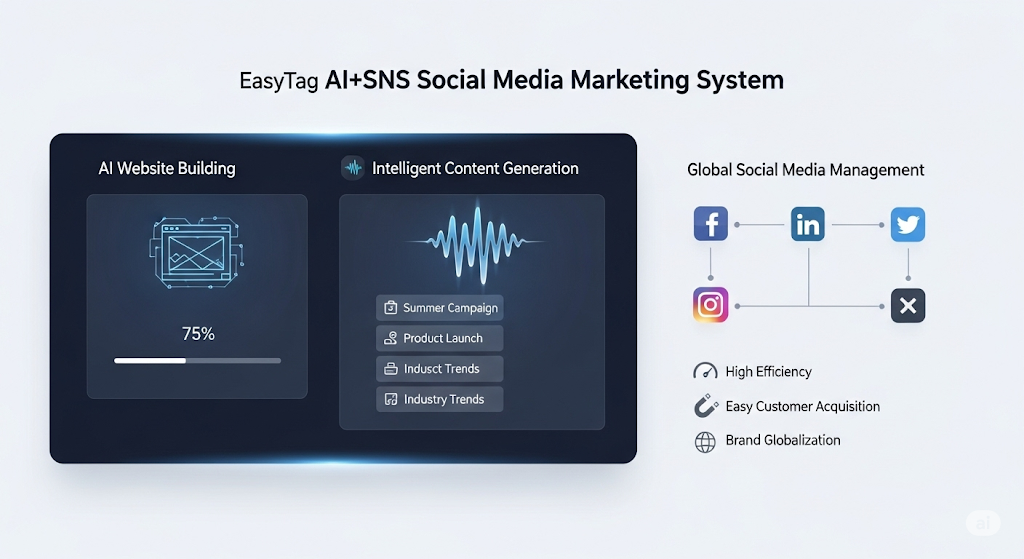
 AI+SNS Social Media Marketing SystemYingbao AI+SNS Social Media Marketing System - Precision social capture for the social media era. Supports one-click content synchronization across major platforms like Facebook and LinkedIn. AI intelligently rewrites posts for enhanced relevance. 24/7 AI customer service and user profiling analysis empower businesses to efficiently expand into global markets.
 AI+SEO营销解决方案易营宝AI+SEO营销解决方案,通过AI批量写作、智能生成TDK、精准关键词扩词等功能,全面优化网站SEO效果,提升流量与转化率。助力企业构建高效智能网站新生态。
 AI+SEM Advertising Marketing SolutionsAI+SEM Advertising Marketing Solution leverages AI technology to deeply empower SEM ad campaigns. It automatically generates weekly/monthly reports using AI, presenting account data across multiple dimensions for comprehensive insights into campaign performance and trends. The system precisely recommends keywords and target countries, intelligently generates high-conversion ad copy, and enables one-click activation of efficient campaign plans to help businesses rapidly acquire customers. Simultaneously, it monitors core metrics in real time, intelligently identifies abnormal fluctuations, and issues timely alerts to ensure stable, high-return advertising results.
 Domain Name ServicesEasyWin provides professional domain name services, including intelligent queries, one-stop registration, brand protection, and full lifecycle management, helping businesses build a digital brand image.
 EasyOperate B2C Cross-Border E-Commerce Platform & Independent WebsiteEasyStore B2C Cross-border E-commerce Independent Store is an intelligent website building and cross-border e-commerce integrated solution independently developed by EasyStore Information Technology (Beijing) Co., Ltd. The system is specially designed for small and medium-sized as well as large export enterprises, integrating 'website building, operation, marketing, advertising, and conversion' into one, helping enterprises quickly establish cross-border e-commerce independent stores to achieve brand globalization and global sales growth.
The platform supports multiple languages, multiple currencies, and multi-channel marketing, with built-in AI intelligent translation and SEO optimization systems, suitable for mainstream markets such as Southeast Asia, Europe and America, Latin America, and the Middle East, assisting Chinese manufacturing enterprises in efficiently deploying international e-commerce strategies. SSL证书易营宝提供专业SSL安全证书服务,包括单域名和泛域名证书,确保网站数据传输加密、身份验证和完整性保护,助力企业建立安全可信的在线业务环境。