









- Can the average annual growth rate reflect real opportunities in overseas markets?Oct 07, 2026View details
- Which customer acquisition channels will be affected by cross-border marketing trends in 2026?Sep 06, 2026View details
- Which homogenization risks should be considered in an analysis of the AI-powered website building industry?Aug 30, 2026View details
- How Will AI Marketing Trends 2026 Change Advertising Budget AllocationAug 28, 2026View details
- Is the EV SSL certificate market shrinking or upgrading? How should companies assess certificate procurement?Aug 11, 2026View details
- Why the old AMP SEO 2020 practices no longer work and what has changed in current optimization prioritiesAug 02, 2026View details
Is day-to-day content maintenance convenient with EasyYunbao's multilingual website building platform?
Whether day-to-day content maintenance for Yiyingbao multilingual websites is convenient depends on whether staff can independently complete the entire process of “editing content, handling translations, checking pages, and publishing.” For export websites focused on product displays, news updates, and generating inquiries, the maintenance workload is manageable if these tasks can be completed consecutively in the admin panel. If every update has to be entered again on each language site, or must be handled by service personnel, the maintenance burden becomes more noticeable as the number of languages grows.
Yiyingbao provides intelligent website building and multilingual website development services, but the specific admin panel capabilities, account permissions, and service scope should be assessed based on the selected plan and delivery agreement. When reading “Yiyingbao Multilingual Website Building: Real-World User Feedback,” the most useful feedback explains what updates were made, which languages were involved, and which steps the staff actually handled. A simple statement such as “easy to use” is not enough to support a purchasing decision.
First, see how many places need updating when you change a product
For website operators, adding a new product, adjusting specifications, and replacing images are more typical daily tasks than redesigning an entire website. When evaluating Yiyingbao, take a real product through the full update process: change the model, specifications, and delivery-time information in the primary Chinese or English version, then check how the pages in other languages are handled.
It is important to distinguish between two types of content. Basic information such as model numbers, dimensions, and materials should remain consistent. Product selling points, application descriptions, and market-specific terminology, however, may need to be adjusted separately for each language. If the admin panel overwrites all content at once, translations that have already been reviewed may be changed back. If every field has to be maintained separately, some pages may be missed.
During a demonstration, therefore, check whether you can clearly select the synchronization scope, identify which languages have not yet been updated, and make changes to one language without affecting other versions. These capabilities should not be inferred from the statement “supports multiple languages”; they should be tested one by one in the admin panel provided at delivery.
Images should also be checked. When the main product image is replaced, does it change on pages in other languages as well? If the image contains Chinese text, can separate versions be configured? Do download links and specification sheets still point to old files? Changing the text in the editor does not mean the update is complete.
Translation is easier when the subsequent review process is manageable
Generating translations is only one part of multilingual maintenance. For manufacturers and B2B export businesses, model numbers, material grades, units, operating conditions, and certification statements can all affect how buyers understand the content. Even when AI-assisted translation is used, someone still needs to check technical terminology and sales claims.
If you plan to use Yiyingbao’s translation capabilities, pay particular attention to the editing process after translations are generated: is it easy to compare the source and translated text? Can you edit just one language? Will manual revisions be overwritten the next time the source content is updated? If content has to be copied into an external document for review and then pasted back into the admin panel paragraph by paragraph, the number of steps and the risk of version mix-ups both increase.
After content in the primary language is updated, there should also be a clear status for pages in other languages. Operators should be able to see which content has not yet been translated, which has been reviewed, and which has been published. Without clear statuses, the English page may have updated specifications while pages in other languages still show outdated information.
The number of languages should also match the team’s capabilities. A company with just one website operator and no support for reviewing less common languages can start by maintaining the languages used in its key markets, then expand coverage gradually. Launching many languages at once without being able to check product information on an ongoing basis makes maintenance difficult in the long run.
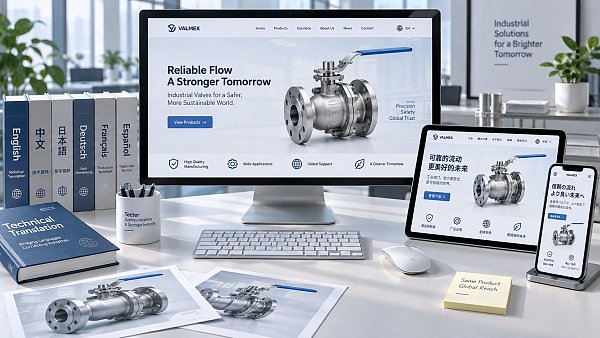
Editing pages is not enough—you also need confidence in the publishing process
Once the text and images have been updated, page checks still take time. The same content can vary in length across languages, causing buttons, navigation menus, and product cards to wrap or overlap. Therefore, when assessing maintenance convenience, include previews in every language and mobile checks as part of the complete workflow.
For websites that support both SEO and advertising, page titles, descriptions, URLs, and forms should also be checked. Accidentally changing a URL during a routine product update may affect access through existing links. If updating the button text on an advertising landing page causes problems with the destination or inquiry receipt settings, it may also affect lead generation. Whether these related settings are easy to review in the admin panel directly affects whether operators can complete the work independently.
For teams working together, permissions and recovery capabilities also affect the day-to-day experience. If sales staff can update specifications, operators can revise copy, and managers can review and publish—with clearly defined permissions for each role—the risk of mistakes is easier to control. Whether version history, undo, and restore functions are available should also be checked in practice when selecting a solution, especially for websites that are updated frequently.
Use a complete update to see whether the workflow works for your team
Rather than watching service personnel give a quick demonstration, a more effective way to evaluate the system is to have the people who will manage the website try it themselves. Choose a product with a specification table, images, and downloadable files, and complete the following tasks:
- Update the product specifications and one image in the primary language, then check the extent of changes on pages in other languages.
- Review the translation in one language, save it, then update the source text again to see whether the manual edits are retained.
- Preview the pages on desktop and mobile, and check the layout, download links, and inquiry form.
- After publishing, find an error and try to correct or restore it yourself, then confirm the status of the other language versions.
There is no need to prioritize speed during this exercise. Focus on recording which steps can be completed independently and which require consulting a guide or contacting service personnel. If most routine updates can be handled in-house and external support is only needed for infrequent tasks such as structural changes, the maintenance process is more likely to fit the team’s operating rhythm.
Self-service maintenance in the admin panel should also be assessed separately from managed services. If some updates need to be handled by the Yiyingbao service team, the delivery agreement should specify the scope of updates, submission method, turnaround time, and who is responsible for translation review. For companies without a dedicated website operator, service support may be more important. For teams that frequently add products and update landing pages, independent editing and publishing permissions are worth checking first.
Ultimately, convenience can be judged by asking one specific question: when product specifications change at short notice, can the person responsible for the website find the affected pages in each language, make and review the changes, and confirm that they have been published? If they can complete this process smoothly, the multilingual maintenance workflow is a good fit for the team.
Related Articles

Related Products
 Yiyingbao SaaS Intelligent Website Building and Marketing SystemYiyingbao SaaS Intelligent Website Building and Marketing System, AI-powered no-code website building, rapid creation of multilingual B2B international websites in 10 minutes, global server acceleration, AI-powered SEO optimization, helping businesses connect efficiently with global markets. The perfect integration of technology and operation makes building an international trade website remarkably simple
 AI+SEM Intelligent Advertising Marketing SystemAI+SEM drives intelligent ad creation, empowering full-funnel precision advertising marketing. The system automatically generates weekly/monthly reports, AI recommends keywords and target countries, monitors core metrics in real-time with intelligent alerts, and enables one-click high-conversion ad solutions to help quickly acquire customers and improve ROI.
 AI+SEO Dual-Engine System Optimization ServicesYiyingbao’s AI+SEO dual-engine optimization system helps foreign trade enterprises acquire high-quality organic traffic through AI-powered keyword research, content generation, and comprehensive technical optimization, significantly improving search rankings and conversion rates.
 AI+SNS Social Media Marketing SystemYingbao AI+SNS Social Media Marketing System - Precision social capture for the social media era. Supports one-click content synchronization across major platforms like Facebook and LinkedIn. AI intelligently rewrites posts for enhanced relevance. 24/7 AI customer service and user profiling analysis empower businesses to efficiently expand into global markets.
 AI+SEO营销解决方案易营宝AI+SEO营销解决方案,通过AI批量写作、智能生成TDK、精准关键词扩词等功能,全面优化网站SEO效果,提升流量与转化率。助力企业构建高效智能网站新生态。
 AI+SEM Advertising Marketing SolutionsAI+SEM Advertising Marketing Solution leverages AI technology to deeply empower SEM ad campaigns. It automatically generates weekly/monthly reports using AI, presenting account data across multiple dimensions for comprehensive insights into campaign performance and trends. The system precisely recommends keywords and target countries, intelligently generates high-conversion ad copy, and enables one-click activation of efficient campaign plans to help businesses rapidly acquire customers. Simultaneously, it monitors core metrics in real time, intelligently identifies abnormal fluctuations, and issues timely alerts to ensure stable, high-return advertising results.
 Domain Name ServicesEasyWin provides professional domain name services, including intelligent queries, one-stop registration, brand protection, and full lifecycle management, helping businesses build a digital brand image.
 EasyOperate B2C Cross-Border E-Commerce Platform & Independent WebsiteEasyStore B2C Cross-border E-commerce Independent Store is an intelligent website building and cross-border e-commerce integrated solution independently developed by EasyStore Information Technology (Beijing) Co., Ltd. The system is specially designed for small and medium-sized as well as large export enterprises, integrating 'website building, operation, marketing, advertising, and conversion' into one, helping enterprises quickly establish cross-border e-commerce independent stores to achieve brand globalization and global sales growth.
The platform supports multiple languages, multiple currencies, and multi-channel marketing, with built-in AI intelligent translation and SEO optimization systems, suitable for mainstream markets such as Southeast Asia, Europe and America, Latin America, and the Middle East, assisting Chinese manufacturing enterprises in efficiently deploying international e-commerce strategies. SSL证书易营宝提供专业SSL安全证书服务,包括单域名和泛域名证书,确保网站数据传输加密、身份验证和完整性保护,助力企业建立安全可信的在线业务环境。









