






Process description: Import the mini program code downloaded from the Yiyingbao backend into the WeChat developer tool, then upload it from the WeChat developer tool to the WeChat public platform, and finally submit it for review.
1. Download and install WeChat developer tools
Download address: https://mp.weixin.qq.com/debug/wxadoc/dev/devtools/download.html
After downloading, open the tool, scan the QR code of the Mini Program administrator WeChat account to log in, and select the Mini Program project after logging in.
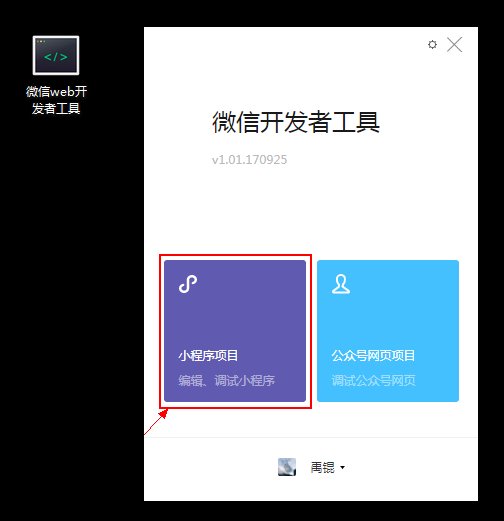
2. Improve the mini program project information
Enter the Mini Program project editing page, fill in the APPID (i.e. the Mini Program ID), project name (letters are recommended), select the project directory (select the first directory after the code package is unzipped as shown in the upper right corner of the figure below), and click OK.
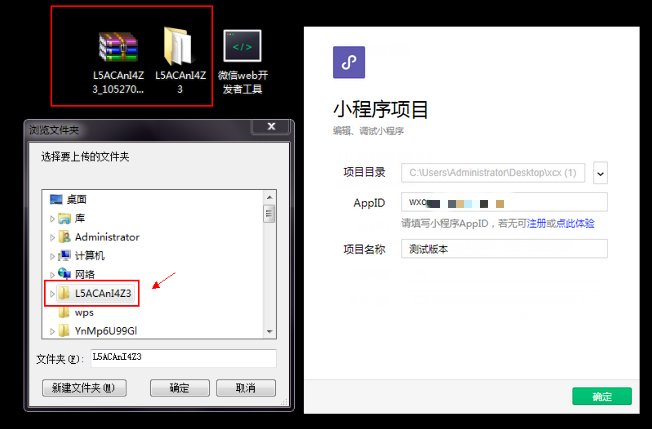
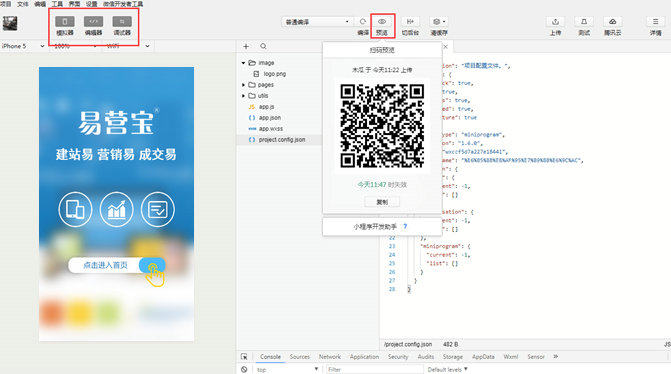
3. Online debugging applet
Click on the upper right corner of the developer tools - Simulator, Editor, Debugger to view the structure and code of the Mini Program. Click on Preview to experience the Mini Program by scanning the QR code with your phone
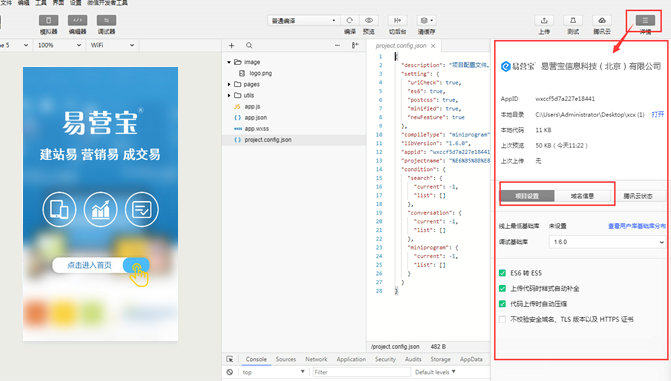
4. Improve the mini program project settings and domain name information
Click Details in the upper right corner of the debugging interface to set up the project and view domain name information (see the figure below for setting options)
(Note: The domain name must be configured as the domain name for which the CA certificate has been applied. To modify the domain name, please log in to the WeChat Mini Program account on the WeChat public platform - Settings - Development Settings - Business Domain Name. WeChat developer tools do not provide domain name modification.)
5. Upload the mini program to the WeChat public platform
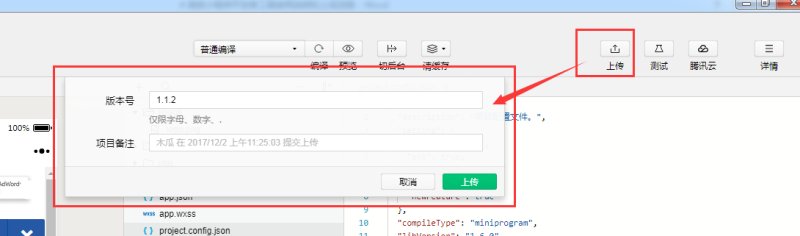
After debugging is completed, click Upload, fill in the version number and project notes, and click OK
6. Submit for review on WeChat public platform
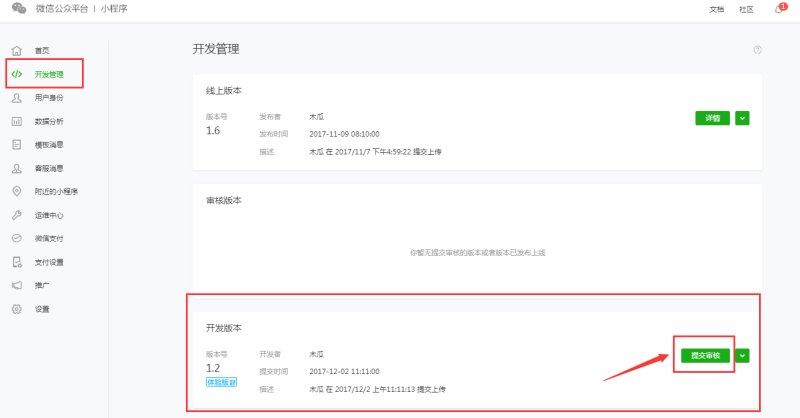
WeChat public platform login applet, developer management-development version-submit for review
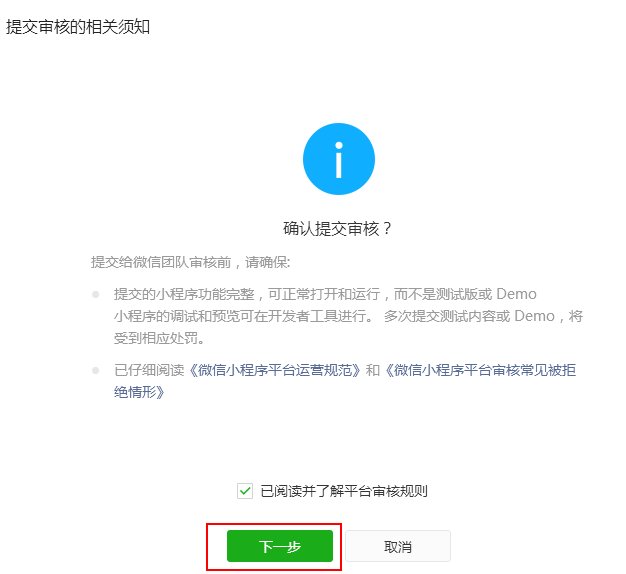
7. Agree to the WeChat Mini Program Development Agreement. Check that you have read it and click Next.
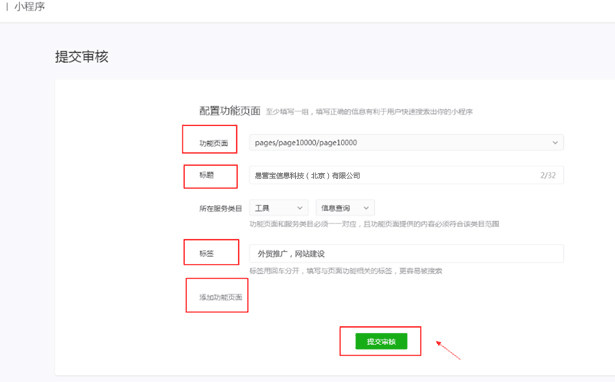
8. Improve the information on the mini program function page
Fill in at least one function page information (you can click to add a function page) and submit it for review. The review time is 2-3 working days. After passing the review, you can search for your mini program in the WeChat client.
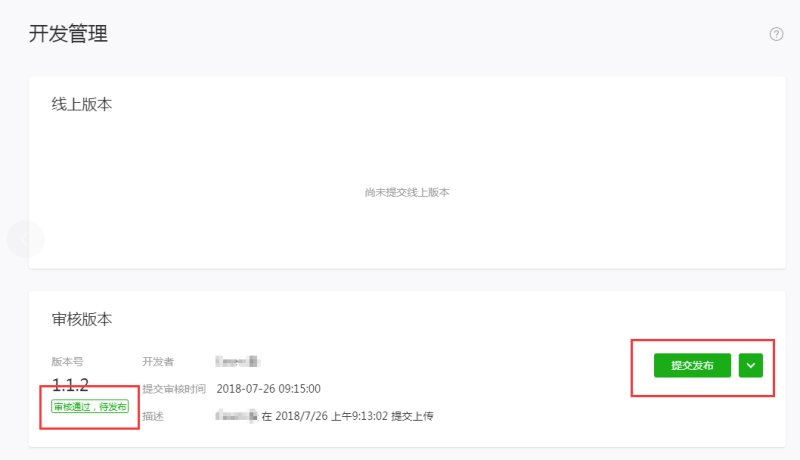
9. After the review is passed, click Submit to publish.
Related News
 What High-Converting Content Is Suitable for Yiyingbao Dynamic PagesWhat High-Converting Content Is Suitable for Yiyingbao Dynamic Pages? This article explains how to balance SEO indexing, trust building, and inquiry conversion through case updates, customer testimonials, promotional campaigns, and industry insights, helping integrated website and marketing service businesses improve lead generation efficiency.
 Overseas Social Media Operations and Brand Exposure: Don't Focus Only on Follower CountWhen it comes to brand exposure through overseas social media operations, don’t focus solely on follower numbers. This article analyzes changes in platform algorithms, website engagement, branded search, and the conversion journey to help you understand how an integrated website and marketing approach can improve exposure quality, build trust, and generate genuine growth.
 Optimize Your Standalone Website’s User Experience by Fixing These 5 High-Bounce-Rate Issues FirstBefore making major changes to your standalone website, focus on optimizing the user experience. This article examines five high-bounce-rate issues—an unclear above-the-fold section, slow loading, confusing navigation, generic content, and weak conversion entry points—to help you quickly identify problems and improve time on site, inquiry conversions, and marketing performance.
 How Can Multilingual Website Translation Services Balance Efficiency and AccuracyHow Can Multilingual Website Translation Services Balance Efficiency and Accuracy? This article explores translation, SEO, and conversion coordination strategies across scenarios such as inquiry-generation websites, e-commerce websites, and brand websites, helping businesses improve overseas website indexing, credibility, and customer acquisition efficiency.



Online Inquiry