






Feature Introduction
The video control allows videos to be displayed on the page. A content-rich website requires not only text and images but also video functionality. EasyStore's video control perfectly supports third-party video sources (including Youku, Tudou, Sina Video, and other site resources). With just a link, you can effortlessly present video content to visitors.
Usage Process
Step 1: Drag and drop a video control to the desired page, as shown below:
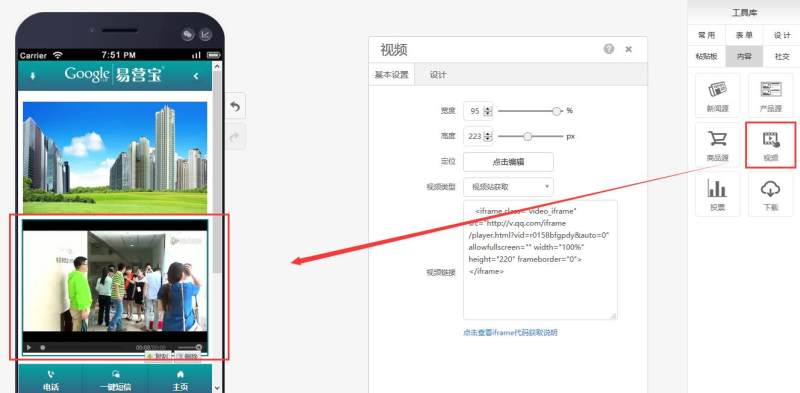
Step 2: Select the video type and link: Video site retrieval refers to uploading the video to a video website (such as Youku or Tencent Video) first, then copying the universal code from the video website and pasting it into the video link field. Custom link refers to uploading an MP4-format video to the website space first, then pasting the link into the video link field. See the image below:
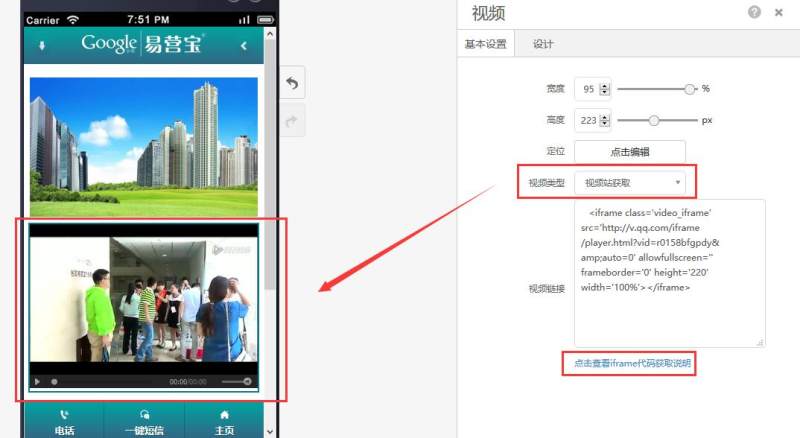
Note: The "Click to view iframe code retrieval instructions" below provides a detailed explanation of the site retrieval method.
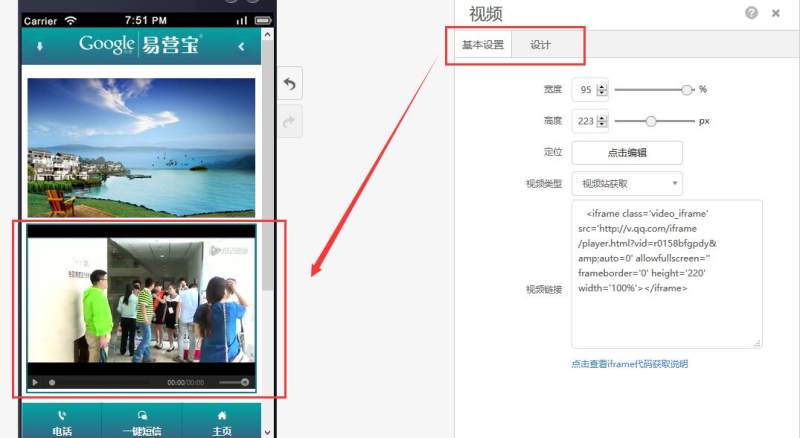
Step 3: Adjust the width, height, positioning, and shadow effects in the design according to your needs, as shown below:
Related News
 What High-Converting Content Is Suitable for Yiyingbao Dynamic PagesWhat High-Converting Content Is Suitable for Yiyingbao Dynamic Pages? This article explains how to balance SEO indexing, trust building, and inquiry conversion through case updates, customer testimonials, promotional campaigns, and industry insights, helping integrated website and marketing service businesses improve lead generation efficiency.
 Overseas Social Media Operations and Brand Exposure: Don't Focus Only on Follower CountWhen it comes to brand exposure through overseas social media operations, don’t focus solely on follower numbers. This article analyzes changes in platform algorithms, website engagement, branded search, and the conversion journey to help you understand how an integrated website and marketing approach can improve exposure quality, build trust, and generate genuine growth.
 Optimize Your Standalone Website’s User Experience by Fixing These 5 High-Bounce-Rate Issues FirstBefore making major changes to your standalone website, focus on optimizing the user experience. This article examines five high-bounce-rate issues—an unclear above-the-fold section, slow loading, confusing navigation, generic content, and weak conversion entry points—to help you quickly identify problems and improve time on site, inquiry conversions, and marketing performance.
 How Can Multilingual Website Translation Services Balance Efficiency and AccuracyHow Can Multilingual Website Translation Services Balance Efficiency and Accuracy? This article explores translation, SEO, and conversion coordination strategies across scenarios such as inquiry-generation websites, e-commerce websites, and brand websites, helping businesses improve overseas website indexing, credibility, and customer acquisition efficiency.



Online Inquiry