









- The China-US tariff arrangement has reached a preliminary consensus, and the trade association will be establishedJun 15, 2026View details
- What determines B2C cross-border e-commerce website development costs? A breakdown of features, interfaces, and deployment methodsJun 17, 2026View details
- China-Morocco zero-tariff access, a breakthrough in the cost of Moroccan goods exports to ChinaJun 11, 2026View details
- What signal should be released for the suspension of exports to JapanJun 10, 2026View details
- China's May LNG imports rebounded, with increased volumes from Russia and Canada filling the Middle East supply gapJun 10, 2026View details
- Will GEO change its SEO strategy?Jun 04, 2026View details
- What types of businesses are end-to-end solutions suitable for?Jun 03, 2026View details
- 2026 Global Growth Channel TrendsJun 02, 2026View details
How to optimize forms? First, identify these 6 submission barriers before increasing inquiry volume
How to optimize forms? Increase inquiry volume by first identifying these 6 submission barriers
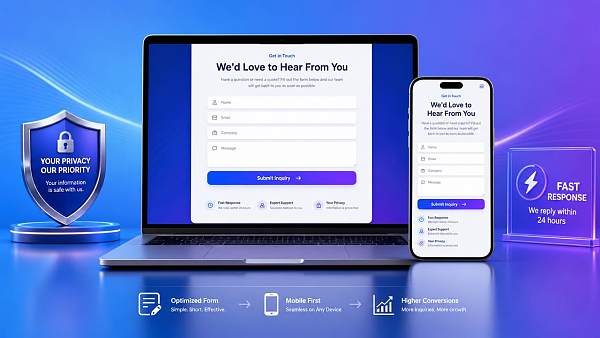
Many companies focus on traffic growth, but put the most important part of form optimization at the back. Visitors are willing to click in, but that does not mean they are willing to submit.
What really affects inquiry volume is often not a major problem, but some small details that seem insignificant. Unclear buttons, too many fields, and slow loading can all cause potential customers to give up at the very last step.
Therefore, form optimization should not only look at the design, but more importantly whether the submission path is smooth. Only by first finding the barriers can conversion improvement have a foundation.
The 6 common issues below cover almost all the reasons why website form submissions fail. Checking them one by one is usually more effective than blindly making revisions.
1. Too many fields is the most common form optimization mistake
Many websites want to get complete customer information in one go, so they put name, email, phone number, company, job title, country, needs, budget, purchasing cycle, and other large amounts of content into the form.
From a management perspective, this is convenient. But from the user's perspective, it feels like an interrogation. Especially on first visit, the customer has not yet built enough trust.
The first principle of form optimization is to lower the submission threshold first. Information that can be filled in later should not be placed up front.
- Keep only the name, contact method, and core needs first.
- Make budget, job title, and purchasing cycle optional.
- Do not write descriptive fields too long.
In actual business, shorter forms are often more likely to bring in effective leads. Let customers speak first, then fill in more information during follow-up communication, and the efficiency is actually higher.
2. Unclear buttons, users do not know what to do next
Many website submission buttons say "Submit", "Send", or "Confirm". They seem fine, but the action cue is too weak to drive conversion.
Good form optimization is not just about making the button clickable, but about making users clearly understand what happens after they click it.
- Change "Submit" to "Get a Quote" or "Contact Us Now".
- Separate the button color from the main page color.
- Add a response promise near the button, such as "Reply within 24 hours".
A more obvious signal is that many high-conversion pages add low-risk prompts near the button, such as "Information is only used for business contact" or "Your privacy will not be disclosed".
These small adjustments may look simple, but they are one of the quickest ways to see results in form optimization.
3. Poor mobile experience will directly cost a large number of inquiries
Much of today's traffic comes from mobile devices. If the form works fine on desktop but is difficult to enter on mobile, inquiry loss will be very obvious.
Common issues include input boxes that are too small, the page requiring horizontal scrolling, buttons being covered, dropdown menus being hard to tap, and verification codes being too complicated.
Therefore, form optimization must check mobile devices separately, rather than only looking at the design mockup.
- Make sure the input fields are large enough for one-handed use.
- Reduce multi-level dropdown selections.
- Avoid pop-ups covering the submit button.
- Prefer simple verification methods.
If the website is also targeting overseas markets, multilingual pages should be checked in sync. Tools like 易营宝AI翻译中心 can help keep multilingual content updated in sync and automatically adapt details such as local date formats and measurement units, reducing submission hesitation caused by unnatural language presentation.
4. Slow loading means customers will not wait for you to get ready
Many companies underestimate the impact of speed on form optimization. Especially on ad landing pages, campaign pages, and standalone site landing pages, if the page is one or two seconds slower, conversion may drop significantly.
The reason is simple. Customers have limited patience. If the page keeps not responding, they will question whether the website is reliable, or simply close it.
This also means that form optimization is not just front-end copy work; it is directly related to technical performance.
- Compress unnecessary scripts and image assets.
- Reduce the stacking calls of third-party plugins.
- Let the form area load first.
- Provide immediate feedback after submission.
If users click the button but see no prompt, they will often click repeatedly, or even assume submission failed. The result is not duplicate leads, but direct loss.
5. Lack of trust makes customers prefer to leave rather than leave their information
Another easily overlooked point in form optimization is trust building. When users fill in contact information, they are essentially taking a risk.
If the page has no company information, case studies, privacy statement, or clear response mechanism, customers will worry about harassment, leakage, or ineffective follow-up.
Especially in businesses such as website + marketing service integration, customers usually first judge whether the service provider is stable, professional, and trustworthy before submitting.
Taking 易营宝信息科技(北京)有限公司 as an example, as a global digital marketing service provider driven by artificial intelligence and big data, with long-term coverage of intelligent website building, SEO optimization, advertising placement, and overseas social media operations and other full-chain services, such a demonstration of complete capabilities itself helps improve form submission willingness.
- Add a real business introduction next to the form.
- Show customer cases or service scope.
- Clearly state privacy protection and response time.
The stronger the trust, the more stable the results brought by form optimization. Because what the customer submits is not just information, but permission to communicate.
6. No feedback after submission makes all the previous form optimization efforts wasted
Many websites focus all their attention on "how to get customers to fill it out", while ignoring "what customers see after filling it out". If this step is not handled well, the previous efforts will be offset.
If the page is blank after submission, redirects abnormally, or only shows a cold "Submitted successfully", customers will still feel uneasy.
A more effective approach is to add a clear feedback mechanism in form optimization.
- Prompt "Your request has been received".
- State the estimated contact time.
- Guide users to view cases, solutions, or related services.
If overseas business is involved, you can also provide a multilingual material download entry by leveraging multilingual content generated by 易营宝AI翻译中心. This not only improves the subsequent reading experience, but also reduces understanding deviations in cross-language communication.
The more complete the experience after submission, the more willing customers are to keep moving forward, and subsequent sales follow-up will be smoother.
First identify the issues, then talk about scaling up. Only then is form optimization truly effective
Looking back, you will find that many declines in inquiries are not because the market has no demand, but because there are too many friction points hidden in the submission path.
Too many fields, unclear buttons, poor mobile experience, slow loading, insufficient trust, and no feedback after submission; these 6 issues are almost the core obstacles that should be addressed first in form optimization.
If you want to increase inquiry volume, you may as well start with this checklist, checking page by page and correcting step by step.
Truly effective form optimization does not rely on piling up features, nor on subjective guesswork, but on continuously reducing barriers, increasing trust, and shortening the decision path.
First clear away the submission barriers, then do traffic acquisition and conversion improvement. Inquiry growth will be more stable and more sustainable.
Related Articles



Related Products
 EasyCamp SaaS Smart Website Marketing SystemE-Yingbao SaaS Smart Website Marketing System: AI-powered, zero-code website building. Rapidly launch multilingual independent e-commerce sites in just 10 minutes. Global server acceleration and AI-driven SEO optimization empower businesses to efficiently connect with global markets. The seamless integration of technology and user-friendly operation makes building e-commerce sites incredibly simple.
 AI+SEM Intelligent Advertising Marketing SystemAI+SEM drives intelligent ad creation, empowering full-funnel precision advertising marketing. The system automatically generates weekly/monthly reports, AI recommends keywords and target countries, monitors core metrics in real-time with intelligent alerts, and enables one-click high-conversion ad solutions to help quickly acquire customers and improve ROI.
 AI+SEO Dual Engine Optimization ServiceEasyWin AI+SEO Dual Engine Optimization System leverages AI-powered keyword mining, content generation, and comprehensive technical optimization to help foreign trade enterprises acquire high-quality organic traffic, significantly improving search rankings and conversion rates.
 AI+SNS Social Media Marketing SystemYingbao AI+SNS Social Media Marketing System - Precision social capture for the social media era. Supports one-click content synchronization across major platforms like Facebook and LinkedIn. AI intelligently rewrites posts for enhanced relevance. 24/7 AI customer service and user profiling analysis empower businesses to efficiently expand into global markets.
 AI+SEO营销解决方案易营宝AI+SEO营销解决方案,通过AI批量写作、智能生成TDK、精准关键词扩词等功能,全面优化网站SEO效果,提升流量与转化率。助力企业构建高效智能网站新生态。
 AI+SEM Advertising Marketing SolutionsAI+SEM Advertising Marketing Solution leverages AI technology to deeply empower SEM ad campaigns. It automatically generates weekly/monthly reports using AI, presenting account data across multiple dimensions for comprehensive insights into campaign performance and trends. The system precisely recommends keywords and target countries, intelligently generates high-conversion ad copy, and enables one-click activation of efficient campaign plans to help businesses rapidly acquire customers. Simultaneously, it monitors core metrics in real time, intelligently identifies abnormal fluctuations, and issues timely alerts to ensure stable, high-return advertising results.
 Domain Name ServicesEasyWin provides professional domain name services, including intelligent queries, one-stop registration, brand protection, and full lifecycle management, helping businesses build a digital brand image.
 EasyOperate B2C Cross-Border E-Commerce Platform & Independent WebsiteEasyStore B2C Cross-border E-commerce Independent Store is an intelligent website building and cross-border e-commerce integrated solution independently developed by EasyStore Information Technology (Beijing) Co., Ltd. The system is specially designed for small and medium-sized as well as large export enterprises, integrating 'website building, operation, marketing, advertising, and conversion' into one, helping enterprises quickly establish cross-border e-commerce independent stores to achieve brand globalization and global sales growth.
The platform supports multiple languages, multiple currencies, and multi-channel marketing, with built-in AI intelligent translation and SEO optimization systems, suitable for mainstream markets such as Southeast Asia, Europe and America, Latin America, and the Middle East, assisting Chinese manufacturing enterprises in efficiently deploying international e-commerce strategies. SSL证书易营宝提供专业SSL安全证书服务,包括单域名和泛域名证书,确保网站数据传输加密、身份验证和完整性保护,助力企业建立安全可信的在线业务环境。









