








- The U.S. has ended the $800 de minimis exemption for non-postal shipments; express courier packages must be formally declared.Nov 16, 2026View details
- ASEAN Signs Digital Economy Framework Agreement, Moving Toward Harmonized Cross-Border E-Commerce RulesNov 15, 2026View details
- Shenzhen Becomes the First City in Mainland China to Exceed RMB 5 Trillion in Foreign TradeNov 15, 2026View details
- Fujian Announces the First Batch of Provincial-Level Cross-Border E-Commerce Industrial Parks and Key Brands for CultivationNov 14, 2026View details
- Amazon Global Store Announces the Launch of the 2026 Black Friday Global Shopping SeasonNov 14, 2026View details
- CCTV.com Examines APEC’s Role in China’s Foreign TradeNov 12, 2026View details
How to Complete a Pre-Launch Self-Check After Downloading the Foreign Trade Website Building Checklist
How to Complete a Pre-Launch Self-Check After Downloading the Foreign Trade Website Building Checklist
After downloading a foreign trade website building checklist, many project managers treat it as the final “tick-box task”: the pages are completed, products have been uploaded, and domain resolution is configured, so the website appears ready to go live. In actual projects, however, this is often precisely where problems are most likely to occur. A website being accessible does not mean overseas customers can browse it smoothly; a form being submittable does not mean sales can receive inquiries; and the existence of English pages does not mean search engines can identify them correctly.
For project managers under pressure from schedules, budgets, and cross-departmental coordination, the core of a pre-launch self-check is not to “find more issues,” but to prioritize risks and address them before official launch and promotion. This is especially important for manufacturing B2B websites, where multilingual content, inquiry paths, document downloads, advertising landing pages, and subsequent SEO are often interconnected. A minor configuration omission may result in leads not entering the CRM until after the marketing team begins advertising, or key pages not being indexed at all.
Define the Launch Scope First: Do Not Let “Almost Done” Undermine Delivery
After receiving the checklist, it is recommended to first divide the project into three categories: “must go live,” “can be completed after launch,” and “not to be published yet,” rather than treating every page equally. Pages that must go live usually include the homepage, core product or solution pages, About Us, Contact Us, Privacy Policy, and key landing pages that receive advertising or organic search traffic. Pages with incomplete product information, image copyrights pending confirmation, or translations still requiring review by business departments can remain in the backend; there is no need to rush them online merely to increase the number of pages.
A common misconception is that more product pages are always better. For a newly launched foreign trade website, if dozens of product pages contain only model numbers and a repeated description, they neither help buyers make informed decisions nor make subsequent content maintenance easier. A more reliable approach is to first ensure that key category pages clearly explain application scenarios, key specifications, customization scope, available documentation, and how to make further inquiries. Quantity can be added later; information credibility cannot.
Check Speed and Compatibility Through Real User Journeys
Do not conduct speed checks only on the office network or the designer’s computer. Overseas customers may access the website through mobile networks, corporate networks, or nodes in different regions, and images, videos, third-party fonts, and tracking scripts may all slow down the first screen. During project acceptance, go through the complete journey on both mobile and desktop devices at least once: enter a product category from the homepage, view product details, download a catalog, fill out a form, and receive a success message. Review every step rather than only checking page screenshots.
If the first screen loads noticeably slowly, first investigate oversized original images, autoplay videos, excessive pop-ups, and analytics code loaded repeatedly. A foreign trade website does not necessarily need to pursue visual effects. In particular, for sites focused on engineering procurement and equipment inquiries, customers care more about whether products are easy to understand, specifications are easy to find, and contact actions are convenient. On mobile devices, minor issues such as floating buttons covering specification tables or form input fields being obscured by the keyboard can directly result in lost inquiries.

Multilingual Does Not Just Mean Translation Is Complete: Both Paths and Versions Must Be Correct
The most common issue in multilingual projects is that “switching languages works properly on the homepage, but inner pages lead to the wrong language.” Before launch, switch languages from any product detail page and confirm that users remain on the corresponding product page rather than being sent back to the homepage or redirected to another category. The language selector, navigation, breadcrumbs, inquiry buttons, footer policy links, and automatic email replies all need to be included in the same round of checks.
Content for different markets should not be mechanically shared. When English is used for procurement communication in North America, Europe, or Southeast Asia, the communication focus may differ; pages for the German, French, Middle Eastern, or Latin American markets also need to be confirmed against actual business requirements in terms of units of measurement, contact details, delivery information, and wording conventions. If the content quality of a certain language cannot yet be ensured, it is better not to publish it in a hurry than to leave pages with mixed languages, obvious machine-translation traces, or incorrect phone numbers.
Forms and Tracking: Acceptance Must Include a Real Submission
Form testing must not stop at seeing a success message after submission. Different roles should each make one submission: test whether required-field validation is reasonable, check whether emails enter the designated mailbox or CRM, and confirm whether sales personnel can see the source page, submission time, and information entered by the customer. If automatic replies are configured, also confirm that the customer receives an email with the correct language, sender name, and links. Details such as attachment uploads, CAPTCHA, country calling codes, and privacy consent checkboxes often reveal problems at this stage as well.
If the website will subsequently run Google Ads, Facebook Ads, or social media traffic campaigns, tracking configuration must not be postponed until after advertising begins. At a minimum, confirm that basic traffic analytics are enabled, core conversion actions can be identified, and clearly define whether a “successful inquiry” is based on a successful submission page, a button click, or entry into the CRM. These three criteria are not exactly the same, and the project team must establish the standard before launch; otherwise, marketing, sales, and service providers can easily end up looking at different data later.
SEO Indexing Checks: The Key Is “Whether It Is Allowed to Be Found”
Before officially going live, confirm that the test environment has not been carried over to the production site: whether pages are still blocked from crawling, whether test-domain links have been retained by mistake, and whether identical titles or duplicate descriptions exist across the entire site. The sitemap, internal links between important pages, canonical URL settings, as well as the 404 page and redirects from old links, are all worth joint confirmation by the development and operations teams.
However, do not treat the absence of rankings within a few days after launch as a technical failure. It takes time for a new website to be discovered, crawled, and gradually establish page relationships, especially when content is still limited and external exposure has only just begun. The goal of a pre-launch self-check is to ensure that search engines and users see the same set of accessible pages with complete content and correct links; keyword performance, meanwhile, requires ongoing assessment based on content development, industry competition, and subsequent promotion plans.
Only by Assigning Owners in the Checklist Can Acceptance Be Truly Actionable
A useful launch checklist should not contain only “completed/not completed.” It is recommended to add the responsible person, verification method, deadline, and follow-up handling plan next to each item. For example, technical personnel are responsible for the domain name, SSL certificate, redirects, and form integrations; the marketing team confirms advertising links, tracking, and creative assets; the sales department verifies inquiry notifications and response mechanisms; and the business owner gives final confirmation of product information, qualifications displayed, and target-market wording. This way, even if adjustments are needed later, decision-making and handling points can be quickly identified.
Since 2013, Yiyingbao Information Technology (Beijing) Co., Ltd. has continuously served enterprises in overseas digital marketing scenarios. Its capabilities in intelligent website building, multilingual websites, SEO, advertising, and social media operations cover multiple stages from website building to customer acquisition. For projects using integrated website building and marketing services, project managers should still adhere to independent acceptance: platform capabilities address building and operational efficiency, while enterprises themselves remain responsible for product materials, lead handling, and market strategy. Spending an extra half day completing real user journeys before launch is usually more cost-effective than spending a week troubleshooting after launch.
Related Articles
 Website SEO Checklist: Review Everything from Crawling and Indexing to Page Content
 How to Write an SEO Brief for a Website Redesign: Migration and Acceptance Checklist
 Before launching a new website, how can you use an SEO checklist to identify indexing barriers?



Related Products
 Yiyingbao SaaS Intelligent Website Building and Marketing SystemYiyingbao SaaS Intelligent Website Building and Marketing System, AI-powered no-code website building, rapid creation of multilingual B2B international websites in 10 minutes, global server acceleration, AI-powered SEO optimization, helping businesses connect efficiently with global markets. The perfect integration of technology and operation makes building an international trade website remarkably simple
 AI+SEM Intelligent Advertising Marketing SystemAI+SEM drives intelligent ad creation, empowering full-funnel precision advertising marketing. The system automatically generates weekly/monthly reports, AI recommends keywords and target countries, monitors core metrics in real-time with intelligent alerts, and enables one-click high-conversion ad solutions to help quickly acquire customers and improve ROI.
 AI+SEO Dual-Engine System Optimization ServicesYiyingbao’s AI+SEO dual-engine optimization system helps foreign trade enterprises acquire high-quality organic traffic through AI-powered keyword research, content generation, and comprehensive technical optimization, significantly improving search rankings and conversion rates.
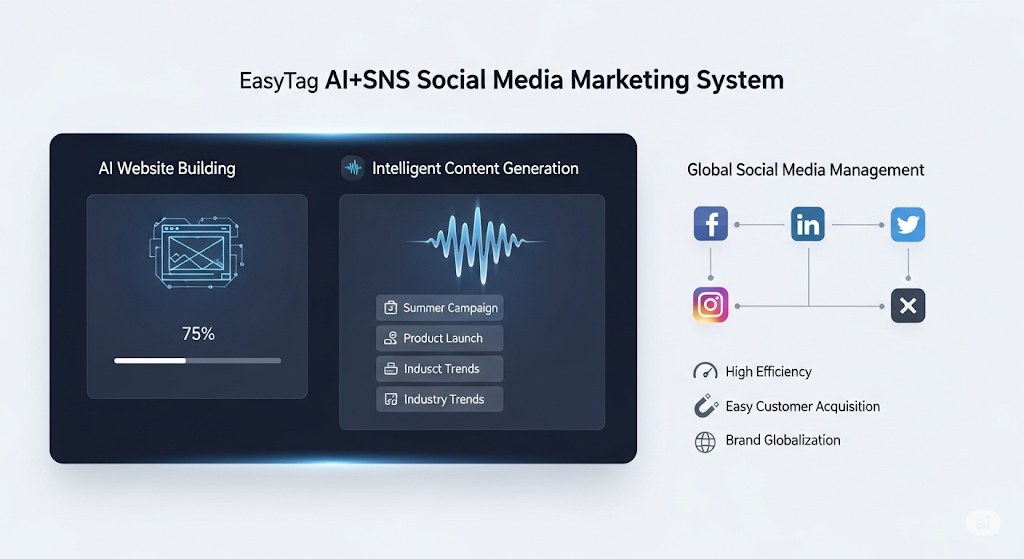
 AI+SNS Social Media Marketing SystemYingbao AI+SNS Social Media Marketing System - Precision social capture for the social media era. Supports one-click content synchronization across major platforms like Facebook and LinkedIn. AI intelligently rewrites posts for enhanced relevance. 24/7 AI customer service and user profiling analysis empower businesses to efficiently expand into global markets.
 AI+SEO营销解决方案易营宝AI+SEO营销解决方案,通过AI批量写作、智能生成TDK、精准关键词扩词等功能,全面优化网站SEO效果,提升流量与转化率。助力企业构建高效智能网站新生态。
 AI+SEM Advertising Marketing SolutionsAI+SEM Advertising Marketing Solution leverages AI technology to deeply empower SEM ad campaigns. It automatically generates weekly/monthly reports using AI, presenting account data across multiple dimensions for comprehensive insights into campaign performance and trends. The system precisely recommends keywords and target countries, intelligently generates high-conversion ad copy, and enables one-click activation of efficient campaign plans to help businesses rapidly acquire customers. Simultaneously, it monitors core metrics in real time, intelligently identifies abnormal fluctuations, and issues timely alerts to ensure stable, high-return advertising results.
 Domain Name ServicesEasyWin provides professional domain name services, including intelligent queries, one-stop registration, brand protection, and full lifecycle management, helping businesses build a digital brand image.
 EasyOperate B2C Cross-Border E-Commerce Platform & Independent WebsiteEasyStore B2C Cross-border E-commerce Independent Store is an intelligent website building and cross-border e-commerce integrated solution independently developed by EasyStore Information Technology (Beijing) Co., Ltd. The system is specially designed for small and medium-sized as well as large export enterprises, integrating 'website building, operation, marketing, advertising, and conversion' into one, helping enterprises quickly establish cross-border e-commerce independent stores to achieve brand globalization and global sales growth.
The platform supports multiple languages, multiple currencies, and multi-channel marketing, with built-in AI intelligent translation and SEO optimization systems, suitable for mainstream markets such as Southeast Asia, Europe and America, Latin America, and the Middle East, assisting Chinese manufacturing enterprises in efficiently deploying international e-commerce strategies. SSL证书易营宝提供专业SSL安全证书服务,包括单域名和泛域名证书,确保网站数据传输加密、身份验证和完整性保护,助力企业建立安全可信的在线业务环境。