









- Which customer acquisition channels will be affected by cross-border marketing trends in 2026?Sep 06, 2026View details
- Which homogenization risks should be considered in an analysis of the AI-powered website building industry?Aug 30, 2026View details
- How Will AI Marketing Trends 2026 Change Advertising Budget AllocationAug 28, 2026View details
- Is the EV SSL certificate market shrinking or upgrading? How should companies assess certificate procurement?Aug 11, 2026View details
- Why the old AMP SEO 2020 practices no longer work and what has changed in current optimization prioritiesAug 02, 2026View details
- How to Choose Topics for an Industry News Section to Attract More Organic Search TrafficJul 29, 2026View details
How can you troubleshoot and fix hreflang language mismatch issues on pages?
First, determine whether this is a standard hreflang language mismatch
When a page has a hreflang language mismatch, the problem is not the “error” itself, but that it may cause search engines to misinterpret the page language, regional version, and alternate-page relationship. The result is usually not that the entire site disappears from search results. Instead, some directories or country versions on an international site may be indexed slowly, rank incorrectly, or even have the English page appear in the French market while the Spanish page is treated as a generic page.
During a technical evaluation, do not rush to modify the tags. First clarify the problem: Does the language or region specified by hreflang actually match the currently visible content on the page? For example, you may specify en-us while the main body is actually in German; or the URL may be in a Spanish directory while the template header inherits the English version’s hreflang. These are typical issues. If only a small number of navigation items, buttons, or comments use mixed languages, it may not constitute a serious mismatch. The key is the language of the main content and the page positioning.
If your site-audit tool reports something like pages have hreflang language mismatch issues, you should usually check three things first: the actual page language, the hreflang syntax, and whether the language versions point back to one another. Many teams replace the tags across the entire site immediately, only to disrupt language-version relationships that were originally working properly.
Look at the page itself instead of focusing only on the code
I usually open the page with the error and directly review the first screen and the middle section of the main content. The logic is simple: search engines primarily identify a page’s language based on its main visible text, not on what is written in the directory name.
- The language that accounts for more than half of the main content is most likely the language the page will be identified as.
- If only the header and footer have been translated while the product descriptions in the middle remain in the original language, the hreflang is likely to be judged as mismatched.
- Pages with incomplete machine translation are especially common. For example, the title is in French while the specification table is still in English. Such pages are particularly prone to problems.
- Pay close attention when the content changes dynamically according to IP address, cookies, or browser language. The version captured by crawlers may be completely different from the version you see manually.
Here is a useful rule of thumb: if the language of the main page content is unstable, fix the content and output logic first, and then fix hreflang. No matter how standard the tags are, they cannot rescue a page whose actual content is confusing.
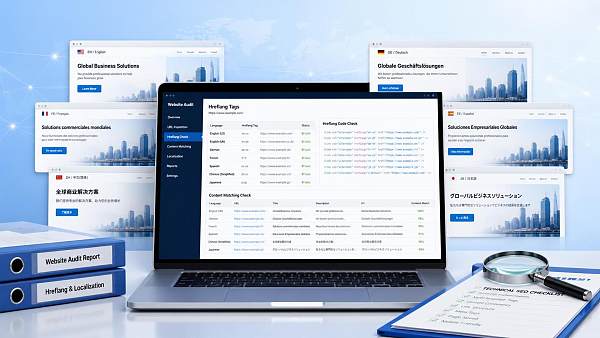
Check the hreflang syntax, as many issues come down to the most basic formatting
Only in the second step should you check the hreflang declarations in the source code, sitemap, or response headers. The focus is not simply on whether they exist, but whether they are written correctly and point to the correct destinations.
If your website-building system generates tags in batches, template inheritance errors are the most common issue. For example, a product-detail page may call the language group of a category page, or the entire site may output the same hreflang group, causing French and German pages to point to unrelated pages. This is not usually a single-page issue; it generally needs to be fixed in the template-mapping rules.
Verify the relationships between language versions instead of treating any “translated page” as the “corresponding page”
The premise of hreflang is not simply that “the two pages use different languages,” but that “the two pages are different language or regional versions of the same content from a business perspective.” This is where many multilingual websites go wrong.
Consider a common scenario: the English page is for Product A, while the Spanish page is for the Product A category page. The team assumes that they can be marked as alternates because “the topics are close enough.” This makes it difficult for search engines to determine the alternate relationship. You should check the following:
- Are the page types consistent—for example, a detail page paired with a detail page and a category page paired with a category page?
- Does the core content correspond? The wording does not need to be identical, but the business subject should be the same.
- Are any language versions missing? When there is no corresponding version, it is better not to add a tag than to force an incorrect match.
This step is particularly important for international trade websites, cross-border e-commerce stores, and multi-region corporate websites. When targeting North America, Europe, Japan and South Korea, the Middle East, and other markets, many websites have both language differences and regional differences. If the page content, currency, logistics commitments, and contact information have already changed significantly, it may be more than a language version—it may be an independent regional page. The hreflang relationship should be organized according to the actual business structure rather than guessed from the directory name.
Review canonicalization, redirects, and hreflang together
Sometimes the problem cannot be identified by looking at hreflang alone. When you review it together with canonical and redirects, the error becomes much clearer. Common conflicts include:
- The French page declares itself as fr, but its canonical points to the English page.
- The URL specified by hreflang automatically redirects to another language version.
- Mobile pages, parameterized pages, and pages with trailing slashes are mixed into the language group.
The handling principle is clear: Each language version must first have an independently accessible, indexable canonical URL before you establish hreflang reciprocal relationships. If the URL itself is unstable, search engines are unlikely to interpret the tag group as you expect.
Do not overlook duplicate declarations in the Sitemap and HTTP headers
Some teams correct the page source code but continue to see the error because the XML Sitemap still contains the old hreflang relationships, or because certain non-HTML files output another set of annotations through HTTP headers. When search engines receive multiple conflicting signals, the problem naturally persists.
Therefore, during troubleshooting, do not inspect only the front-end HTML. At a minimum, also verify the following:
- The hreflang tags inside the page head.
- Alternate links in the multilingual Sitemap.
- Whether the server or CDN is adding language-related response headers.
If your website uses SaaS website building or template-based bulk publishing, it is recommended to unify the sources that generate these three signals. Do not let the front-end template, Sitemap, and plugins each add their own version. Distributed signals are the biggest risk for multilingual websites.
Make corrections in priority order instead of changing the entire site at once
When changes are necessary, the order matters. I recommend starting with the pages that have the greatest impact: indexed directory pages with traffic, core product pages, and homepages for country sites, followed by long-tail pages. The reason is practical: if hreflang is changed incorrectly in bulk, the impact can be much greater than that of an error on a single page.
A practical correction sequence is usually as follows:
- Confirm the main language of the page and remove content that has not been fully translated.
- Correct the canonical and final indexable URL of the current page.
- Complete self-referencing and reciprocal references for pages in the same group.
- Update the alternate relationships in the Sitemap at the same time.
- Perform sample crawls to confirm that the content does not switch to the wrong version when accessed from different regions.
Documentation management is also important during a technical evaluation of a multilingual website. In internal training or process-development scenarios, it may occasionally be necessary to document language-version rules, page-mapping relationships, and team collaboration methods in a standardized format. This type of work is somewhat similar to the use case of method-oriented materials such as Innovative Strategies for Enterprise Talent Resource Development and Management Models in the Knowledge Economy Era, with the emphasis in both cases on “standardizing rules” rather than putting out temporary fires.
Avoid several common misconceptions before making changes
Some errors are not caused by a lack of technical capability, but by incorrect business judgments made first.
- Launching automatically translated pages directly as official language pages. If the main text, specifications, breadcrumbs, and structured fields are not translated together, language inconsistencies are almost unavoidable.
- Creating one directory for each country while completely reusing the content. This is not necessarily wrong, but if every page simply copies the English version and changes only the hreflang, search engines may not accept the regional differences you have defined.
- Overusing region codes to cover more markets. When there are no clear regional differences, a generic language version is usually more reliable.
- Fixing only the homepage. In practice, product-detail pages, blog posts, filtered pages, and paginated pages are more likely to generate errors because they are often produced by different templates.
How to close out a technical evaluation
If you already have a batch of pages with hreflang issues, there is no need to make the problem seem bigger than it is. First divide the pages into three categories: the content language is genuinely wrong, the tag mapping is wrong, or the URL relationship is wrong. The first two categories usually require changes to the templates and content sources, while the last generally requires canonical, redirects, and the Sitemap to be handled together.
In practice, the priority can be very straightforward: start with the pages that receive core traffic, then review pages using the same template, and finally check whether there is a system-level generation error. As long as the main page language is stable, the relationships between versions are genuine, and reciprocal references are complete, issues such as pages have hreflang language mismatch issues can generally be brought under control. Do not try to perfect every market and every directory all at once. First clean up the group of pages most likely to confuse search engines; subsequent optimization will then have a solid foundation.
Related Articles
 What are the fundamental differences between B2B website translation and B2C website translation?
 Website Localization Is More Than Translation: What Else Should Be Adjusted Before Entering a New Market?
 How Can Multilingual Website Translation Avoid Machine Translation Distortion and Brand Messaging Inconsistencies



Related Products
 Yiyingbao SaaS Intelligent Website Building and Marketing SystemYiyingbao SaaS Intelligent Website Building and Marketing System, AI-powered no-code website building, rapid creation of multilingual B2B international websites in 10 minutes, global server acceleration, AI-powered SEO optimization, helping businesses connect efficiently with global markets. The perfect integration of technology and operation makes building an international trade website remarkably simple
 AI+SEM Intelligent Advertising Marketing SystemAI+SEM drives intelligent ad creation, empowering full-funnel precision advertising marketing. The system automatically generates weekly/monthly reports, AI recommends keywords and target countries, monitors core metrics in real-time with intelligent alerts, and enables one-click high-conversion ad solutions to help quickly acquire customers and improve ROI.
 AI+SEO Dual-Engine System Optimization ServicesYiyingbao’s AI+SEO dual-engine optimization system helps foreign trade enterprises acquire high-quality organic traffic through AI-powered keyword research, content generation, and comprehensive technical optimization, significantly improving search rankings and conversion rates.
 AI+SNS Social Media Marketing SystemYingbao AI+SNS Social Media Marketing System - Precision social capture for the social media era. Supports one-click content synchronization across major platforms like Facebook and LinkedIn. AI intelligently rewrites posts for enhanced relevance. 24/7 AI customer service and user profiling analysis empower businesses to efficiently expand into global markets.
 AI+SEO营销解决方案易营宝AI+SEO营销解决方案,通过AI批量写作、智能生成TDK、精准关键词扩词等功能,全面优化网站SEO效果,提升流量与转化率。助力企业构建高效智能网站新生态。
 AI+SEM Advertising Marketing SolutionsAI+SEM Advertising Marketing Solution leverages AI technology to deeply empower SEM ad campaigns. It automatically generates weekly/monthly reports using AI, presenting account data across multiple dimensions for comprehensive insights into campaign performance and trends. The system precisely recommends keywords and target countries, intelligently generates high-conversion ad copy, and enables one-click activation of efficient campaign plans to help businesses rapidly acquire customers. Simultaneously, it monitors core metrics in real time, intelligently identifies abnormal fluctuations, and issues timely alerts to ensure stable, high-return advertising results.
 Domain Name ServicesEasyWin provides professional domain name services, including intelligent queries, one-stop registration, brand protection, and full lifecycle management, helping businesses build a digital brand image.
 EasyOperate B2C Cross-Border E-Commerce Platform & Independent WebsiteEasyStore B2C Cross-border E-commerce Independent Store is an intelligent website building and cross-border e-commerce integrated solution independently developed by EasyStore Information Technology (Beijing) Co., Ltd. The system is specially designed for small and medium-sized as well as large export enterprises, integrating 'website building, operation, marketing, advertising, and conversion' into one, helping enterprises quickly establish cross-border e-commerce independent stores to achieve brand globalization and global sales growth.
The platform supports multiple languages, multiple currencies, and multi-channel marketing, with built-in AI intelligent translation and SEO optimization systems, suitable for mainstream markets such as Southeast Asia, Europe and America, Latin America, and the Middle East, assisting Chinese manufacturing enterprises in efficiently deploying international e-commerce strategies. SSL证书易营宝提供专业SSL安全证书服务,包括单域名和泛域名证书,确保网站数据传输加密、身份验证和完整性保护,助力企业建立安全可信的在线业务环境。









