









- Hengqin Cooperation Zone Shares Cross-Border E-Commerce Developments, Focusing on Macao-Hengqin Collaboration and International MarketsOct 24, 2026View details
- A Shenyang study highlights the development of the “cross-border e-commerce + industrial cluster” modelOct 24, 2026View details
- Three China Advertising Association GEO group standards take effect on October 23Oct 24, 2026View details
- Amazon Raises Fulfillment Fees Twice, Yet the Median Platform Fee Remains Around 40%Oct 22, 2026View details
- AliExpress and YouTube Partner to Expand Marketing Opportunities for Chinese Brands Going GlobalOct 22, 2026View details
- Publicis says AI marketing is developing at two speeds, with agentic AI helping win clientsOct 21, 2026View details
How can you evaluate a provider’s translation editing capabilities for AI-powered multilingual website services?
When evaluating an AI multilingual website provider’s translation editing capabilities, start by checking three outcomes: whether technical terminology stays consistent, whether manual edits are preserved in future updates, and whether changes can be restored accurately after an incorrect release. Fluent translations show only how well the initial content was generated. To assess whether the system can support ongoing operations, review the complete workflow from editing and review through to publication.
For websites with extensive product ranges, frequent updates, or input from overseas teams, these capabilities should be included in procurement acceptance testing. For a small number of static introduction pages, editing each page individually may be sufficient. But for product catalogs, advertising landing pages, and multiple language markets, “supports online editing” is not enough to determine whether the system is suitable. When selecting an AI multilingual website system provider, ask them to demonstrate the system using your company’s own content.
Test terminology and contextual control with content that is difficult to edit
Test content should include product names, model numbers, technical specifications, industry terminology, buttons, and an ambiguous marketing passage. A standard company introduction may produce a fluent translation, but is unlikely to reveal differences in editing capabilities. For example, the same word might mean “feed” in equipment instructions but “feed” in a content page; the system should allow editors to handle it according to context.
A terminology database is worth checking, but simply confirming that an entry point exists is not enough. Add a term during the demonstration, set a required translation, and then see how it applies to new translations, existing translations, and regenerated content. Also confirm whether terms can be managed by language, product line, or site; whether brand names, model numbers, and similar content can be set as non-translatable; and whether these rules apply across all translation workflows in actual use.
The supplier should clearly explain whether existing pages are updated automatically. Forced replacement may damage context-specific wording, while no notification at all can leave outdated translations in place. A more practical approach is to identify affected content, display suggested changes, and let editors decide where to apply them. Batch replacements should also offer a preview, so a term that is corrected on a product page is not changed incorrectly in a case study.
Also check whether the editor provides sufficient context. Can editors see the source text, its position on the page, and a preview of the result? A short button label that looks accurate in the backend may wrap or be truncated after publication. Decimal points, units, and placeholders in specifications may also be changed by mistake. Protecting and flagging this content is more valuable than simply providing a large text box.
Editing should cover published content, and manual revisions should withstand updates
“The entire site is editable” should be verified item by item. Beyond body text, can page titles, search snippets, image alt text, navigation, form prompts, and inquiry success messages all be edited by language? If some text can only be changed in a template or requires a support ticket, technical staff should estimate how much additional operational dependency this will create.
Multilingual websites also involve shared content. The same product name may appear on a detail page, a category page, and in a recommendation module. The backend should clearly define which locations are synchronized and which can be edited independently. Otherwise, centralized maintenance may affect page-specific content, while independent edits may create multiple versions. Check whether visual editing preserves links, formatting, and dynamic variables.
The most revealing test is to manually edit a translation and then update the source text. For example, after revising a product description, change only the delivery information in the Chinese source and observe how the system handles the target-language version: Does it flag the content for review? Can it show what changed in the source? If the content is translated again, does it overwrite confirmed industry-specific wording?
Locking manual translations can reduce the risk of overwriting them, but the system should still flag changes to the source text; otherwise, outdated content may remain indefinitely. Ideally, the level of control should match business needs: at a minimum, the system should identify content that has been manually approved and let editors choose whether to retain it, retranslate it, or revise only selected sections. Retranslating an entire page can be an option, but should not be the only way to handle source updates.
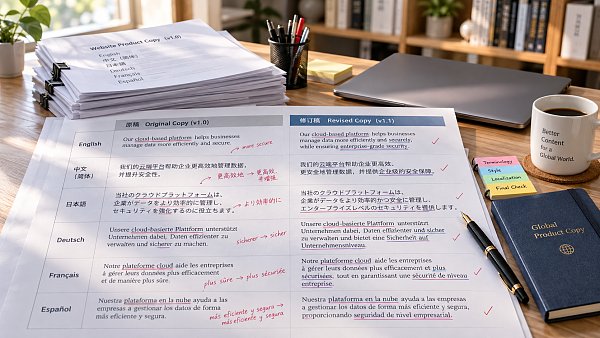
Validate the review, publication, and rollback workflows together
When multiple people are involved, editing permissions directly affect publication risk. Ask for a demonstration using three accounts: a translator edits content, a reviewer approves the translation, and a publisher controls its release. Check whether permissions can be assigned by language or site, and whether backend restrictions also apply to batch operations. If an overseas agency handles only one language, it should not automatically have permission to edit other languages or the entire site.
Observe saving and publishing separately. Do edits immediately affect the live site? Can editors preview a target-language page before publication? If an error is found, can changes to just one language or one page be withdrawn? For websites with ongoing ad campaigns, even an incorrect change to a form prompt or delivery commitment may affect visitors’ decisions, so the review process should cover these short texts as well.
“Backups are supported” is not a sufficient answer on version rollback. Ask the supplier to show a specific edit, including who made it, when it was made, the content before and after the change, and its publication status, and then restore one item. Full-site backups have their uses, but if restoring a single translation requires rolling back the entire site, other valid updates may also be undone. Also check how long history is retained and whether restore actions are recorded as new events.
Make a procurement decision based on a complete workflow
For acceptance testing, select a real product page and prepare two target languages. Then complete the following steps in sequence: import terminology, generate translations, make manual revisions, update the source text, review and publish, and restore an earlier version. Having the supplier work with the same set of content makes it possible to see whether the features work together. Separate demonstrations of a terminology database, editor, and backup page do not prove that the update process is reliable.
Document acceptance results in a form that can be tested again, such as “Confirmed that a notice appears before retranslating a paragraph,” “Form prompts can be edited independently,” and “Restoring one page does not undo edits to other pages.” Also distinguish standard features from add-on modules and custom development, and clarify which operations require the supplier’s assistance. Features demonstrated in a test environment should also be included in the proposed product version and delivery scope.
For an export website with ongoing operations, prioritize acceptance testing for protection of manual revisions, notifications of source changes, editability of critical content, and partial rollback. Collaboration requirements can be simplified for a small showcase site. The key question is whether, at the next product update, the team will know what needs review, be able to preserve the content it has already revised, and reliably publish the correct translations.
Related Articles
 How can you evaluate a provider’s translation editing capabilities for AI-powered multilingual website services?
 Building a Website for the Russian-Speaking Market: Is Translating the Website Enough?
 Does the quote for building a website in a less commonly used language include localization and translation?


Related Products
 Yiyingbao SaaS Intelligent Website Building and Marketing SystemYiyingbao SaaS Intelligent Website Building and Marketing System, AI-powered no-code website building, rapid creation of multilingual B2B international websites in 10 minutes, global server acceleration, AI-powered SEO optimization, helping businesses connect efficiently with global markets. The perfect integration of technology and operation makes building an international trade website remarkably simple
 AI+SEM Intelligent Advertising Marketing SystemAI+SEM drives intelligent ad creation, empowering full-funnel precision advertising marketing. The system automatically generates weekly/monthly reports, AI recommends keywords and target countries, monitors core metrics in real-time with intelligent alerts, and enables one-click high-conversion ad solutions to help quickly acquire customers and improve ROI.
 AI+SEO Dual-Engine System Optimization ServicesYiyingbao’s AI+SEO dual-engine optimization system helps foreign trade enterprises acquire high-quality organic traffic through AI-powered keyword research, content generation, and comprehensive technical optimization, significantly improving search rankings and conversion rates.
 AI+SNS Social Media Marketing SystemYingbao AI+SNS Social Media Marketing System - Precision social capture for the social media era. Supports one-click content synchronization across major platforms like Facebook and LinkedIn. AI intelligently rewrites posts for enhanced relevance. 24/7 AI customer service and user profiling analysis empower businesses to efficiently expand into global markets.
 AI+SEO营销解决方案易营宝AI+SEO营销解决方案,通过AI批量写作、智能生成TDK、精准关键词扩词等功能,全面优化网站SEO效果,提升流量与转化率。助力企业构建高效智能网站新生态。
 AI+SEM Advertising Marketing SolutionsAI+SEM Advertising Marketing Solution leverages AI technology to deeply empower SEM ad campaigns. It automatically generates weekly/monthly reports using AI, presenting account data across multiple dimensions for comprehensive insights into campaign performance and trends. The system precisely recommends keywords and target countries, intelligently generates high-conversion ad copy, and enables one-click activation of efficient campaign plans to help businesses rapidly acquire customers. Simultaneously, it monitors core metrics in real time, intelligently identifies abnormal fluctuations, and issues timely alerts to ensure stable, high-return advertising results.
 Domain Name ServicesEasyWin provides professional domain name services, including intelligent queries, one-stop registration, brand protection, and full lifecycle management, helping businesses build a digital brand image.
 EasyOperate B2C Cross-Border E-Commerce Platform & Independent WebsiteEasyStore B2C Cross-border E-commerce Independent Store is an intelligent website building and cross-border e-commerce integrated solution independently developed by EasyStore Information Technology (Beijing) Co., Ltd. The system is specially designed for small and medium-sized as well as large export enterprises, integrating 'website building, operation, marketing, advertising, and conversion' into one, helping enterprises quickly establish cross-border e-commerce independent stores to achieve brand globalization and global sales growth.
The platform supports multiple languages, multiple currencies, and multi-channel marketing, with built-in AI intelligent translation and SEO optimization systems, suitable for mainstream markets such as Southeast Asia, Europe and America, Latin America, and the Middle East, assisting Chinese manufacturing enterprises in efficiently deploying international e-commerce strategies. SSL证书易营宝提供专业SSL安全证书服务,包括单域名和泛域名证书,确保网站数据传输加密、身份验证和完整性保护,助力企业建立安全可信的在线业务环境。









