









- Levanta’s Inaugural China Summit Held in Shenzhen, Focusing on AI and Cross-Border Brand GrowthOct 20, 2026View details
- The October Edition of the 2026 GGE Shenzhen Cross-Border E-Commerce Expo OpensOct 20, 2026View details
- Dongguan’s foreign trade imports and exports reached RMB 1.29 trillion in the first three quarters, a record high for the same periodOct 20, 2026View details
- Liaoning Holds Province-Wide Meeting to Advance Cross-Border E-Commerce, Emphasizing the Need to Explore Differentiated Development PathsOct 20, 2026View details
- Advanced Manufacturing Seizes Global Opportunities as Guangdong’s Q3 Foreign Trade Surpasses RMB 3 Trillion for the First TimeOct 20, 2026View details
- Can the average annual growth rate reflect real opportunities in overseas markets?Oct 07, 2026View details
How Construction and Renovation Company Website Development Can Showcase Project Case Studies and Improve Local Customer Inquiry Conversion
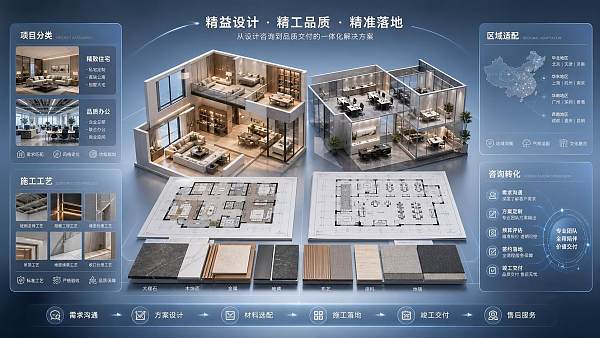
Case pages on construction and renovation company websites often face a situation where there are “many images but few inquiries.” The issue is usually not an insufficient number of projects, but that visitors cannot quickly determine whether a project is similar to their own property type, budget range, construction challenges, and location. Cases should serve to filter options and eliminate concerns, rather than simply function as a portfolio album.
Organize cases by the decision-making journey rather than by completion date
The homepage or case listing page should first provide a small number of high-value filtering dimensions, such as residential, office, retail, hotel, or old-property renovation; these can then be combined with service types such as full-package renovation, partial-package renovation, integrated design and construction, and partial refurbishment. Area, layout, district, and delivery date can serve as secondary filters. The purpose is to help visitors first find reference projects that closely match their needs, and then enter the detail pages to understand the construction capabilities.
Regional filters in particular should not simply say “local cases.” Renovation needs depend heavily on commuting radius, property management requirements, and building age. Renovating older residential communities often involves concealed works inspections, pipeline upgrades, corridor transportation, and coordination of construction hours; newly delivered homes place greater emphasis on storage planning, coordination of cabinetry installation, and finished-product protection; commercial spaces are often affected by opening schedules, fire protection approval interfaces, and MEP conditions. Including these conditions in case tags provides far more value for evaluation than uniformly using “premium cases.”
Case cards should not contain only renderings, project names, and a generic description. Above-the-fold information should answer several basic questions: What was the original condition of the space? What was the scope of the renovation? What key materials or processes were selected? Which factors affected the construction period? For completed projects, cover images should prioritize on-site photos that clearly show spatial relationships; if renderings are used, they should also be clearly labeled to prevent visitors from mistaking design presentations for the final delivered result.
What verifiable information should a case detail page provide?
The focus of a case detail page is to present the trade-offs made during the restoration process. Taking a kitchen renovation as an example, merely showing the completed cabinets without explaining the original flue position, plumbing and electrical points, exhaust route, and countertop size limitations makes it difficult for visitors to determine whether the solution can be replicated in their own home. If a bathroom is involved, the page should explain whether drainage was adjusted, whether waterproofing was redone, how wall and floor substrates were treated, and how wet and dry area transitions were finished. The information does not need to be written as a construction log, but it should retain the key constraints that affect the solution.
- Project overview: Property use, building area or construction area, location, original layout characteristics, and the core renovation objectives.
- Key solution points: Explain the design through floor plan adjustments, circulation changes, or storage layouts, rather than summarizing it only with style names. Labels such as modern, light luxury, and new Chinese style may be retained, but they cannot replace functional explanations.
- Materials and workmanship: List elements that significantly affect the result, such as flooring installation methods, wall substrate treatment, custom cabinet door materials, hardware configuration, and finishing details for door frames and skirting boards. Do not add brand information when it is unknown.
- On-site challenges: Such as load-bearing structures that cannot be altered, beam positions reducing ceiling height, hollow spots in old walls, measurement errors in irregular spaces, or property management transportation restrictions. Only when challenges are clearly described can a case be credible.
“Before-and-after comparisons” are suitable for projects with obvious layout changes, but similar shooting angles and viewing ranges must be maintained. Placing a cluttered partial photo from before renovation next to a polished wide-angle image from after renovation creates a large visual difference, but cannot prove whether space utilization has improved. A more reliable approach is to supplement the comparison with floor plan diagrams, key dimensions, or circulation explanations, so that the changes can be understood rather than merely viewed.
Local pages should capture search traffic rather than repeat city names
When visitors enter a website through searches such as “office renovation in a certain district” or “old house refurbishment nearby,” the landing page needs to connect with real scenarios in that area. The page can cover service coverage, common property types, on-site survey arrangements, coordination with property management for site access, and publicly displayed cases from the same area. Pages for different districts cannot simply replace place names; otherwise, the content lacks reference value and can easily make visitors feel that the information is unreliable.
Within the same city, needs can vary greatly across different areas. Pages for office-dense areas should highlight office circulation, low-voltage cabling, phased construction, and coordination with business resumption; pages for community-concentrated areas can explain old-house demolition and renovation, control of construction noise for neighbors, waste removal, and elevator protection; pages for street-facing shops should focus on storefronts, drainage, lighting, business hours, and overlapping on-site operations. Page content should be determined by actual service boundaries, and should not promise coverage beyond construction management capabilities.
Two-way links should be established between case pages and regional pages: regional pages should display entry points to relevant cases, while case pages should identify the project location and applicable scenarios. This both facilitates continued browsing and creates a continuous path from search visits to inquiry pages. For renovation businesses involving multiple stores or team collaboration, telephone numbers, online forms, and booking rules should also be standardized to avoid conflicting response methods across different pages.
Inquiry entry points need to lower the threshold for describing needs
Renovation inquiries are not ordinary product price requests. Visitors usually have only vague needs, such as “want to refurbish,” “not enough space,” or “need to build an office.” If a form requires them to provide their budget, area, style, construction period, drawings, and all contact information at once, willingness to submit will decline significantly. Initial collection should retain only a small number of fields that can route needs, such as project type, location, building area range, planned start date, and contact information; floor plans, on-site photos, and detailed budgets can be added during subsequent communication.
The inquiry entry point on a case detail page should be related to the current content. When viewing an old-house renovation case, the prompt next to the button can say, “Submit a floor plan or on-site photos, and indicate whether plumbing and electrical upgrades are involved”; when browsing office projects, it can say, “Specify the number of workstations, whether construction will take place while the business remains open, and the expected date of use.” Such prompts do not add copy; they reduce the hesitation caused by visitors not knowing what information they should provide.
Fixed floating entry points are suitable for mobile devices, but they must not obscure case images, filter buttons, or form submission areas. At least one clear inquiry entry point should remain on the page, positioned after the case highlights or at the bottom of the page. If telephone, online communication, and appointment-based site surveys are all available, their respective applicable situations should be explained to avoid creating a selection burden by placing all entry points in the same area.
Use data to determine whether the issue lies with traffic or the page
Viewing traffic alone cannot determine whether a case page is effective. Observe separately the proportion of visitors who enter case details from regional pages, form-opening behavior after staying on case pages, form completion rates, and the quality of inquiries generated by different project types. If regional pages receive considerable visits but case clicks are low, the issue is often unclear card categorization or cover images lacking comparability; if cases are read thoroughly but forms are rarely opened, service scope, processes, or booking methods may not have been explained; if forms are opened frequently but rarely submitted, check the number of fields, mobile input experience, and placement of privacy notices.
Inquiry records should also feed back into content adjustments. Frequently asked questions about construction periods, material substitutions, whether partial renovations can be undertaken separately, and whether an initial site measurement is required can be added to the corresponding case or service pages. When team collaboration, on-site handovers, and information consolidation are involved, the management perspective discussed in Innovative Strategies for Enterprise Human Resource Development and Management Models in the Knowledge Economy Era can be used to organize information transfer among design, construction, and customer service, preventing discrepancies between case commitments and actual communication.
When cases are continuously updated, retain the true status of completed projects rather than removing construction restrictions and solution adjustments merely to make the page look neat. The persuasiveness of a renovation website comes from verifiable details, content that aligns with local scenarios, and a path that allows visitors to initiate inquiries smoothly.
Related Articles

Related Products
 Yiyingbao SaaS Intelligent Website Building and Marketing SystemYiyingbao SaaS Intelligent Website Building and Marketing System, AI-powered no-code website building, rapid creation of multilingual B2B international websites in 10 minutes, global server acceleration, AI-powered SEO optimization, helping businesses connect efficiently with global markets. The perfect integration of technology and operation makes building an international trade website remarkably simple
 AI+SEM Intelligent Advertising Marketing SystemAI+SEM drives intelligent ad creation, empowering full-funnel precision advertising marketing. The system automatically generates weekly/monthly reports, AI recommends keywords and target countries, monitors core metrics in real-time with intelligent alerts, and enables one-click high-conversion ad solutions to help quickly acquire customers and improve ROI.
 AI+SEO Dual-Engine System Optimization ServicesYiyingbao’s AI+SEO dual-engine optimization system helps foreign trade enterprises acquire high-quality organic traffic through AI-powered keyword research, content generation, and comprehensive technical optimization, significantly improving search rankings and conversion rates.
 AI+SNS Social Media Marketing SystemYingbao AI+SNS Social Media Marketing System - Precision social capture for the social media era. Supports one-click content synchronization across major platforms like Facebook and LinkedIn. AI intelligently rewrites posts for enhanced relevance. 24/7 AI customer service and user profiling analysis empower businesses to efficiently expand into global markets.
 AI+SEO营销解决方案易营宝AI+SEO营销解决方案,通过AI批量写作、智能生成TDK、精准关键词扩词等功能,全面优化网站SEO效果,提升流量与转化率。助力企业构建高效智能网站新生态。
 AI+SEM Advertising Marketing SolutionsAI+SEM Advertising Marketing Solution leverages AI technology to deeply empower SEM ad campaigns. It automatically generates weekly/monthly reports using AI, presenting account data across multiple dimensions for comprehensive insights into campaign performance and trends. The system precisely recommends keywords and target countries, intelligently generates high-conversion ad copy, and enables one-click activation of efficient campaign plans to help businesses rapidly acquire customers. Simultaneously, it monitors core metrics in real time, intelligently identifies abnormal fluctuations, and issues timely alerts to ensure stable, high-return advertising results.
 Domain Name ServicesEasyWin provides professional domain name services, including intelligent queries, one-stop registration, brand protection, and full lifecycle management, helping businesses build a digital brand image.
 EasyOperate B2C Cross-Border E-Commerce Platform & Independent WebsiteEasyStore B2C Cross-border E-commerce Independent Store is an intelligent website building and cross-border e-commerce integrated solution independently developed by EasyStore Information Technology (Beijing) Co., Ltd. The system is specially designed for small and medium-sized as well as large export enterprises, integrating 'website building, operation, marketing, advertising, and conversion' into one, helping enterprises quickly establish cross-border e-commerce independent stores to achieve brand globalization and global sales growth.
The platform supports multiple languages, multiple currencies, and multi-channel marketing, with built-in AI intelligent translation and SEO optimization systems, suitable for mainstream markets such as Southeast Asia, Europe and America, Latin America, and the Middle East, assisting Chinese manufacturing enterprises in efficiently deploying international e-commerce strategies. SSL证书易营宝提供专业SSL安全证书服务,包括单域名和泛域名证书,确保网站数据传输加密、身份验证和完整性保护,助力企业建立安全可信的在线业务环境。









