









- Which customer acquisition channels will be affected by cross-border marketing trends in 2026?Sep 06, 2026View details
- Which homogenization risks should be considered in an analysis of the AI-powered website building industry?Aug 30, 2026View details
- How Will AI Marketing Trends 2026 Change Advertising Budget AllocationAug 28, 2026View details
- Is the EV SSL certificate market shrinking or upgrading? How should companies assess certificate procurement?Aug 11, 2026View details
- Why the old AMP SEO 2020 practices no longer work and what has changed in current optimization prioritiesAug 02, 2026View details
- How to Choose Topics for an Industry News Section to Attract More Organic Search TrafficJul 29, 2026View details
How to troubleshoot multilingual field mapping errors in export-oriented website development
After a foreign trade website launches multilingual versions, what troubles technical evaluators most is often not translation quality, but issues such as “content exists in the backend, yet the frontend is blank,” “Chinese fields appear on English product pages,” or “prices, units, or images are misaligned in a certain language.” Most of these issues are not isolated failures, but inconsistencies among field definitions, language identifiers, data structures, and API parameters.
When teams repeatedly ask, “What should we do when multilingual field mapping for foreign trade websites keeps failing?”, it is not advisable to immediately rebuild language packs or re-upload content in bulk. A more reliable approach is to first identify the layer where the error occurs: whether the source field has not been retrieved, the mapping rule has failed to match, or the target-language data has been overwritten during saving or rendering. The following troubleshooting process applies to multilingual standalone websites for B2B foreign trade websites, cross-border e-commerce stores, advertising landing pages, and sites that synchronize product data from ERP, PIM, or CMS systems.
First Confirm Which Part of the Process Is Causing the Error
Multilingual field mapping is typically not a single “translation” action, but a data pipeline: source system fields → field mapping rules → language content objects → API transmission → page template rendering. An error displayed on a page may not necessarily occur at the page layer.
It is recommended to select one representative product or page record and document its source data, API request body, API response, CMS backend saved result, and final frontend output separately. Do not troubleshoot using the entire database; a single “problem sample” makes discrepancies easier to identify. For example, if the Chinese name displays correctly while the German name is blank, compare the field paths, field values, and publishing statuses of the same record under zh-CN and de-DE.
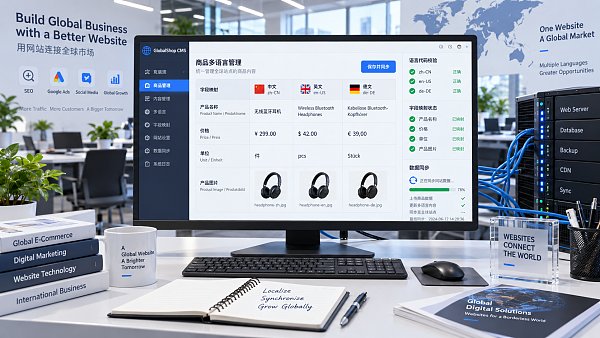
If the target-language field is correctly present in the API response but is not displayed on the page, focus on template variables, caching, and published versions. If the field is already empty or the field name is incorrect at the API request stage, return to the mapping configuration and upstream data source processing.
Field Names May Look the Same but Actually Refer to Different Fields
Inconsistent field naming is a frequent cause of multilingual field mapping errors in foreign trade website development. This is especially common when ERP, PIM, and website-building systems are maintained by different teams. The Chinese name may be called product_name, the English API may use name_en, while the page component reads i18n.name. Although the three have the same meaning, this does not mean the system will recognize them automatically.
During troubleshooting, do not only check the display name. Verify the field’s internal identifier, complete path, and mapping priority. Common issues include:
- Differences in capitalization or underscores:
ProductName,product_name, andproductNameare not the same field in most systems. - Incorrect field path hierarchy: The target field should be
translations.en.title, but is written astranslation.en.title. Saving may not produce an error, but the content will not enter the intended location. - Reserved field conflicts: Fields such as
nameanddescriptionmay be used by the platform as base fields, while extended fields require a clearly defined namespace. - Mapping overrides: A general rule writes the title first, and a subsequent language-specific rule overwrites it with an empty value, leaving only a blank field on the frontend.
A reliable practice is to create a field dictionary that clearly specifies the business name, source field, target field, data type, multilingual status, default value, required-field rules, and responsible system. A field dictionary is not a documentation burden; it is a shared basis for adding languages, adjusting templates, and integrating APIs in the future.
Do Not Overlook Data Types: Text Displaying Correctly Does Not Mean the Structure Is Correct
Multilingual titles are usually strings, so issues are relatively straightforward. However, fields such as product parameters, rich-text details, specification tables, image galleries, and SEO metadata often contain arrays or objects. Once the data types differ between the source and target ends, problems such as “a value exists but is not displayed,” “only the first item is displayed,” or “the entire detail section is missing” can easily occur.
Pay particular attention to numeric fields. Prices, weights, and dimensions do not necessarily need translation, but currency symbols, units, thousands separators, and tax descriptions usually vary by region. If price is treated directly as translatable text, the price may no longer be available for calculation. Conversely, placing “USD 1,200 / set” into a purely numeric field can also disrupt store checkout or filtering logic. The correct approach is to manage the value, currency, unit, and display text separately.
Language Code Matching Failures Often Appear to Be “Translation Not Taking Effect”
The key values of language packs or language objects must remain consistent with site routing and API conventions. Although en, en-US, and en-GB all represent English, they may be three different language identifiers within a system. The same issue also exists for markets using Portuguese, French, Spanish, and other languages.
During technical evaluation, include a “language code mapping table” in the launch checklist: which code is used by frontend URLs, which code is used for backend languages, which code is sent through APIs, and what the default fallback language is. If the site route is /de/ but the content service only returns de-DE, does the page have a compatibility mapping? If not, the system may silently fall back to English or default Chinese, resulting in mixed-language content.
Also check when language packs are loaded. Some frontend frameworks first render the initial screen in the default language and then asynchronously switch to the target language. If components do not listen for language state changes, the title may switch to English while specification parameters remain in the default language. In this case, the issue lies not in the content repository, but in frontend state management and the component refresh mechanism.
For API Parameters, Check Both “What Is Sent” and “How the System Interprets It”
API integration testing cannot rely solely on HTTP 200 to determine success. Many CMS or website-building platforms accept unknown fields, ignore invalid objects, or even save data using default values. As a result, the API succeeds, but the data does not enter the target-language record.
It is recommended to retain request and response samples in the testing environment, with particular attention to the following: whether the character set in the request header is UTF-8; whether language parameters are placed in the URL, Header, or Body; whether update APIs use full replacement or partial merging; and whether empty strings, null, and missing fields respectively mean “clear,” “do not update,” or “use default value.” During batch synchronization, if the caller does not distinguish these three states, translated content can easily be cleared by mistake.
For platforms that support Webhooks, scheduled synchronization, or queue tasks, also review task idempotency. An old task executed after a new task may overwrite a new translation with an old version. The write order can be controlled through content version numbers, update timestamps, or source record hash values to prevent such difficult-to-reproduce “intermittent errors.”
An Actionable Troubleshooting Sequence
- Reproduce the issue using a single problematic record; do not directly rerun the full dataset in the production environment.
- Confirm that the source field has a value and export the original structure of the source record.
- Verify the field dictionary: internal field names, object paths, mapping priorities, and data types.
- Capture API requests and responses to confirm the target language code and the fields actually written.
- Check the target-language content in the CMS, publishing status, and default-language fallback rules.
- Clear or bypass the cache, and verify whether template variables are reading the correct language object.
- After fixing the issue, conduct regression testing using at least two languages, two types of page templates, and one record containing rich text.
For enterprises using an integrated website-building and marketing system, field mapping also affects SEO titles, Meta descriptions, product structured data, advertising landing page copy, and social media sharing information. Therefore, do not verify only the page body when applying fixes. For AI-powered website-building platforms such as Yiyingbao that serve overseas standalone websites, it is more appropriate to incorporate field specifications, language rules, and template calls into unified project configuration during multilingual content setup, page publishing, and overseas promotion coordination, reducing situations in which content teams and technical teams each maintain their own naming conventions.
A truly stable multilingual website requires more than simply being able to switch languages; every language must remain consistent from the data source and page presentation to search engine crawling. By turning a field mapping failure into improvements to field standards, API contracts, and regression mechanisms, teams will have a much easier time when subsequently adding less commonly used languages or integrating new product lines.
Related Articles

Related Products
 Yiyingbao SaaS Intelligent Website Building and Marketing SystemYiyingbao SaaS Intelligent Website Building and Marketing System, AI-powered no-code website building, rapid creation of multilingual B2B international websites in 10 minutes, global server acceleration, AI-powered SEO optimization, helping businesses connect efficiently with global markets. The perfect integration of technology and operation makes building an international trade website remarkably simple
 AI+SEM Intelligent Advertising Marketing SystemAI+SEM drives intelligent ad creation, empowering full-funnel precision advertising marketing. The system automatically generates weekly/monthly reports, AI recommends keywords and target countries, monitors core metrics in real-time with intelligent alerts, and enables one-click high-conversion ad solutions to help quickly acquire customers and improve ROI.
 AI+SEO Dual-Engine System Optimization ServicesYiyingbao’s AI+SEO dual-engine optimization system helps foreign trade enterprises acquire high-quality organic traffic through AI-powered keyword research, content generation, and comprehensive technical optimization, significantly improving search rankings and conversion rates.
 AI+SNS Social Media Marketing SystemYingbao AI+SNS Social Media Marketing System - Precision social capture for the social media era. Supports one-click content synchronization across major platforms like Facebook and LinkedIn. AI intelligently rewrites posts for enhanced relevance. 24/7 AI customer service and user profiling analysis empower businesses to efficiently expand into global markets.
 AI+SEO营销解决方案易营宝AI+SEO营销解决方案,通过AI批量写作、智能生成TDK、精准关键词扩词等功能,全面优化网站SEO效果,提升流量与转化率。助力企业构建高效智能网站新生态。
 AI+SEM Advertising Marketing SolutionsAI+SEM Advertising Marketing Solution leverages AI technology to deeply empower SEM ad campaigns. It automatically generates weekly/monthly reports using AI, presenting account data across multiple dimensions for comprehensive insights into campaign performance and trends. The system precisely recommends keywords and target countries, intelligently generates high-conversion ad copy, and enables one-click activation of efficient campaign plans to help businesses rapidly acquire customers. Simultaneously, it monitors core metrics in real time, intelligently identifies abnormal fluctuations, and issues timely alerts to ensure stable, high-return advertising results.
 Domain Name ServicesEasyWin provides professional domain name services, including intelligent queries, one-stop registration, brand protection, and full lifecycle management, helping businesses build a digital brand image.
 EasyOperate B2C Cross-Border E-Commerce Platform & Independent WebsiteEasyStore B2C Cross-border E-commerce Independent Store is an intelligent website building and cross-border e-commerce integrated solution independently developed by EasyStore Information Technology (Beijing) Co., Ltd. The system is specially designed for small and medium-sized as well as large export enterprises, integrating 'website building, operation, marketing, advertising, and conversion' into one, helping enterprises quickly establish cross-border e-commerce independent stores to achieve brand globalization and global sales growth.
The platform supports multiple languages, multiple currencies, and multi-channel marketing, with built-in AI intelligent translation and SEO optimization systems, suitable for mainstream markets such as Southeast Asia, Europe and America, Latin America, and the Middle East, assisting Chinese manufacturing enterprises in efficiently deploying international e-commerce strategies. SSL证书易营宝提供专业SSL安全证书服务,包括单域名和泛域名证书,确保网站数据传输加密、身份验证和完整性保护,助力企业建立安全可信的在线业务环境。









