









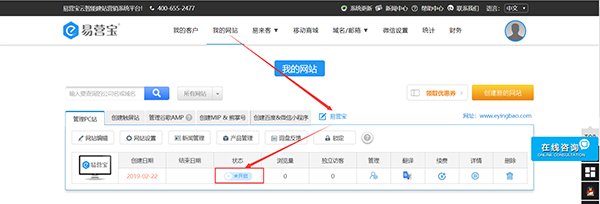
1. After logging into the backend, click the "Not Activated" button under the status.
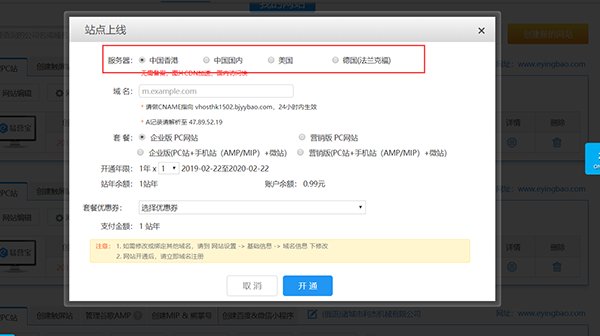
2. Select a server, including:
(1) China Hong Kong (available for both overseas and domestic users, no ICP filing required);
(2) China Mainland (for domestic users only, requires ICP filing on Alibaba Cloud);
(3) USA (for overseas users only, no ICP filing required);
(4) Germany (Frankfurt) (fast access speed for users in Germany, France, UK, Spain, Italy, Netherlands, and other European countries, no ICP filing required)
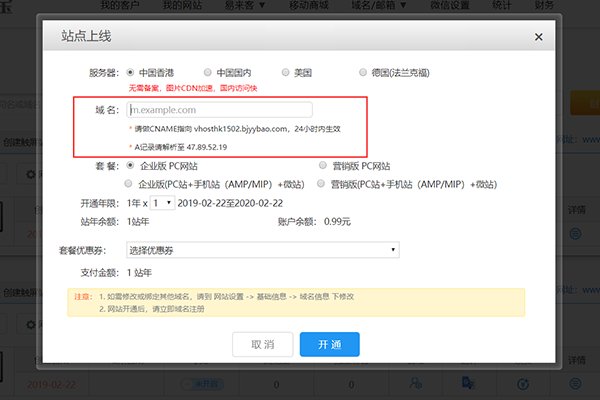
3. Enter the domain name. The configuration will take effect only after DNS resolution is completed.
Website Resolution
China Hong Kong:
* CNAME points to vhosthk1502.bjyybao.com
* A record resolves to 47.89.52.19
China Mainland:
* CNAME points to cnwh93.bjyyb.net
* A record resolves to 118.190.2.93
USA Server:
* CNAME points to uswh54.bjyyb.net
* A record resolves to 47.88.79.54
Germany (Frankfurt)
* CNAME points to derwh133.bjyyb.net
* A record resolves to 47.254.170.133
4. Select a package
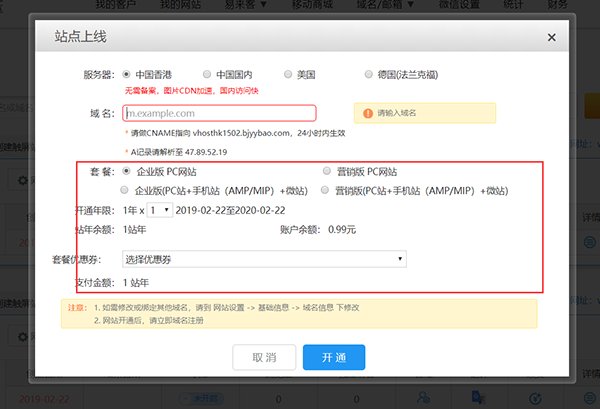
Note: The website will not take effect immediately after going live, with a maximum delay of 4 hours.
Online Inquiry
