









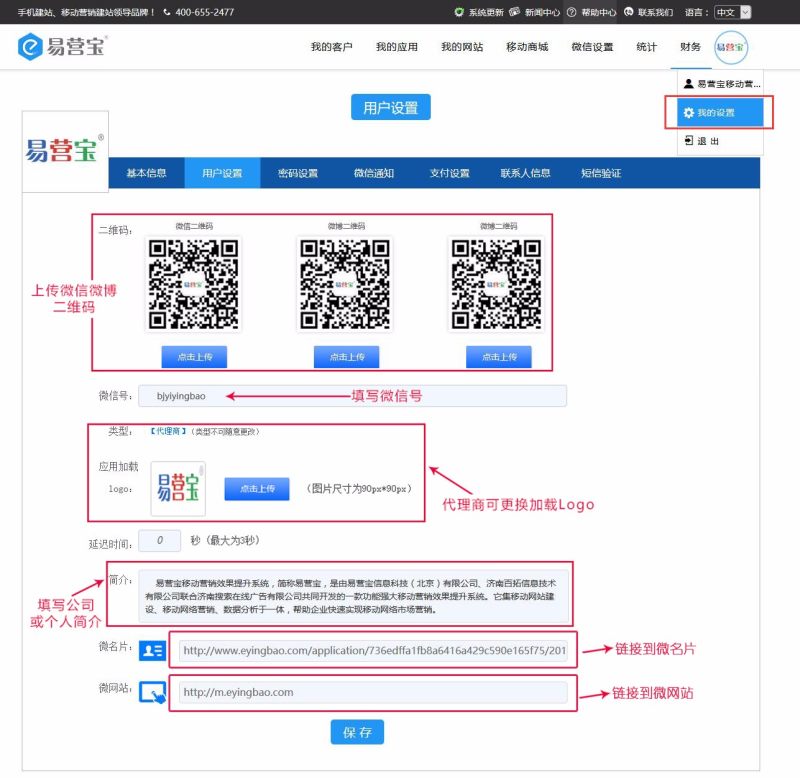
1. After logging into Easy Treasure, click the avatar in the upper right corner and select "My Settings" — "User Settings". In User Settings, you can upload WeChat and Weibo QR codes, fill in company or personal profiles, and link to WeBusiness Cards and microsites. Additionally, agent permissions allow you to change the loading logo.
2. After filling in the information, the display style on the mobile end will appear as follows:
About Me: Displays basic information, profile, and QR codes

Hot Topics: Displays all article shares created under the current account

3. Click "My Website" to enter the configured microsite or mobile website

Online Inquiry
